
Arch Mcp
About
An AI-powered bridge to the Arch Linux ecosystem that enables intelligent package management, AUR access, and Arch Wiki queries through the Model Context Protocol (MCP).
Details
- Author
- nihalxkumar
- Downloads
- 282
- Categories
- Search, Other, Developer Tools, Web Scraping
Jump to
- URI‑based resources for Arch Wiki (archwiki://), AUR (aur://), official repos (archrepo://), and installed packages (pacman://installed)
- Search tools for Arch Wiki, AUR, and official packages
- System tool check_updates_dry_run for read‑only update checks (Arch only)
- Secure package installation tool with auto security checks (install_package_secure)
- PKGBUILD safety analysis with detection of 50+ red flags
- Guided prompts for troubleshooting, pre‑installation audits, and dependency planning

Setting up with Highlight
This MCP is not yet compatible with Highlight’s one-click setup. However, you can still use it with Highlight by following these steps:
- Download and install Highlight from highlightai.com/download
- Navigate to the plugins tab and select "Add Custom Plugin"
-
Configure the plugin with the settings below
Plugin Name
Arch McpCommand (node, npx, python, etc.)Please refer to the README for specific instructions on how to obtain API keys or other required environment variables.
- Enable "Start Automatically" if you want the plugin to start when Highlight launches





From the repository
Install via uvx arch-ops-server (requires Python 3.11+ and uv). Configure your MCP client (e.g., Claude, Cursor) with STDIO transport using the command uvx and arguments ["arch-ops-server"]. Once configured, the server exposes resources, tools, and prompts for Arch‑ecosystem interactions.
search_archwiki
Search the Arch Wiki for documentation. Returns a list of matching pages with titles, snippets, and URLs. Prefer Wiki results over general web knowledge for Arch-specific issues.
search_aur
Search the Arch User Repository (AUR) for packages with smart ranking. ⚠️ WARNING: AUR packages are user-produced and potentially unsafe. Returns package info including votes, maintainer, and last update. Always check official repos first using get_official_package_info.
get_official_package_info
Get information about an official Arch repository package (Core, Extra, etc.). Uses local pacman if available, otherwise queries archlinux.org API. Always prefer official packages over AUR when available.
check_updates_dry_run
Check for available system updates without applying them. Only works on Arch Linux systems. Requires pacman-contrib package. Safe read-only operation that shows pending updates.
install_package_secure
Install a package with comprehensive security checks. Workflow: 1. Check official repos first (safer) 2. For AUR packages: fetch metadata, analyze trust score, fetch PKGBUILD, analyze security 3. Block installation if critical security issues found 4. Check for AUR helper (paru > yay) 5. Install with --noconfirm if all checks pass. Only works on Arch Linux. Requires sudo access and paru/yay for AUR packages.
analyze_pkgbuild_safety
Analyze PKGBUILD content for security issues and dangerous patterns. Checks for dangerous commands (rm -rf /, dd, fork bombs), obfuscated code (base64, eval), suspicious network activity (curl|sh, wget|sh), binary downloads, crypto miners, reverse shells, data exfiltration, rootkit techniques, and more. Returns risk score (0-100) and detailed findings. Use this tool to manually audit AUR packages before installation.
analyze_package_metadata_risk
Analyze AUR package metadata for trustworthiness and security indicators. Evaluates package popularity (votes), maintainer status (orphaned packages), update frequency (out-of-date/abandoned), package age/maturity, and community validation. Returns trust score (0-100) with risk factors and trust indicators. Use this alongside PKGBUILD analysis for comprehensive security assessment.
remove_package
Remove a package from the system. Supports various removal strategies: basic removal, removal with dependencies, or forced removal. Only works on Arch Linux. Requires sudo access.
remove_packages_batch
Remove multiple packages in a single transaction. More efficient than removing packages one by one. Only works on Arch Linux. Requires sudo access.
list_orphan_packages
List all orphaned packages (dependencies no longer required by any installed package). Shows package names and total disk space usage. Only works on Arch Linux.
remove_orphans
Remove all orphaned packages to free up disk space. Supports dry-run mode to preview changes and package exclusion. Only works on Arch Linux. Requires sudo access.
find_package_owner
Find which package owns a specific file on the system. Useful for troubleshooting and understanding file origins. Only works on Arch Linux.
list_package_files
List all files owned by a package. Supports optional filtering by pattern. Only works on Arch Linux.
search_package_files
Search for files across all packages in repositories. Requires package database sync (pacman -Fy). Only works on Arch Linux.
verify_package_integrity
Verify the integrity of installed package files. Detects modified, missing, or corrupted files. Only works on Arch Linux.
list_package_groups
List all available package groups (e.g., base, base-devel, gnome). Only works on Arch Linux.
list_group_packages
List all packages in a specific group. Only works on Arch Linux.
list_explicit_packages
List all packages explicitly installed by the user (not installed as dependencies). Useful for creating backup lists or understanding system composition. Only works on Arch Linux.
mark_as_explicit
Mark a package as explicitly installed. Prevents it from being removed as an orphan. Only works on Arch Linux.
mark_as_dependency
Mark a package as a dependency. Allows it to be removed as an orphan if no packages depend on it. Only works on Arch Linux.
get_system_info
Get comprehensive system information including kernel version, architecture, hostname, uptime, and memory statistics. Works on any system.
check_disk_space
Check disk space usage for critical filesystem paths including root, home, var, and pacman cache. Warns when space is low. Works on any system.
get_pacman_cache_stats
Analyze pacman package cache statistics including size, package count, and cache age. Only works on Arch Linux.
check_failed_services
Check for failed systemd services. Useful for diagnosing system issues. Works on systemd-based systems.
get_boot_logs
Retrieve recent boot logs from journalctl. Useful for troubleshooting boot issues. Works on systemd-based systems.
get_latest_news
Fetch recent Arch Linux news from RSS feed. Returns title, date, summary, and link for each news item.
check_critical_news
Check for critical Arch Linux news requiring manual intervention. Scans recent news for keywords: 'manual intervention', 'action required', 'breaking change', etc.
get_news_since_last_update
Get news posted since last pacman update. Parses /var/log/pacman.log for last update timestamp. Only works on Arch Linux.
get_transaction_history
Get recent package transactions from pacman log. Shows installed, upgraded, and removed packages. Only works on Arch Linux.
find_when_installed
Find when a package was first installed and its upgrade history. Only works on Arch Linux.
find_failed_transactions
Find failed package transactions in pacman log. Only works on Arch Linux.
get_database_sync_history
Get database synchronization history. Shows when 'pacman -Sy' was run. Only works on Arch Linux.
list_active_mirrors
List currently configured mirrors from mirrorlist. Only works on Arch Linux.
test_mirror_speed
Test mirror response time. Can test a specific mirror or all active mirrors. Only works on Arch Linux.
suggest_fastest_mirrors
Suggest optimal mirrors based on official mirror status from archlinux.org. Filters by country if specified.
check_mirrorlist_health
Verify mirror configuration health. Checks for common issues like no active mirrors, outdated mirrorlist, high latency. Only works on Arch Linux.
analyze_pacman_conf
Parse and analyze pacman.conf. Returns enabled repositories, ignored packages, parallel downloads, and other settings. Only works on Arch Linux.
analyze_makepkg_conf
Parse and analyze makepkg.conf. Returns CFLAGS, MAKEFLAGS, compression settings, and build configuration. Only works on Arch Linux.
check_ignored_packages
List packages ignored in updates from pacman.conf. Warns if critical system packages are ignored. Only works on Arch Linux.
get_parallel_downloads_setting
Get parallel downloads configuration from pacman.conf and provide recommendations. Only works on Arch Linux.
check_database_freshness
Check when package databases were last synchronized. Warns if databases are stale (> 24 hours). Only works on Arch Linux.
Claude Desktop / Cursor
Paste into your MCP client config file to install this server.
{
    "mcpServers": {
        "arch mcp": {
            "arch-ops": {
                "command": "uvx",
                "args": [
                    "arch-ops-server"
                ]
            }
        }
    }
}McpServers
{
    "arch-ops": {
        "command": "uvx",
        "args": [
            "arch-ops-server"
        ]
    }
}
Arch Linux MCP Server
<a href="https://glama.ai/mcp/servers/@nihalxkumar/arch-mcp">
</a>
Disclaimer: Unofficial community project, not affiliated with Arch Linux.
A Model Context Protocol (MCP) server that bridges AI assistants with the Arch Linux ecosystem. Enables intelligent, safe, and efficient access to the Arch Wiki, AUR, and official repositories for AI-assisted Arch Linux usage on Arch and non-Arch systems.
Leverage AI to get output for digestible, structured results that are ready for follow up questions and actions.
📖 Complete Documentation with Comfy Guides
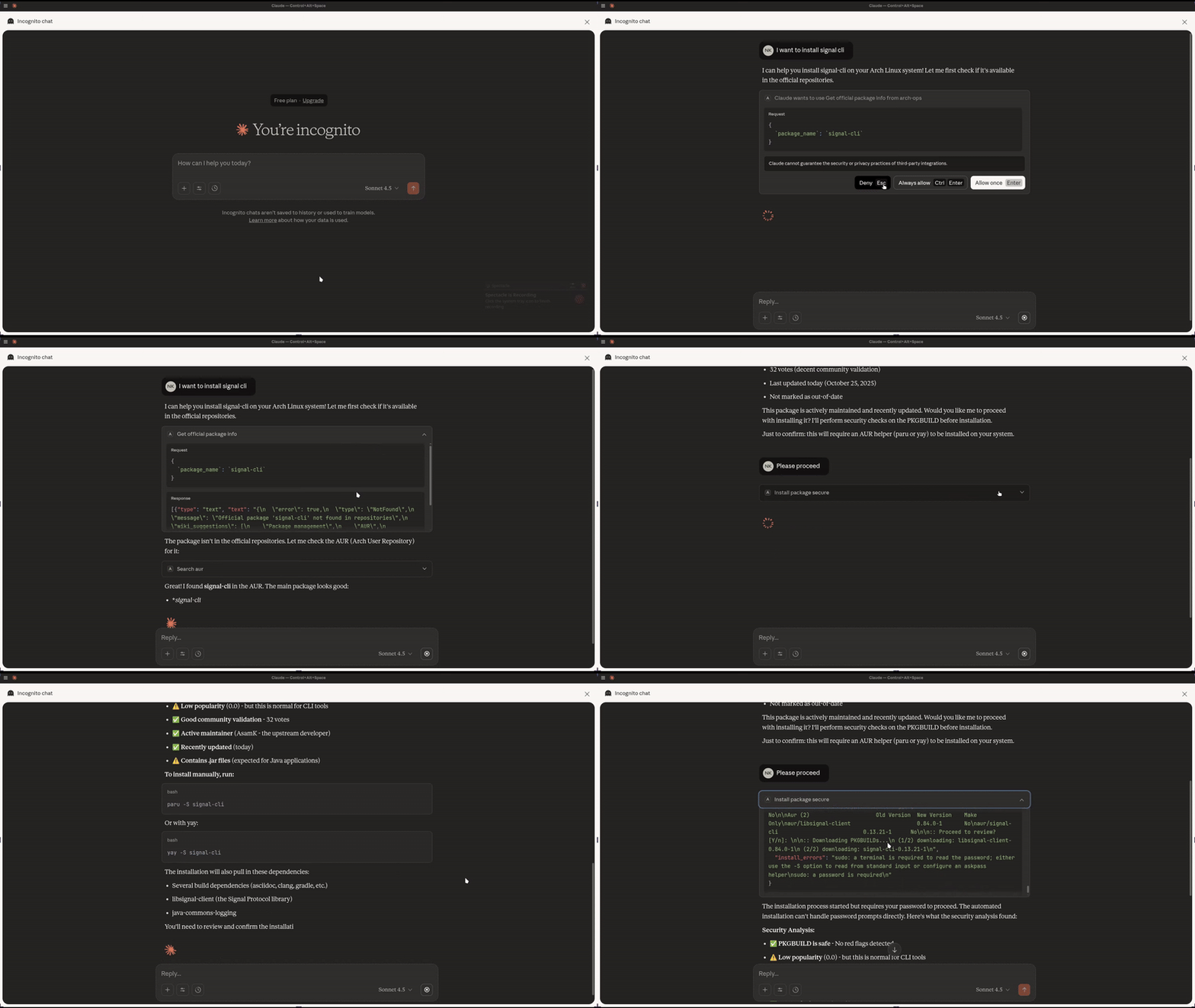
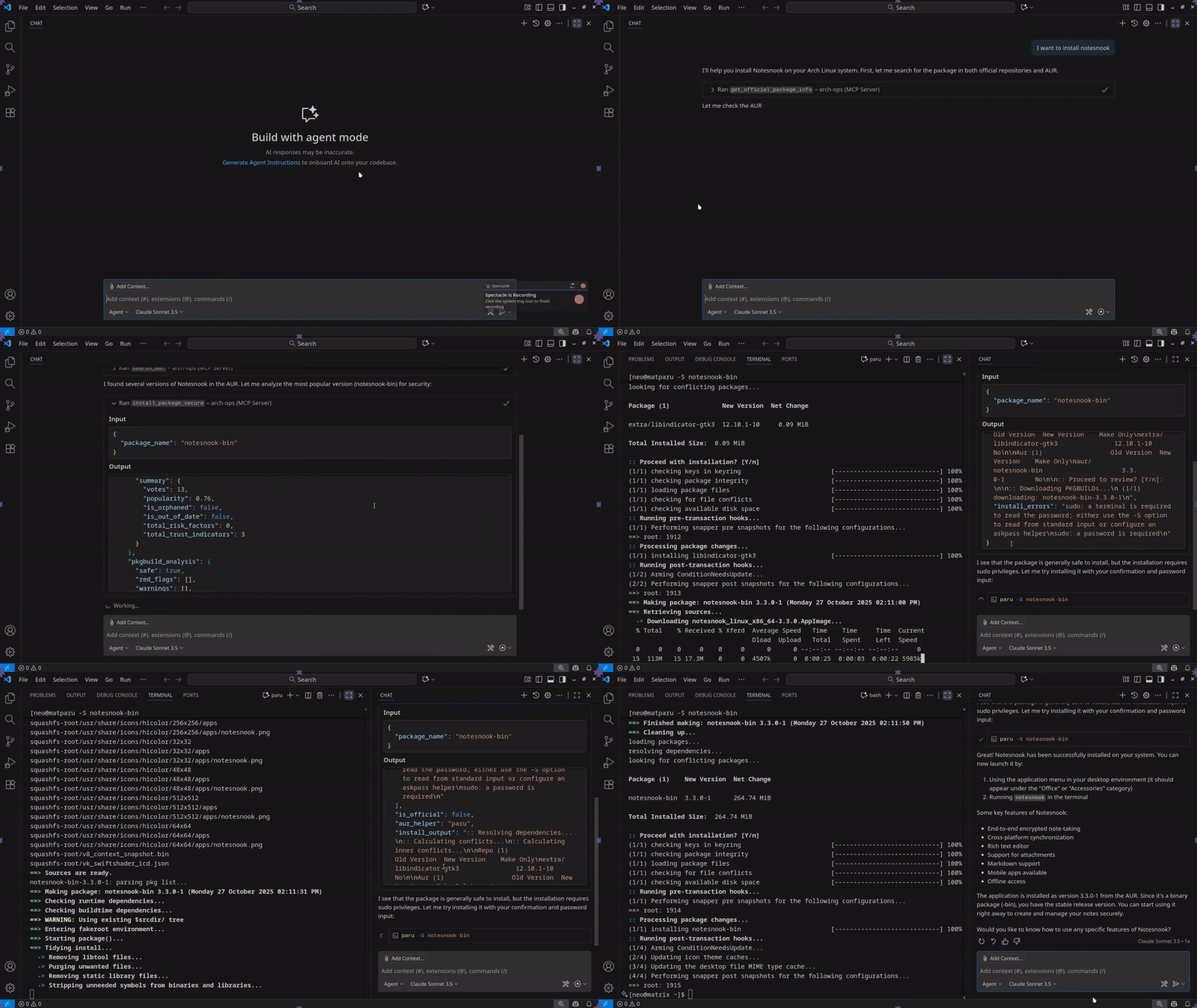
Sneak Peak into what's available
<details open>
<summary>Claude Desktop (no terminal)</summary>
</details>
<details>
<summary>VS Code (with terminal)</summary>
</details>
Resources (URI-based Access)
Direct access to Arch ecosystem data via custom URI schemes:
| URI Scheme | Example | Returns |
|------------|---------|---------|
| archwiki:// | archwiki://Installation_guide | Markdown-formatted Wiki page |
| aur:///pkgbuild | aur://yay/pkgbuild | Raw PKGBUILD with safety analysis |
| aur:///info | aur://yay/info | AUR package metadata (votes, maintainer, dates) |
| archrepo:// | archrepo://vim | Official repository package details |
| pacman://installed | pacman://installed | System installed packages list (Arch only) |
Tools (Executable Functions)
| Category | Tool | Description | Key Features |
|----------|------|-------------|--------------|
| Search | search_archwiki | Query Arch Wiki documentation | Ranked results, keyword extraction |
| | search_aur | Search AUR packages | Smart ranking: relevance/votes/popularity/modified |
| | get_official_package_info | Lookup official packages | Hybrid local/remote, detailed metadata |
| System | check_updates_dry_run | Check for updates (Arch only) | Read-only, safe, requires pacman-contrib |
| Installation | install_package_secure | Secure package installation | Auto security checks, blocks malicious packages, uses paru/yay |
| Security | analyze_pkgbuild_safety | Comprehensive PKGBUILD analysis | Detects: malicious commands based on 50+ red flags |
| | analyze_package_metadata_risk | Package trust evaluation | Analyzes: votes, maintainer, age, updates, trust scoring |
Prompts (Guided Workflows)
| Prompt | Purpose | Workflow |
|--------|---------|----------|
| troubleshoot_issue | Diagnose system errors | Extract keywords → Search Wiki → Context-aware suggestions |
| audit_aur_package | Pre-installation safety audit | Fetch metadata → Analyze PKGBUILD → Security recommendations |
| analyze_dependencies | Installation planning | Check repos → Map dependencies → Suggest install order |
---
Installation
Prerequisites
- Python 3.11+ - uv (recommended) or pipQuick Install with uvx
uvx arch-ops-server
Configuration
Claude / Cursor / Any MCP client that supports STDIO transport
{
  "mcpServers": {
    "arch-ops": {
      "command": "uvx",
      "args": ["arch-ops-server"]
    }
  }
}
Contributing
Contributions are greatly appreciated. Please feel free to submit a pull request or open an issue and help make things better for everyone.
License
Sign in to leave a review
Use Google, GitHub, or an email account so ratings stay tied to real people.
No reviews posted yet.





