
Apple Notes Mcp Server
About
Read and write Apple Notes, with Apple Notes native formatting support
Details
- Author
- ailenshen
- GitHub stars
- 10
- Downloads
- 284
- Categories
- Knowledge Base
Jump to
- Read and write Apple Notes with native formatting.
- Fast SQLite-based listing and searching.
- Remote access via HTTP mode with built-in secret.
- Automatic permission detection and fix guidance.
- Native Markdown import for styled notes.
- Delete notes by moving to Recently Deleted.

Setting up with Highlight
This MCP is not yet compatible with Highlight’s one-click setup. However, you can still use it with Highlight by following these steps:
- Download and install Highlight from highlightai.com/download
- Navigate to the plugins tab and select "Add Custom Plugin"
-
Configure the plugin with the settings below
Plugin Name
Apple Notes Mcp ServerCommand (node, npx, python, etc.)Please refer to the README for specific instructions on how to obtain API keys or other required environment variables.
- Enable "Start Automatically" if you want the plugin to start when Highlight launches





From the repository
Add to your MCP client configuration (e.g., Claude Desktop or Claude Code) with the command npx -y @ailenshen/apple-notes-mcp@latest, then grant Full Disk Access and Accessibility permissions to node in System Settings. Use natural language commands to interact with your notes. For remote access, run with the --http flag.
list_notes
List notes from Apple Notes. Returns title, folder, dates, pinned status, snippet. Optionally filter by folder name and limit results.
search_notes
Search Apple Notes by keyword. Searches in title and snippet. Returns matching notes with metadata.
get_note
Get the full content of a note by its title, returned as Markdown. Optionally specify folder to disambiguate.
create_note
Create a new note in Apple Notes from Markdown content. The first line becomes the title. Optionally specify a target folder (defaults to 'Notes').
update_note
Update an existing note in Apple Notes. Deletes the old note and creates a new one with the given Markdown content, preserving the original folder.
delete_note
Delete a note from Apple Notes by title. Optionally specify folder to disambiguate. The note is moved to Recently Deleted.
Claude Desktop / Cursor
Paste into your MCP client config file to install this server.
{
    "mcpServers": {
        "apple notes mcp server": {
            "apple-notes": {
                "command": "npx",
                "args": [
                    "-y",
                    "@ailenshen/apple-notes-mcp@latest"
                ]
            }
        }
    }
}McpServers
{
    "apple-notes": {
        "command": "npx",
        "args": [
            "-y",
            "@ailenshen/apple-notes-mcp@latest"
        ]
    }
}
Apple Notes MCP Server
Read and write Apple Notes, with Apple Notes native formatting support.

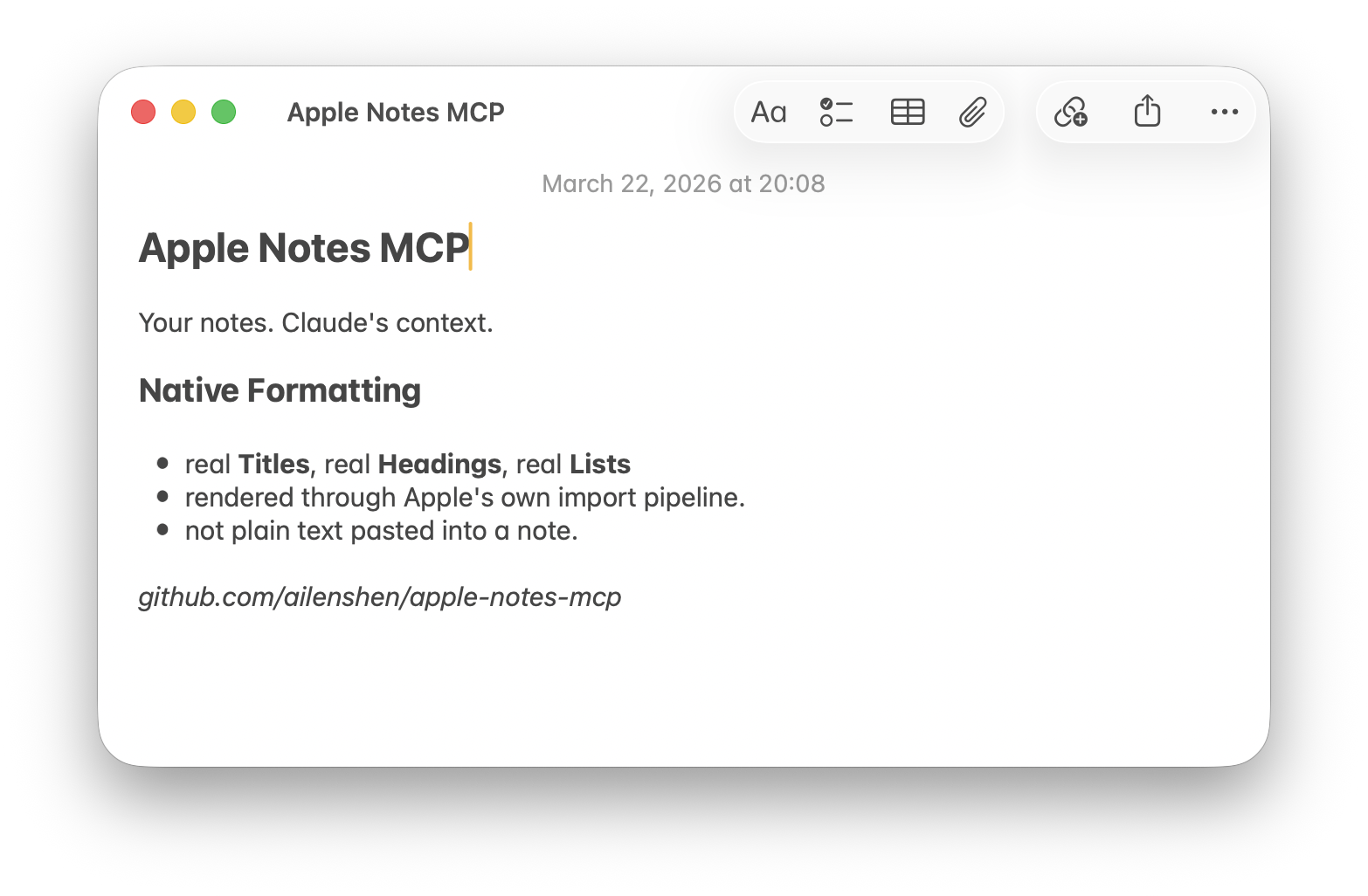
Most Apple Notes MCP servers can only write plain text. This one creates natively formatted notes — Titles, Headings, Bold, Lists all render as real Apple Notes styles, not plain text. This is achieved by leveraging Notes.app's built-in Markdown import capability.
<picture>
<source media="(prefers-color-scheme: dark)" srcset="assets/screenshot-dark.png">
<source media="(prefers-color-scheme: light)" srcset="assets/screenshot-light.png">
</picture>
Requires: macOS 26 (Tahoe) or later, Node.js 24+
Setup
1. Add to your MCP client
Claude Desktop — edit ~/Library/Application Support/Claude/claude_desktop_config.json:
{
  "mcpServers": {
    "apple-notes": {
      "command": "npx",
      "args": ["-y", "@ailenshen/apple-notes-mcp@latest"]
    }
  }
}
Claude Code — run in Terminal:
claude mcp add apple-notes -- npx -y @ailenshen/apple-notes-mcp@latest
2. Grant permissions
To support native formatting, the server uses Notes.app's built-in Markdown import — it opens .md files with Notes.app and automatically confirms the Import dialog. This requires two macOS permissions for node:
| Permission | Where to enable | Why |
|-----------|----------------|-----|
| Full Disk Access | System Settings > Privacy & Security > Full Disk Access > enable node | Read the Notes database for listing and searching |
| Accessibility | System Settings > Privacy & Security > Accessibility > enable node | Auto-confirm the Import dialog when creating notes |
On first use, macOS will prompt you to approve — just click Allow. If you missed the prompt, go to the settings above and turn on node manually. After granting, restart your MCP client.
> If a permission is missing, the server will tell you exactly which one and how to fix it.
3. Start using it
Just talk to your AI naturally:
- "List all my notes in the Projects folder"
- "Search my notes for 'meeting agenda'"
- "Read my Shopping List note"
- "Create a note in Work with today's action items"
- "Update my Shopping List with these new items"
- "Delete the note called 'Old Draft'"
What Can It Do?
| Tool | Description |
|------|-------------|
| list_notes | Browse notes, optionally filter by folder |
| search_notes | Find notes by keyword |
| get_note | Read full content as Markdown |
| create_note | Write Markdown → natively formatted note |
| update_note | Replace content, preserving folder |
| delete_note | Move to Recently Deleted |
Markdown support in Notes
| Element | Works? |
|---------|--------|
| Headings, bold, italic, lists, inline code | Yes |
| Block quotes | Content kept, no indent style |
| Links | Text kept, URL lost |
| Tables, footnotes | No |
Remote Access (HTTP mode)
Want to access your Apple Notes from your phone or another computer?
npx @ailenshen/apple-notes-mcp@latest --http
This prints an endpoint URL with a built-in secret:
Endpoint: http://localhost:3100/mcp/a3f8b2c9e1d4...
Point your remote MCP client to this URL. To access over the internet, put it behind HTTPS using a tunnel (ngrok, Cloudflare Tunnel, etc.).
| Flag | Default | Description |
|------|---------|-------------|
| --port <number> | 3100 | Port number |
| --secret <string> | random | Custom URL secret |
To keep it running across reboots, see the wiki for a LaunchAgent example.
How It Works
| Action | Method | Speed |
|--------|--------|-------|
| List / Search | SQLite (read-only) | < 100ms |
| Read | AppleScript → Markdown | ~1s |
| Create | Native Markdown import | ~0.5s |
| Update | Delete + Create | ~1.5s |
| Delete | AppleScript | ~1s |
- Reading queries the Notes database directly via SQLite — fast and safe. Content is converted from Apple's HTML to Markdown via turndown.
- Creating uses macOS's native Markdown import (open -a Notes), so formatting is preserved natively. Notes.app briefly appears (~0.5s) during creation.
- Updating deletes the old note and creates a new one, automatically preserving the original folder.
- Deleting moves notes to Recently Deleted, same as doing it by hand.
Known Limitations
- Partial note editing (e.g. "fix just this paragraph") is not supported. update_note always replaces the full content. This is a fundamental limitation of how Notes exposes content — its AppleScript interface returns HTML, not the original Markdown, so a clean read→edit→write round-trip isn't possible today.
- Notes briefly appears during note creation. The Markdown import flow requires auto-confirming a dialog in Notes.app, which may momentarily bring it to the foreground.
These limitations would be lifted if Apple adds Markdown import/export to AppleScript, or opens an official Notes API — both are tracked for future macOS releases.
Vision
Apple Notes is the most natural place to keep personal knowledge on Apple devices — it syncs everywhere, it's fast, and it's private. But it's a walled garden with no API.
This project makes Apple Notes a first-class data source for AI. The long-term goal: wherever you're talking to AI — on your Mac, on your phone, on the web — your Apple Notes are always accessible, readable, and writable.
License
MIT
Sign in to leave a review
Use Google, GitHub, or an email account so ratings stay tied to real people.
No reviews posted yet.





