
Alibaba Cloud Edge Security Acceleration
About
Provides a bridge to Alibaba Cloud's Edge Security Acceleration service for managing edge routines, deployments, routes, and sites through authenticated API operations.
Details
- Author
- aliyun
- Repository
- aliyun/mcp-server-esa
- GitHub stars
- 22
- Downloads
- 121
- License
- MIT License
- Categories
- Cloud Service, Infrastructure, Security, Other, Developer Tools, AI
- Tags
- #integration
Jump to
- Implements Model Context Protocol for tool execution
- Provides access to ESA OpenAPI services
- Runs as a server via stdio for seamless integration
- Manages ESA Routines (create, delete, list, get)
- Manages ESA Routes (create, update, delete, list)
- Manages ESA Records and Site DNS entries

Setting up with Highlight
This MCP is not yet compatible with Highlight’s one-click setup. However, you can still use it with Highlight by following these steps:
- Download and install Highlight from highlightai.com/download
- Navigate to the plugins tab and select "Add Custom Plugin"
-
Configure the plugin with the settings below
Plugin Name
Alibaba Cloud Edge Security AccelerationCommand (node, npx, python, etc.)npxArguments-
Argument 1
-y -
Argument 2
@highlight/mcp-server
Please refer to the README for specific instructions on how to obtain API keys or other required environment variables.
-
Argument 1
- Enable "Start Automatically" if you want the plugin to start when Highlight launches





From the repository
Configure the server in an MCP-enabled client config using the npx command with environment variables ESA_ACCESS_KEY_ID and ESA_ACCESS_KEY_SECRET for authentication. The server runs via stdio for seamless integration with model runners.
html_deploy
Quickly deploy an HTML page to ESA Function & Pages and return a default access URL to the user.
folder_deploy
Deploy a local folder of static files (HTML/CSS/JS/images etc.) to ESA Function & Pages and return a default access URL. The folder will be packaged as assets and uploaded.
routine_create
Create a new Edge Routine (ER) in your Alibaba Cloud account.
routine_delete
Delete an existing Edge Routine (ER) from your Alibaba Cloud account.
routine_list
List all Edge Routines (ERs) in your Alibaba Cloud account.
routine_get
Get a the details of a Edge Routine (ER).
routine_code_commit
Save a code version for future modifications or release within an Edge Routine (ER).
routine_code_deploy
Deploy a selected code version to the staging or production environment. If version is not exist, should call routine_code_commit first
deployment_delete
Delete a specified code version associated with an Edge Routine (ER).
er_record_create
Create a new record associated with an Edge Routine (ER)
er_record_delete
Delete a specified record associated with an Edge Routine (ER).
er_record_list
List all records associated with a specific Edge Routine (ER).
route_create
Create a new route associated with an Edge Routine (ER).
route_update
Modify the configuration of an existing Edge Routine route.
route_delete
Delete a specified route associated with an Edge Routine (ER).
route_get
Get details of a specific route associated with an Edge Routine (ER).
routine_route_list
List all routes associated with a specific Edge Routine (ER).
site_route_list
List all routes associated with a specific site.
list_sites
用于查询当前用户下的站点列表 ,包括站点的名称、状态、配置等信息。
site_active_list
List all active sites
site_match
Identify which site in the account matches the provided input criteria.
create_site
Adds a website. Make sure that you have an available plan before you add a website. Make sure that your website domain name has an ICP filing if the location you want to specify covers the Chinese mainland.
update_site_pause
Modifies the ESA proxy configuration of a website.
get_site_pause
Queries the ESA proxy configuration of a website.
set_certificate
Configures whether to enable certificates and update certificate information for a website.
apply_certificate
Applies for a free SSL certificate.
get_certificate
Retrieve the certificate, private key, and certificate information
delete_certificate
Deletes a certificate for a website.
list_certificates
Lists certificates of a website.
get_certificate_quota
Query certificate quota and usage.
update_ipv6
Modifies the IPv6 configuration of a website.
get_ipv6
Queries the IPv6 configuration of a website.
update_managed_transform
Modifies the configuration of managed transforms for your website.
get_managed_transform
Query Managed Transform Configuration.
site_record_list
List DNS records associated with a specific site.
create_site_a_or_aaaa_record
Creates a DNS record for a specific website. Only A/AAAA records are supported.
create_site_cname_record
Creates a DNS record for a specific website. Only supports records with type=CNAME and sourceType=Domain.
create_site_txt_record
Creates a DNS record for a specific website. Only TXT records are supported.
create_site_ns_record
Creates a DNS record for a specific website. Only NS records are supported.
create_site_mx_record
Creates a DNS record for a specific website. Only MX records are supported.
update_record
This operation allows you to update multiple types of DNS records, including but not limited to A/AAAA, CNAME, NS, MX, TXT, CAA, SRV, and URI. You can modify the record content by providing the necessary fields such as Value, Priority, and Flag. For origins added in CNAME records such as OSS and S3, the API enables you to configure authentication details to ensure secure access. Usage notes: The record value (Value) must match the record type. For example, the CNAME record should correspond to the target domain name. You must specify a priority (Priority) for some record types, such as MX and SRV. You must specify specific fields such as Flag and Tag for CAA records. When you update security records such as CERT and SSHFP, you must accurately set fields such as Type and Algorithm.If your origin type is OSS or S3, configure the authentication details in AuthConf based on the permissions.
delete_record
Deletes a DNS record of a website based on the specified RecordId.
list_records
Queries a list of Domain Name System (DNS) records of a website, including the record value, priority, and authentication configurations. Supports filtering by specifying parameters such as RecordName and RecordMatchType.
get_record
Queries the configuration of a single DNS record, such as the record value, priority, and origin authentication setting (exclusive to CNAME records).
Claude Desktop / Cursor
Paste into your MCP client config file to install this server.
{
    "mcpServers": {
        "alibaba cloud edge security acceleration": {
            "env": {},
            "args": [
                "-y",
                "@highlight/mcp-server"
            ],
            "command": "npx"
        }
    }
}Linux
{
    "env": [],
    "args": [
        "-y",
        "@highlight/mcp-server"
    ],
    "command": "npx"
}
Macos
{
    "env": [],
    "args": [
        "-y",
        "@highlight/mcp-server"
    ],
    "command": "npx"
}
Windows
{
    "env": [],
    "args": [
        "/c",
        "npx",
        "-y",
        "@highlight/mcp-server"
    ],
    "command": "cmd"
}
ESA MCP Server
ESA MCP Server is an implementation of the Model Context Protocol (MCP) server, designed to facilitate communication between AI models and Edge Security Acceleration (ESA) services. This server acts as a bridge, allowing models to leverage ESA features through a standardized protocol.
---
Installation
Configure in your MCP-enabled client config:
{
  "mcpServers": {
    "esa-mcp-server": {
      "command": "npx",
      "args": ["-y", "mcp-server-esa"],
      "env": {
        "ESA_ACCESS_KEY_ID": "your AK",
        "ESA_ACCESS_KEY_SECRET": "your SK"
      }
    }
  }
}
Demo Videos
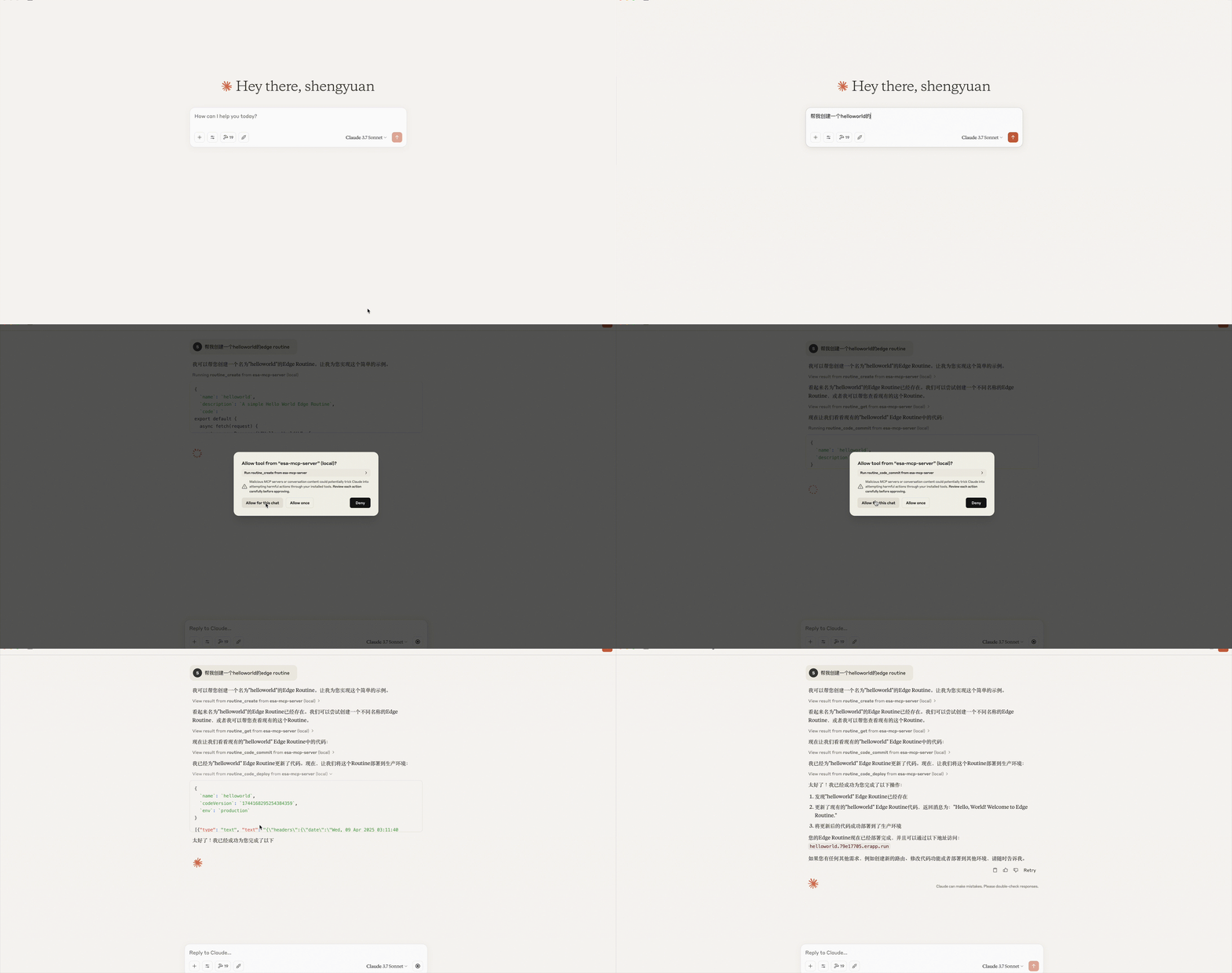
Claude Demo

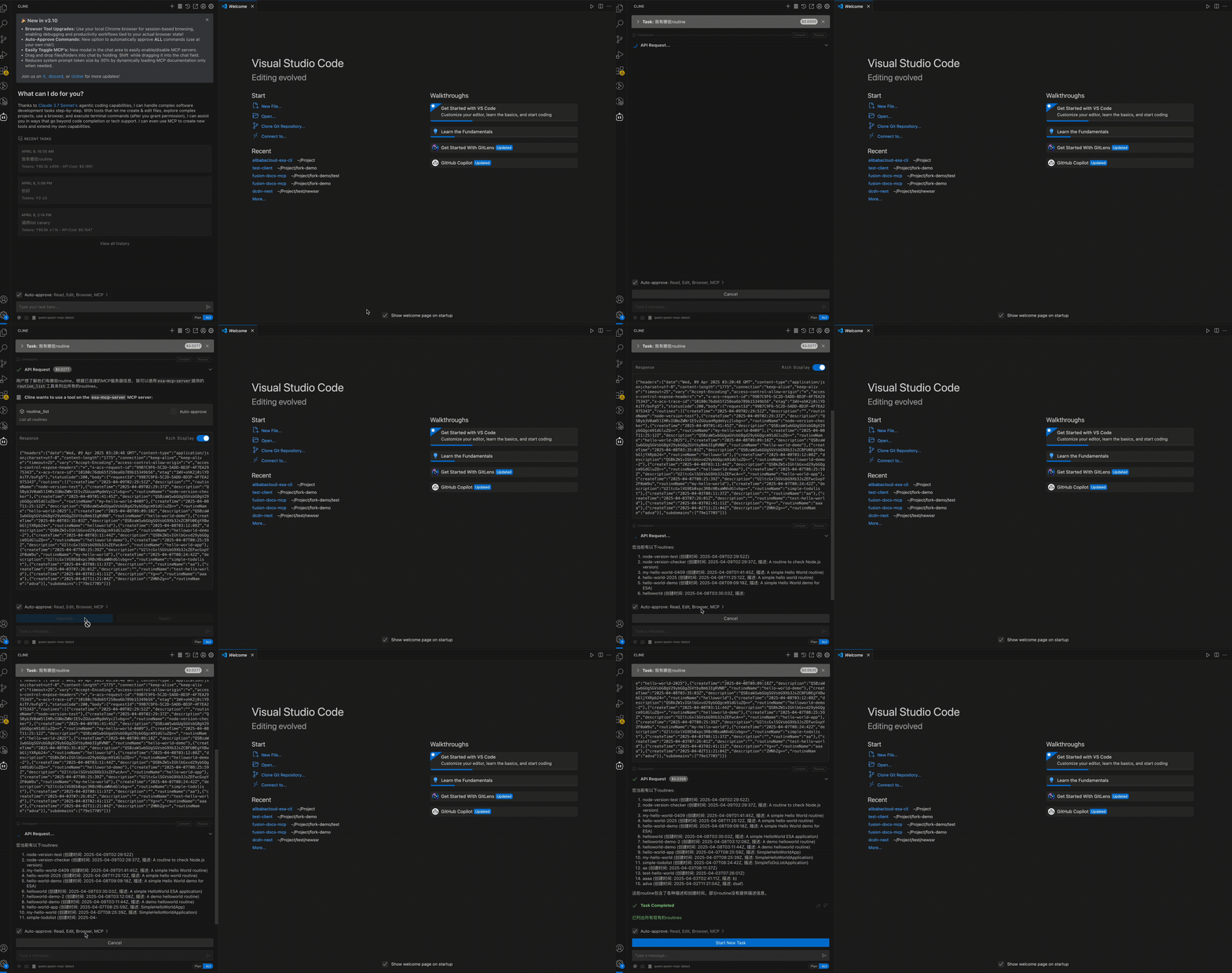
Cline Demo
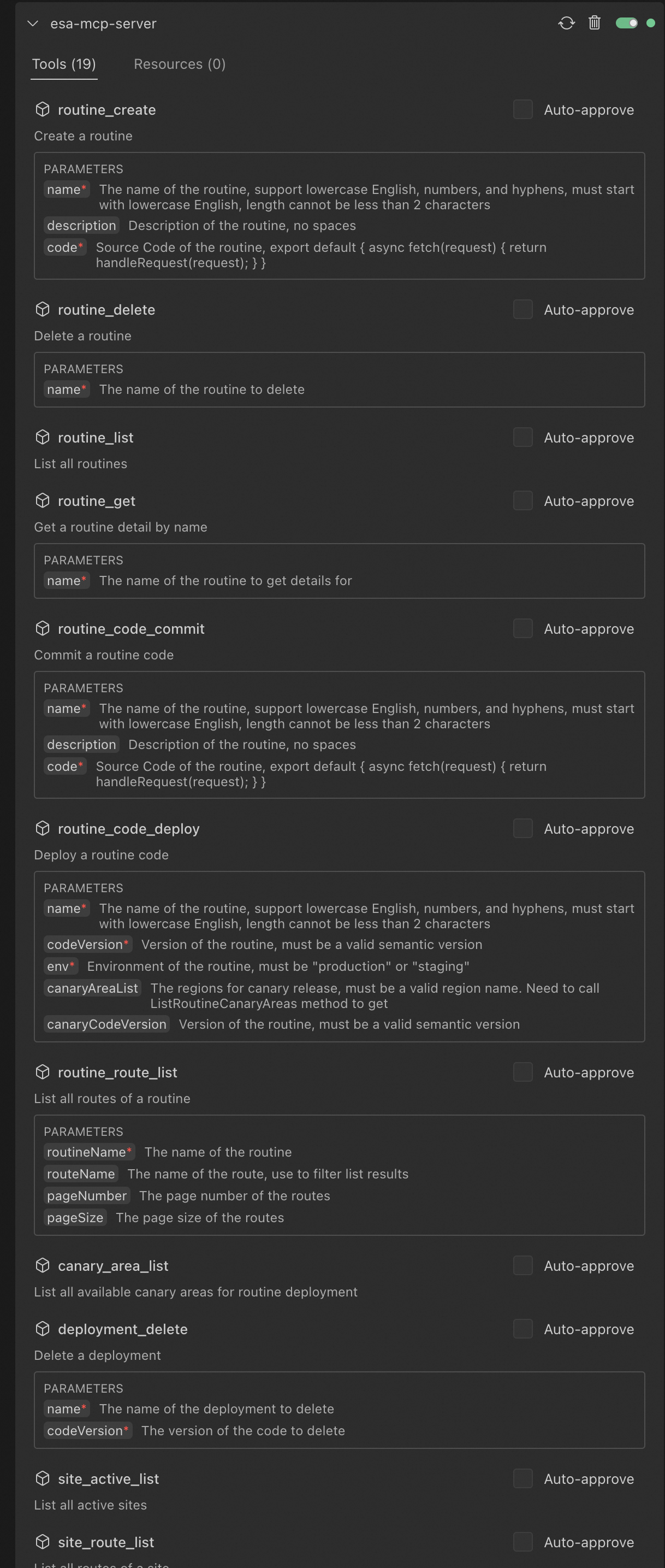
Cline configured successfully:
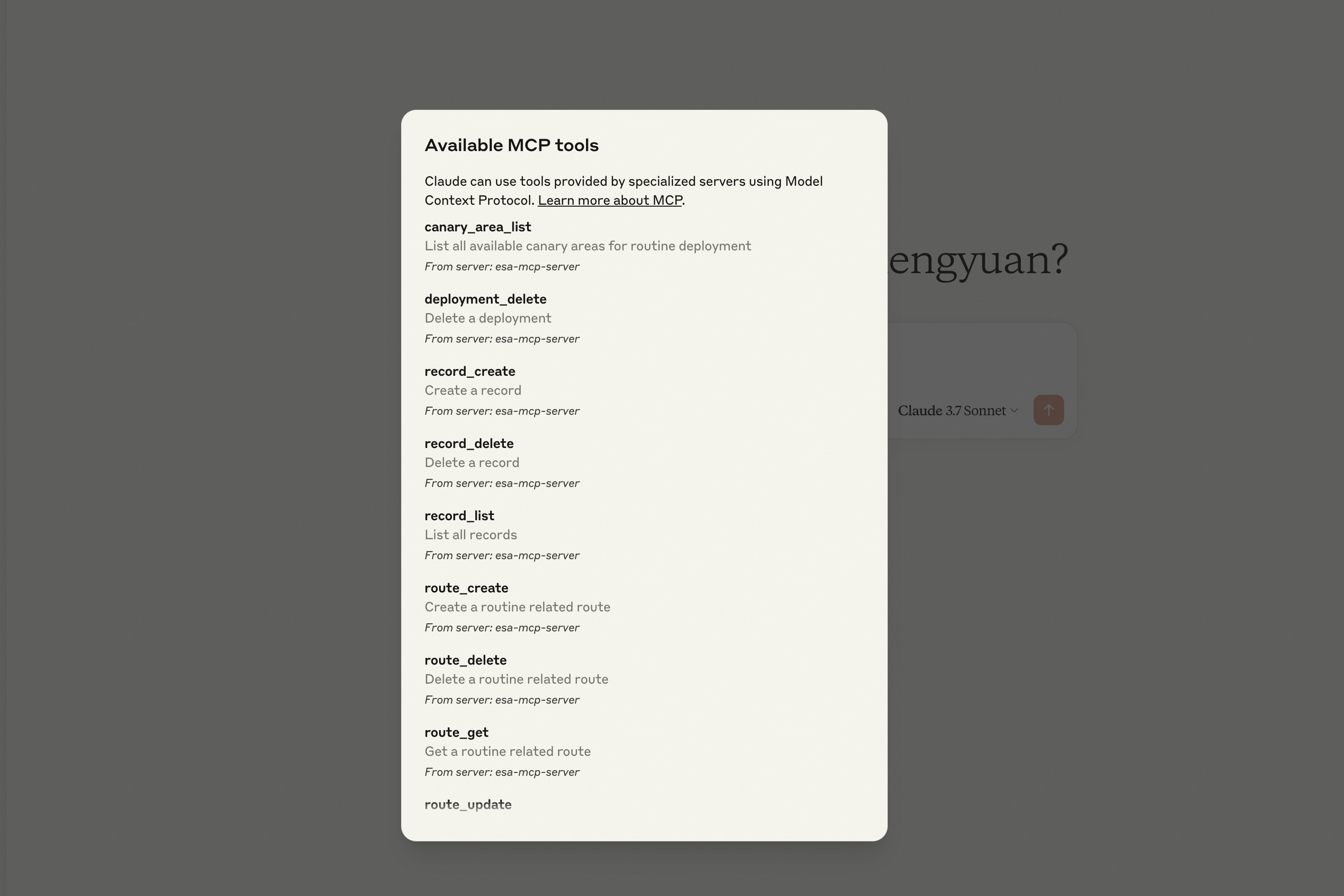
Claude configured successfully:
Features
- Implements Model Context Protocol for tool execution
- Provides access to ESA OpenAPI services
- Runs as a server via stdio for seamless integration with model runners
Tools List
The server provides the following ESA tools callable via the MCP protocol:
Routine Management Tools
routine_create
Create a Routine
| Parameter | Type | Required | Description |
| --------------- | ---------- | ------------ | ------------------------------------------------------------ |
| name | string | Yes | Routine name, supports lowercase letters, numbers, and hyphens, must start with a lowercase letter, min 2 chars |
| description | string | No | Routine description, no spaces allowed |
| code | string | Yes | Routine source code, e.g.:export default { async fetch(request) { return handleRequest(request); } } |
routine_delete
Delete a Routine
| Parameter | Type | Required | Description |
| ------------- | ---------- | ------------ | --------------------------------- |
| name | string | Yes | Name of the Routine to delete |
routine_list
List all Routines
No parameters required.
routine_get
Get Routine details
| Parameter | Type | Required | Description |
| ------------- | ---------- | ------------ | -------------------------------- |
| name | string | Yes | Name of the Routine to query |
---
Deployment Tools
routine_code_commit
Commit Routine code
| Parameter | Type | Required | Description |
| ------------- | ---------- | ------------ | ----------------------- |
| name | string | Yes | Routine name |
| code | string | Yes | Routine source code |
routine_code_deploy
Deploy Routine code
| Parameter | Type | Required | Description |
| --------------------- | ---------- | ------------ | ------------------------------------------------------------ |
| name | string | Yes | Routine name |
| codeVersion | string | Yes | Routine version, must be valid semver |
| env | string | Yes | Routine environment: "production" or "staging" |
| canaryAreaList | array | No | Canary release areas, must be valid area names (see canary_area_list) |
| canaryCodeVersion | string | No | Canary version, must be valid semver |
canary_area_list
List all available canary areas for Routine deployment
No parameters required.
deployment_delete
Delete a deployment
| Parameter | Type | Required | Description |
| ------------- | ---------- | ------------ | ------------------- |
| name | string | Yes | Deployment name |
Route Management Tools
route_create
Create a route for a Routine
| Parameter | Type | Required | Description |
| --------------- | ---------- | -------------------- | --------------------------------------------- |
| siteId | number | Yes | Site ID |
| mode | string | Yes | Route mode: 'simple' or 'custom' |
| route | string | Required by mode | Route path (required if mode is 'simple') |
| rule | string | Yes | Route rule (required if mode is 'custom') |
| routineName | string | Yes | Routine name |
| routeName | string | Yes | Route name |
| bypass | string | Yes | Bypass: 'on' or 'off' (default 'off') |
| routeEnable | string | Yes | Enable: 'on' or 'off' (default 'on') |
| sequence | number | No | Route sequence (default: current count) |
route_update
Update a Routine route
| Parameter | Type | Required | Description |
| --------------- | ---------- | ------------ | ------------------------- |
| siteId | number | Yes | Site ID |
| configId | number | Yes | Config ID |
| routeName | string | Yes | Route name |
| routeEnable | string | Yes | Enable: 'on' or 'off' |
| rule | string | Yes | Route rule |
| routineName | string | Yes | Routine name |
| bypass | string | Yes | Bypass: 'on' or 'off' |
| sequence | number | No | Route sequence |
route_delete
Delete a Routine route
| Parameter | Type | Required | Description |
| ------------- | ---------- | ------------ | --------------- |
| siteId | number | Yes | Site ID |
| configId | number | Yes | Config ID |
route_get
Get a Routine-related route
| Parameter | Type | Required | Description |
| ------------- | ---------- | ------------ | --------------- |
| siteId | number | Yes | Site ID |
| configId | number | Yes | Config ID |
routine_route_list
List all routes of a Routine
| Parameter | Type | Required | Description |
| --------------- | ---------- | ------------ | ------------------------------------------- |
| routineName | string | Yes | Routine name |
| routeName | string | No | Route name, used to filter list results |
| pageNumber | number | No | Route page number |
| pageSize | number | No | Routes per page |
site_route_list
List all routes of a site
| Parameter | Type | Required | Description |
| -------------- | ---------- | ------------ | ------------------------------------------- |
| siteId | number | Yes | Site ID |
| routeName | string | No | Route name, used to filter list results |
| pageNumber | number | No | Route page number |
| pageSize | number | No | Routes per page |
Record Management Tools
record_create
Create a record
| Parameter | Type | Required | Description |
| ------------- | ---------- | ------------ | ---------------- |
| key | string | Yes | Record key |
| value | string | Yes | Record value |
record_delete
Delete a record
| Parameter | Type | Required | Description |
| ------------- | ---------- | ------------ | ------------------------ |
| key | string | Yes | Record key to delete |
record_list
List all records
No parameters required.
Site Tools
site_active_list
List all active sites
No parameters required.
site_match
Check which site under the account matches the user input
| Parameter | Type | Required | Description |
| ---------- | ------ | -------- | ----------------------------- |
| recordName | string | Yes | The name of the site to match |
site_create_dns_type_a_record
Create an A record for a site
| Parameter | Type | Required | Description |
| ---------- | ------ | -------- | ----------------------------------------------------------- |
| recordName | string | Yes | The name of the DNS record (e.g., subdomain or full domain) |
| siteId | number | Yes | The ID of the site, obtained from the ListSites operation |
| data | object | Yes | The data for the DNS record with value property |
| data.value | string | Yes | The IP address of the A record (e.g., "2.2.2.2") |
site_create_dns_cname_domain_record
Create a CNAME domain record for a site
| Parameter | Type | Required | Description |
| ---------- | ------ | -------- | ----------------------------------------------------------- |
| recordName | string | Yes | The name of the DNS record (e.g., subdomain or full domain) |
| siteId | number | Yes | The ID of the site, obtained from the ListSites operation |
| data | object | Yes | The data for the DNS record with value property |
| data.value | string | Yes | The domain value for the CNAME record |
##
Available Scripts
- npm run build - Build the project using rslib
- npm run dev - Run build in watch mode for development
- npm run format - Format code using Prettier
- npm run lint - Check code using ESLint
Project Structure
- src/index.ts - Main entry point
- src/tools/ - ESA tool implementations
- src/utils/ - Utilities and helpers
License
ISC
Contributions
For Alibaba internal contributors, please follow the standard contribution workflow for the project.
Sign in to leave a review
Use Google, GitHub, or an email account so ratings stay tied to real people.
No reviews posted yet.



