

Alibaba Cloud RDS OpenAPI MCP Server
About
Manage Alibaba Cloud Relational Database Service (RDS) using the OpenAPI.
Details
- Author
- aliyun
- GitHub stars
- 54
- Downloads
- 289
- Categories
- Database, Infrastructure, Other, AI
Jump to
- OpenAPI tools to create, manage, and query RDS instances.
- SQL tools for read-only queries, EXPLAIN, and SHOW commands.
- Toolsets to group tools by functionality (e.g., rds, rds_custom_read).
- Skills for AI-assisted operations and instance management via CLI.
- Prompts for structured RDS troubleshooting and task decomposition.
- Supports both stdio and SSE transport protocols.

Setting up with Highlight
This MCP is not yet compatible with Highlight’s one-click setup. However, you can still use it with Highlight by following these steps:
- Download and install Highlight from highlightai.com/download
- Navigate to the plugins tab and select "Add Custom Plugin"
-
Configure the plugin with the settings below
Plugin Name
Alibaba Cloud RDS OpenAPI MCP ServerCommand (node, npx, python, etc.)Please refer to the README for specific instructions on how to obtain API keys or other required environment variables.
- Enable "Start Automatically" if you want the plugin to start when Highlight launches





From the repository
Install dependencies (uv and Python 3.12), obtain Alibaba Cloud credentials with RDS access, then run the server using uvx alibabacloud-rds-openapi-mcp-server@latest with environment variables ALIBABA_CLOUD_ACCESS_KEY_ID and ALIBABA_CLOUD_ACCESS_KEY_SECRET. Optionally set ALIBABA_CLOUD_SECURITY_TOKEN for STS tokens, SERVER_HOST, SERVER_TRANSPORT, and API_KEY for non-loopback deployments. Configure an MCP client (e.g., cherry-studio, Cline, Claude) to connect via stdio or sse transport. Tools can be filtered using the --toolsets parameter or MCP_TOOLSETS environment variable.
Claude Desktop / Cursor
Paste into your MCP client config file to install this server.
{
    "mcpServers": {
        "alibaba cloud rds openapi mcp server": {
            "alibabacloud-rds-openapi-mcp-server": {
                "command": "uvx",
                "args": [
                    "alibabacloud-rds-openapi-mcp-server@latest"
                ]
            }
        }
    }
}McpServers
{
    "alibabacloud-rds-openapi-mcp-server": {
        "command": "uvx",
        "args": [
            "alibabacloud-rds-openapi-mcp-server@latest"
        ]
    }
}
Alibaba Cloud RDS OpenAPI MCP Server
MCP server for RDS Services via OPENAPIPrerequisites
1. Installuv from Astral or the GitHub README
2. Install Python using uv python install 3.12
3. Alibaba Cloud credentials with access to Alibaba Cloud RDS services
Quick Start
Using cherry-studio (Recommended)
1. Download and install cherry-studio 2. Follow the documentation to install uv, which is required for the MCP environment 3. Configure and use RDS MCP according to the documentation. You can quickly import the RDS MCP configuration using the JSON below. Please set ALIBABA_CLOUD_ACCESS_KEY_ID and ALIBABA_CLOUD_ACCESS_KEY_SECRET to your Alibaba Cloud AK/SK.> The following error may appear during import, which can be ignored:
> xxx settings.mcp.addServer.importFrom.connectionFailed
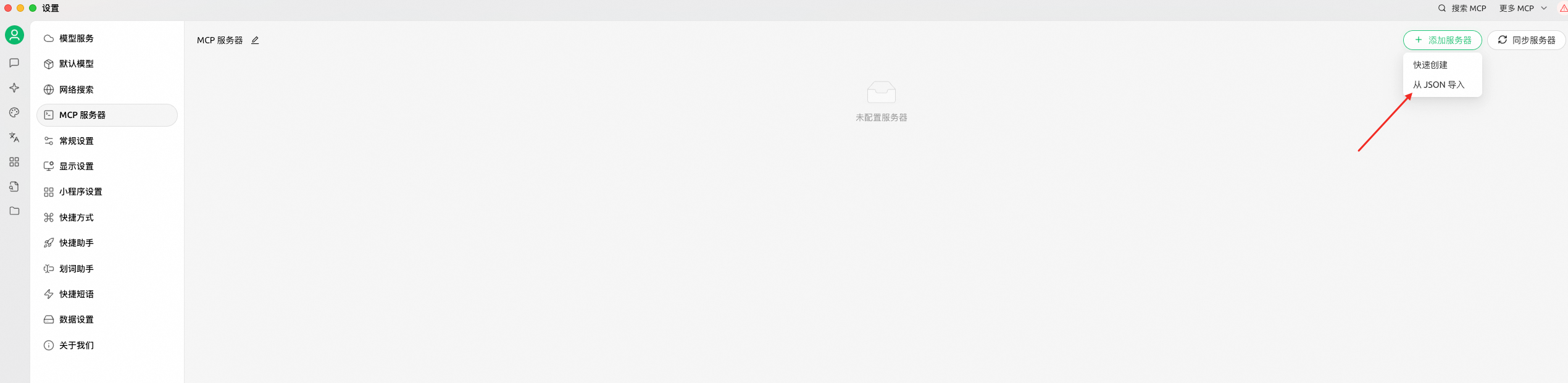
{
  "mcpServers": {
    "rds-openapi": {
      "name": "rds-openapi",
      "type": "stdio",
      "description": "",
      "isActive": true,
      "registryUrl": "",
      "command": "uvx",
      "args": [
        "alibabacloud-rds-openapi-mcp-server@latest"
      ],
      "env": {
        "ALIBABA_CLOUD_ACCESS_KEY_ID": "$you_access_id",
        "ALIBABA_CLOUD_ACCESS_KEY_SECRET": "$you_access_key"
      }
    }
  }
}
4. Finally, click to turn on MCP

5. You can use the prompt template provided below to enhance your experience.
Using Cline
Set you env and run mcp server. ```shellSign in to leave a review
Use Google, GitHub, or an email account so ratings stay tied to real people.
No reviews posted yet.





