
Alibaba Cloud FC MCP Server
About
<p align="center"><b>English</b> | <a href="./README_CN.md">中文</a><br></p> # Alibaba Cloud FC MCP Server This project is the MCP Server for Alibaba Cloud Function Compute (FC) service, based on [Serverless Devs](https://serverless-devs.com/docs/overview) and…
Details
- Author
- aliyun
- GitHub stars
- 8
- Downloads
- 255
- Categories
- Other
Jump to
- Create and update custom runtime functions.
- Retrieve and list function details.
- Delete functions.
- Manage custom domain configurations.
- Get custom runtime prompts.
- Supports stdio transport mode.

Setting up with Highlight
This MCP is not yet compatible with Highlight’s one-click setup. However, you can still use it with Highlight by following these steps:
- Download and install Highlight from highlightai.com/download
- Navigate to the plugins tab and select "Add Custom Plugin"
-
Configure the plugin with the settings below
Plugin Name
Alibaba Cloud FC MCP ServerCommand (node, npx, python, etc.)Please refer to the README for specific instructions on how to obtain API keys or other required environment variables.
- Enable "Start Automatically" if you want the plugin to start when Highlight launches





From the repository
Install Node.js 18+, prepare Alibaba Cloud AccessKeyId and AccessKeySecret with required permissions. Start the server via npx -y alibabacloud-fc-mcp-server with environment variables set. Configure the MCP server in Cursor or Cline using the provided JSON configuration, then interact with the server through agent chat.
put-custom-runtime-function
将构建完成的匹配阿里云自定义运行时的工程,部署到函数计算。代码工程不需要手动打包,会自动处理。如果函数已存在,则尝试覆盖并更新目标函数。建议使用该方法前先确认函数是否存在
update-custom-runtime-function
更新并部署custom runtime函数。如果需要修改代码,必须先完成构建。如果需要更新函数配置,需要提供更新的参数,未提供的参数将保持不变
get-function
获取创建的函数计算的函数信息
list-functions
获取函数计算的函数列表,只返回函数名称与部分函数信息,不返回所有函数信息。如果需要获取所有函数信息,请使用get-function工具
delete-function
删除函数计算的函数
get-custom-domain-config
查询函数计算的域名路由配置
update-custom-domain-config
更新函数计算的域名路由配置,修改域名路由配置
create-custom-domain-config
创建函数计算的域名路由配置,域名必须已经CNAME到函数计算的公网域名(格式为${uid}.${regionId}.fc.aliyuncs.com,例如14**49.cn-hangzhou.fc.aliyuncs.com)上,否则会创建失败。
delete-custom-domain-config
删除函数计算的域名路由配置,CNAME记录不会被删除,需要手动删除CNAME记录
publish-function-version
将函数的最新代码发布为新版本
list-function-versions
获取函数计算的函数版本列表
delete-function-version
删除函数计算的函数版本
Claude Desktop / Cursor
Paste into your MCP client config file to install this server.
{
    "mcpServers": {
        "alibaba cloud fc mcp server": {
            "alibabacloud-fc-mcp-server": {
                "command": "npx",
                "args": [
                    "alibabacloud-fc-mcp-server"
                ],
                "env": {
                    "ALIBABA_CLOUD_ACCESS_KEY_ID": "${your-access-key-id}",
                    "ALIBABA_CLOUD_ACCESS_KEY_SECRET": "${your-access-key-secret}"
                }
            }
        }
    }
}McpServers
{
    "alibabacloud-fc-mcp-server": {
        "command": "npx",
        "args": [
            "alibabacloud-fc-mcp-server"
        ],
        "env": {
            "ALIBABA_CLOUD_ACCESS_KEY_ID": "${your-access-key-id}",
            "ALIBABA_CLOUD_ACCESS_KEY_SECRET": "${your-access-key-secret}"
        }
    }
}
Alibaba Cloud FC MCP Server
This project is the MCP Server for Alibaba Cloud Function Compute (FC) service, based on Serverless Devs and OpenAPI.
Usage Scenarios
Integrate Alibaba Cloud Function Compute capabilities into agent applications that support MCP Client (such as Cursor, Claude, Cline).
Prerequisites
1. Install Node.js (version 18 or above is required).
2. Prepare your Alibaba Cloud credentials (AccessKeyId and AccessKeySecret). The following permissions are recommended:
- AdministratorAccess (recommended for full functionality), or at minimum:
- AliyunFCFullAccess (required)
- AliyunDevsFullAccess (recommended)
- AliyunVPCFullAccess (recommended)
- AliyunLogFullAccess (recommended)
- AliyunEventBridgeFullAccess (optional)
Quick Start
Method 1: Start from npm package [Recommended for MCP Server users]
You can use the following command to start the MCP server in stdio mode:
ALIBABA_CLOUD_ACCESS_KEY_ID=${your-access-key-id} ALIBABA_CLOUD_ACCESS_KEY_SECRET=${your-access-key-secret} npx alibabacloud-fc-mcp-server
Using Cursor [Recommended]
+ Click or edit the Cursor configuration file (doc), and add the following configuration:
"alibabacloud-fc-mcp-server": {
    "command": "npx",
    "args": ["-y", "alibabacloud-fc-mcp-server"],
    "env": {
        "ALIBABA_CLOUD_ACCESS_KEY_ID": "${your-access-key-id}",
        "ALIBABA_CLOUD_ACCESS_KEY_SECRET": "${your-access-key-secret}"
    }
}
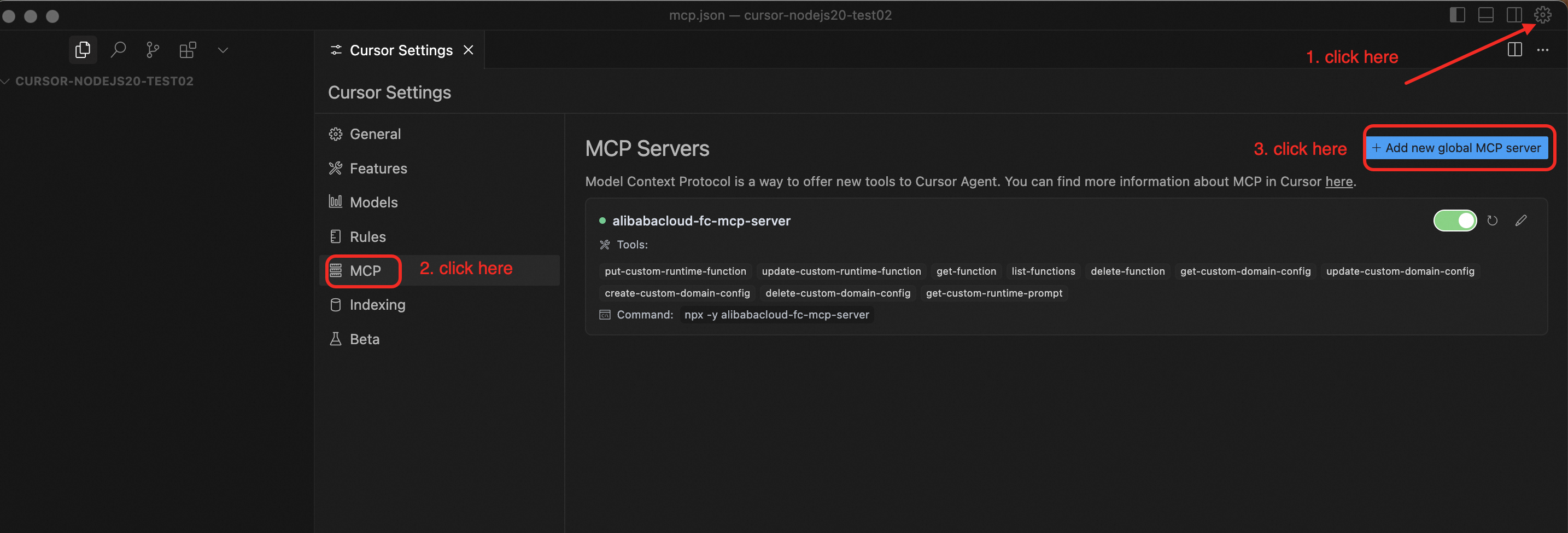
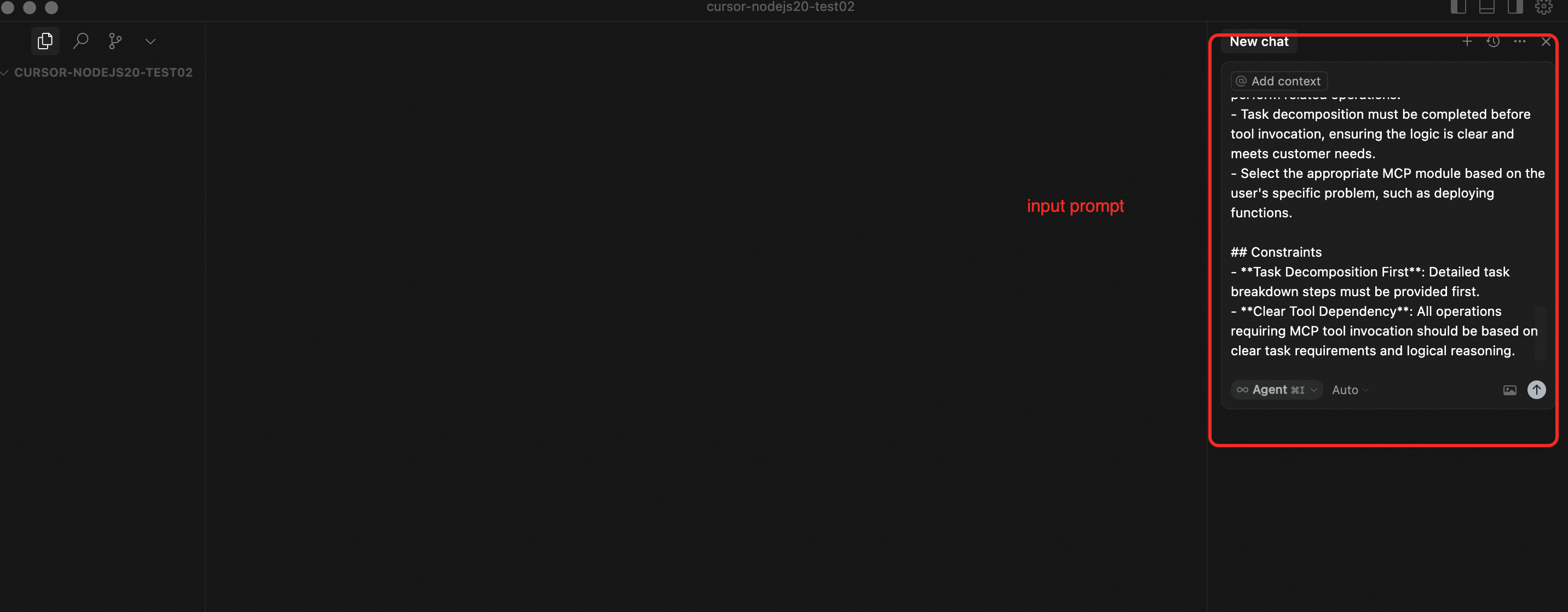
+ Create a new empty project and open it in Cursor. Chat with Cursor in agent mode. Input the Prompts below to guide the conversation.
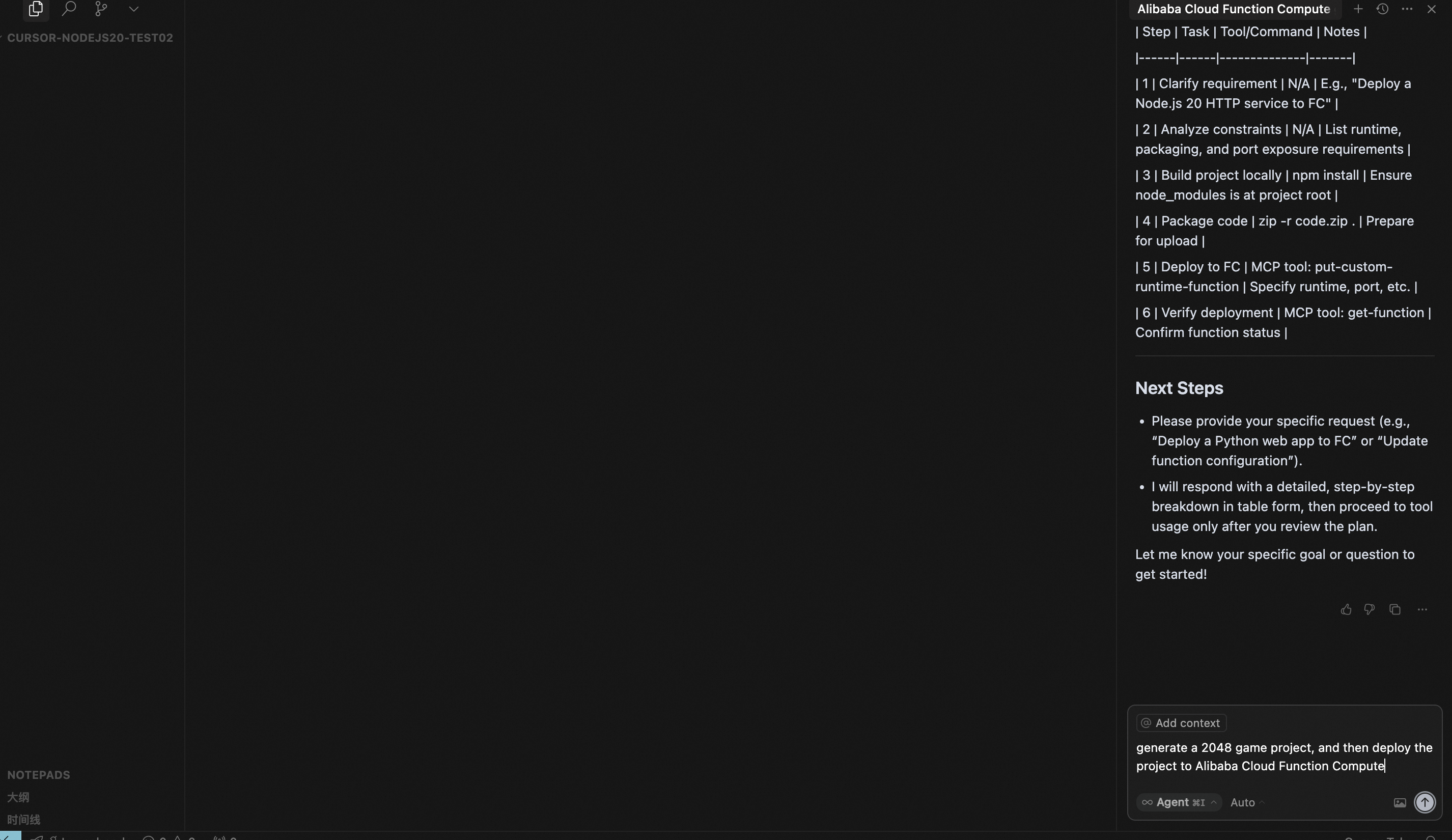
+ Ask the Cursor agent to generate a 2048 game project, then ask the agent to deploy it to Alibaba Cloud Function Compute.
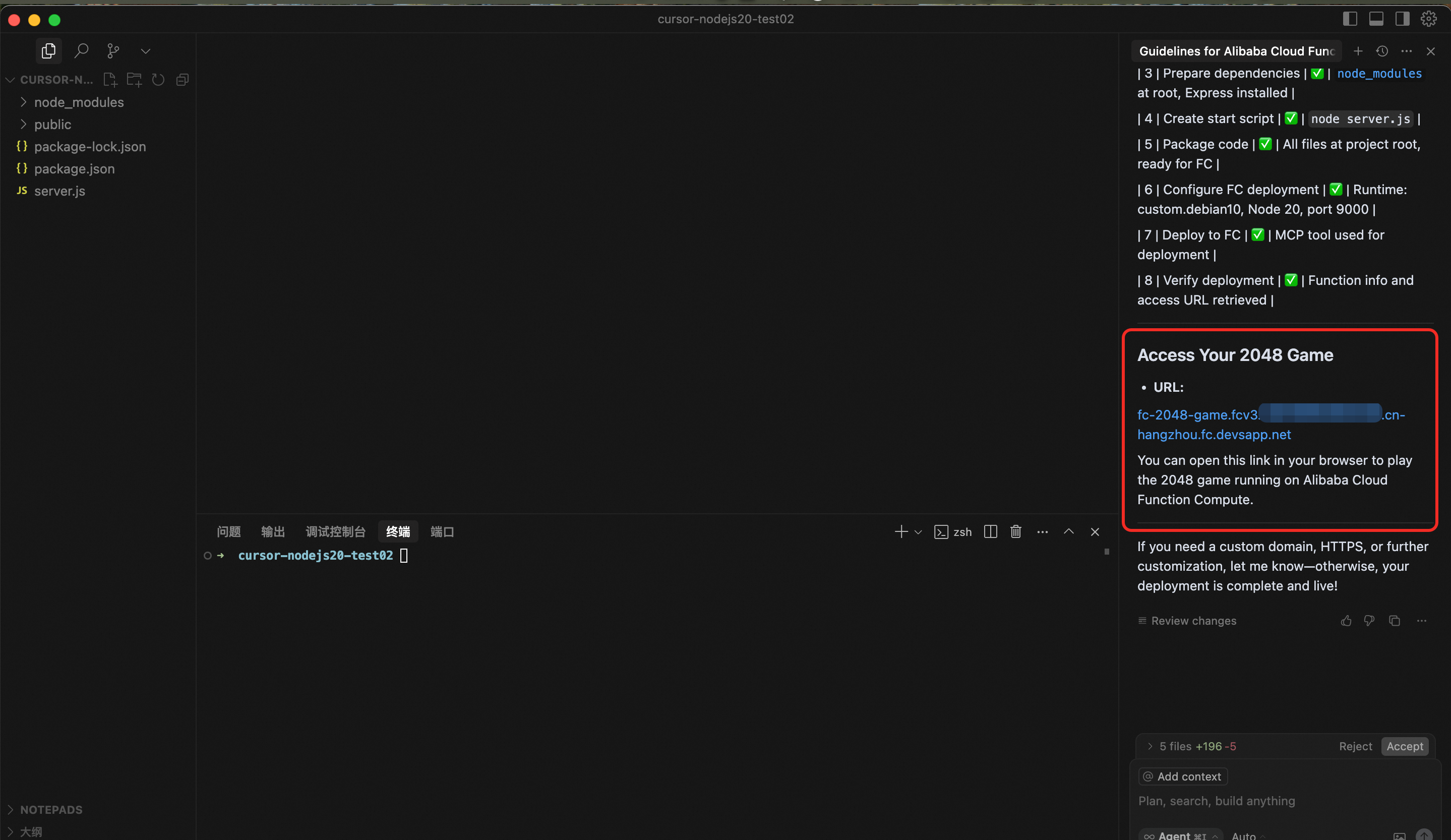
+ Wait for the agent to generate the project and deploy it to Alibaba Cloud Function Compute.
Using Cline
Edit the Cline configuration file (doc), and add the following configuration:"alibabacloud-fc-mcp-server": {
"command": "npx",
"args": ["-y", "alibabacloud-fc-mcp-server"],
"env": {
"ALIBABA_CLOUD_ACCESS_KEY_ID": "${your-access-key-id}",
"ALIBABA_CLOUD_ACCESS_KEY_SECRET": "${your-access-key-secret}"
}
}
Method 2: Start from source code [Recommended for MCP Server developers]
+ First, clone the project and build it:
git clone https://github.com/alibaba/alibabacloud-fc-mcp-server.git

cd alibabacloud-fc-mcp-server

npm install

npm run build
+ Then start the MCP server in stdio mode:
ALIBABA_CLOUD_ACCESS_KEY_ID=${your-access-key-id} ALIBABA_CLOUD_ACCESS_KEY_SECRET=${your-access-key-secret} node {absolute-path-to-project}/build/index.js
+ Finally, configure the MCP server in Cursor or Cline as in Method 1.
Components
Tools
put-custom-runtime-function: Package a project that meets Alibaba Cloud custom runtime requirements, create a function, and deploy the code to that function. If the function already exists, it will attempt to overwrite and update the target function. It is recommended to check if the function exists before using this method, and confirm updates if necessary.
update-custom-runtime-function: Update a custom runtime function. Only the provided parameters will be updated; others remain unchanged.
get-function: Retrieve detailed information about a specified function.
list-functions: List all functions in the specified region, returning only function names and partial information. For full details, use get-function.
delete-function: Delete a specified function.
get-custom-domain-config: Query the custom domain route configuration.
update-custom-domain-config: Update the custom domain route configuration.
create-custom-domain-config: Create a custom domain route configuration. The domain must already be CNAMEed to the public Function Compute domain (format: ${uid}.${regionId}.fc.aliyuncs.com, e.g. 14*49.cn-hangzhou.fc.aliyuncs.com), otherwise it will fail to create.
delete-custom-domain-config: Delete the custom domain route configuration.
get-custom-runtime-prompt: Get the custom runtime prompt. Will be moved to Prompts in the future.
Prompts
```markdown
Sign in to leave a review
Use Google, GitHub, or an email account so ratings stay tied to real people.
No reviews posted yet.





