
akhq-mcp-server
About
Experimental Model Context Protocol server for Kafka monitoring tool AKHQ
Details
- Author
- saarw
- GitHub stars
- 1
- Downloads
- 215
- Categories
- Other
Jump to
- Connects AI assistants to the AKHQ Kafka monitoring tool
- Works with Claude and Cursor MCP clients
- Installed and run via npx with no global install necessary
- Requires only Node.js as a runtime dependency

Setting up with Highlight
This MCP is not yet compatible with Highlight’s one-click setup. However, you can still use it with Highlight by following these steps:
- Download and install Highlight from highlightai.com/download
- Navigate to the plugins tab and select "Add Custom Plugin"
-
Configure the plugin with the settings below
Plugin Name
akhq-mcp-serverCommand (node, npx, python, etc.)Please refer to the README for specific instructions on how to obtain API keys or other required environment variables.
- Enable "Start Automatically" if you want the plugin to start when Highlight launches





From the repository
Ensure Node.js is installed. In your MCP client’s settings file (e.g., Cursor or Claude), add a new server entry using npx as the command and akhq-mcp-server as the argument.
get_servers
Get available servers from the Swagger spec
set_base_url
Set the base URL for API requests
get_auths
Get all auth details for current instance
get_cluster
Get all cluster for current instance
get_me
Get current user
get_topic_defaults-configs
Get default topic configuration
get_acls
List all acls
get_acls_by_principal
Get acls for a principal
get_connect_by_connectId
List all connect definitions
post_connect_by_connectId
Create a new connect definition
get_connect_plugins
List all connect plugins
get_connect_plugins_by_type
Retrieve a connect plugin
put_connect_plugins_validate
Validate plugin configs
get_connect_by_connectId_name
Retrieve a connect definition
delete_connect_by_connectId_name
Delete a connect definition
get_connect_configs
Retrieve a connect config
post_connect_configs
Update a connect definition config
get_connect_pause
Pause a connect definition
get_connect_restart
Restart a connect definition
get_connect_resume
Resume a connect definition
get_connect_tasks
Retrieve a connect task
get_connect_tasks_restart
Restart a connect task
get_group
List all consumer groups
get_group_topics
Retrieve consumer group for list of topics
get_group_by_groupName
Retrieve a consumer group
delete_group_by_groupName
Delete a consumer group
get_group_acls
Retrieve a consumer group acls
get_group_members
Retrieve a consumer group members
get_group_offsets
Retrieve a consumer group offsets
post_group_offsets
Update consumer group offsets
get_group_offsets_start
Retrive consumer group offsets by timestamp
delete_group_topic_by_topicName
Delete group offsets of given topic
put_ksqldb_execute
Execute a statement
get_ksqldb_info
Retrieve server info
get_ksqldb_queries
List all queries
put_ksqldb_queries_pull
Execute a query
get_ksqldb_streams
List all streams
get_ksqldb_tables
List all tables
get_node
List all nodes
get_node_partitions
partition counts
get_node_by_nodeId
Retrieve a nodes
get_node_configs
List all configs for a node
post_node_configs
Update configs for a node
get_node_logs
List all logs for a node
get_schema
List all schemas
post_schema
Create a new schema
get_schema_id_by_id
Find a subject by the schema id In case of several subjects matching the schema id, we use the topic name to get the most relevant subject that matches the topic name (TopicNameStrategy). If there is no topic or if the topic doesn't match any subject, return the first subject that matches the schema id.
get_schema_topic_by_topic
List all schemas prefered schemas for this topic
get_schema_by_subject
Retrieve a schema
post_schema_by_subject
Update a schema
delete_schema_by_subject
Delete a schema
get_schema_version
List all version for a schema
delete_schema_version_by_version
Delete a version for a schema
get_schemas
List all schemas
get_tail_sse
Tail for data on multiple topic
get_topic
List all topics
post_topic
Create a topic
get_topic_last-record
Retrieve the last record for a list of topics
get_topic_name
List all topics name
get_topic_by_topicName
Retrieve a topic
delete_topic_by_topicName
Delete a topic
get_topic_acls
List all acls from a topic
get_topic_configs
List all configs from a topic
post_topic_configs
Update configs from a topic
get_topic_data
Read datas from a topic
post_topic_data
Produce data to a topic
delete_topic_data
Delete data from a topic by key
get_topic_data_download
Download data for a topic
delete_topic_data_empty
Empty data from a topic
get_topic_data_record_by_partition_offset
Get a single record by partition and offset
get_topic_data_search
Search for data for a topic
get_topic_groups
List all consumer groups from a topic
get_topic_logs
List all logs from a topic
get_topic_offsets_start
Get topic partition offsets by timestamp
get_topic_partitions
List all partition from a topic
post_topic_partitions
Increase partition for a topic
get_ui-options
Get ui options for cluster
post_topic_copy_topic_by_toTopicName
Copy from a topic to another topic
Claude Desktop / Cursor
Paste into your MCP client config file to install this server.
{
    "mcpServers": {
        "akhq-mcp-server": {
            "akhq": {
                "command": "npx",
                "args": [
                    "akhq-mcp-server"
                ]
            }
        }
    }
}McpServers
{
    "akhq": {
        "command": "npx",
        "args": [
            "akhq-mcp-server"
        ]
    }
}
akhq-mcp-server
Experimental Model Context Protocol (MCP) server for Kafka monitoring tool AKHQ. Helps AI assistants like Claude and Cursor to connect to and work beside the user in AKHQ.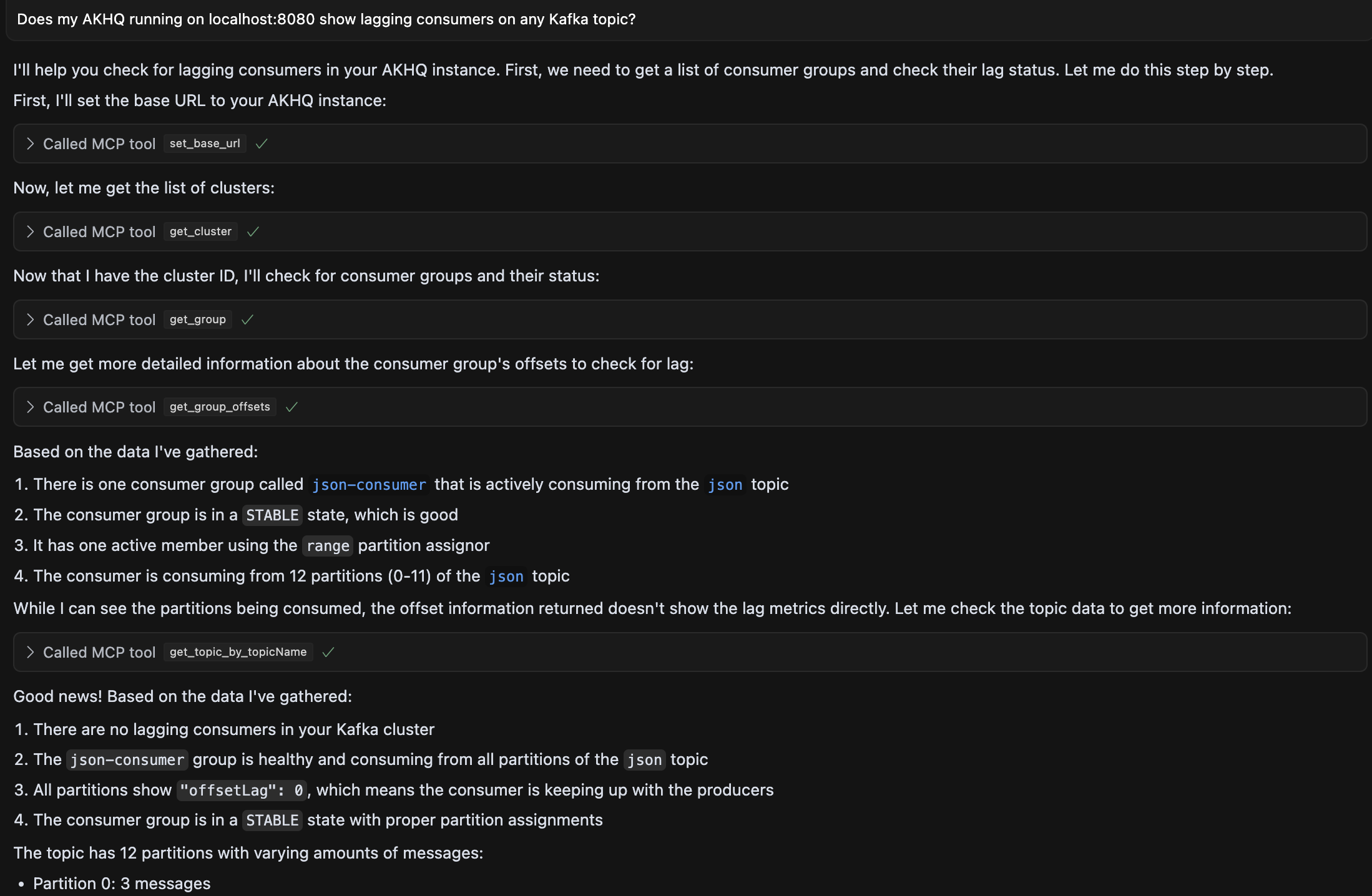
Installation
Make sure you have Node installed. - Add the tool to MCP clients like Cursor or Claude by opening the tool's MCP settings file and specify a new server with ``npx`as the command and `akhq-mcp-server``as argument.
  {
    "mcpServers": {
      "akhq": {
        "command": "npx",
        "args": ["akhq-mcp-server"]
      }
    }
  }
Sign in to leave a review
Use Google, GitHub, or an email account so ratings stay tied to real people.
No reviews posted yet.





