

Agenticstore — The Open Source Standard For Local Mcp Tooling
About
AgenticStore: The secure toolkit for AI agents. Instantly equip Claude Desktop, Cursor, and Windsurf with 27+ MCP tools, persistent memory, and SearXNG search, all protected by a built-in PII prompt firewall to protect your data from being exposed to AI agents.
Details
- Author
- agenticstore
- GitHub stars
- 4
- Downloads
- 374
- Categories
- Productivity, Search, Other, Developer Tools
Jump to
- 🛡️ LLM Prompt Firewall with proxy interception and sanitization
- 🧰 31 specialized MCP tools across code, data, memory, and system modules
- 🧠 Persistent agent memory that survives restarts and sessions
- ✂️ Token optimization with code compression and context pruning
- 🌐 Self-hosted web search via SearXNG (optional)
- 🔒 100% local execution for full data privacy

Setting up with Highlight
This MCP is not yet compatible with Highlight’s one-click setup. However, you can still use it with Highlight by following these steps:
- Download and install Highlight from highlightai.com/download
- Navigate to the plugins tab and select "Add Custom Plugin"
-
Configure the plugin with the settings below
Plugin Name
Agenticstore — The Open Source Standard For Local Mcp ToolingCommand (node, npx, python, etc.)Please refer to the README for specific instructions on how to obtain API keys or other required environment variables.
- Enable "Start Automatically" if you want the plugin to start when Highlight launches





From the repository
Install via pip install agentic-store-mcp --upgrade or uvx agentic-store-mcp, then run agentic-store-mcp. Configure your AI client manually in its config file or use the bundled GUI webapp (agentic-store-webapp at http://localhost:8765) for visual management. Quick start options include V0 (PyPI), V1 (GitHub source), and V2 (MCP Hub UI).
Claude Desktop / Cursor
Paste into your MCP client config file to install this server.
{
    "mcpServers": {
        "agenticstore \u2014 the open source standard for local mcp tooling": {
            "agenticstore": {
                "command": "uvx",
                "args": [
                    "agentic-store-mcp"
                ]
            }
        }
    }
}McpServers
{
    "agenticstore": {
        "command": "uvx",
        "args": [
            "agentic-store-mcp"
        ]
    }
}
<div align="center">
⚡ AgenticStore MCP Server: LLM Prompt Firewall, Token Optimization & AI Security Toolkit
Open-Source Model Context Protocol (MCP) Server for Data Privacy, Prompt Recording, Audit Logs, and 31 Agent Tools for Claude Code, Cursor, and Windsurf.



� Official Documentation • �🚀 Quick Start • 🛡️ Prompt Firewall • 🗂️ Full Tool Directory • 🌐 Web Search • 🔌 Client Setup • 💻 Claude Code • 🖥️ GUI Webapp
</div>
---
🔒 Why You Need This: Enterprise-Grade AI Security Meets Autonomous Agents
Giving AI assistants like Claude, Cursor, and Windsurf access to your codebase and the web is a superpower. But passing sensitive enterprise data to remote LLMs is a massive security risk. Furthermore, hitting token limits quickly degrades LLM context windows and increases costs.
The Problem: You want the massive productivity boost of agentic workflows, but you cannot compromise on Data Loss Prevention (DLP), compliance, leak prevention, or token bloat.
The Solution: AgenticStore MCP Server solves the entire equation natively:
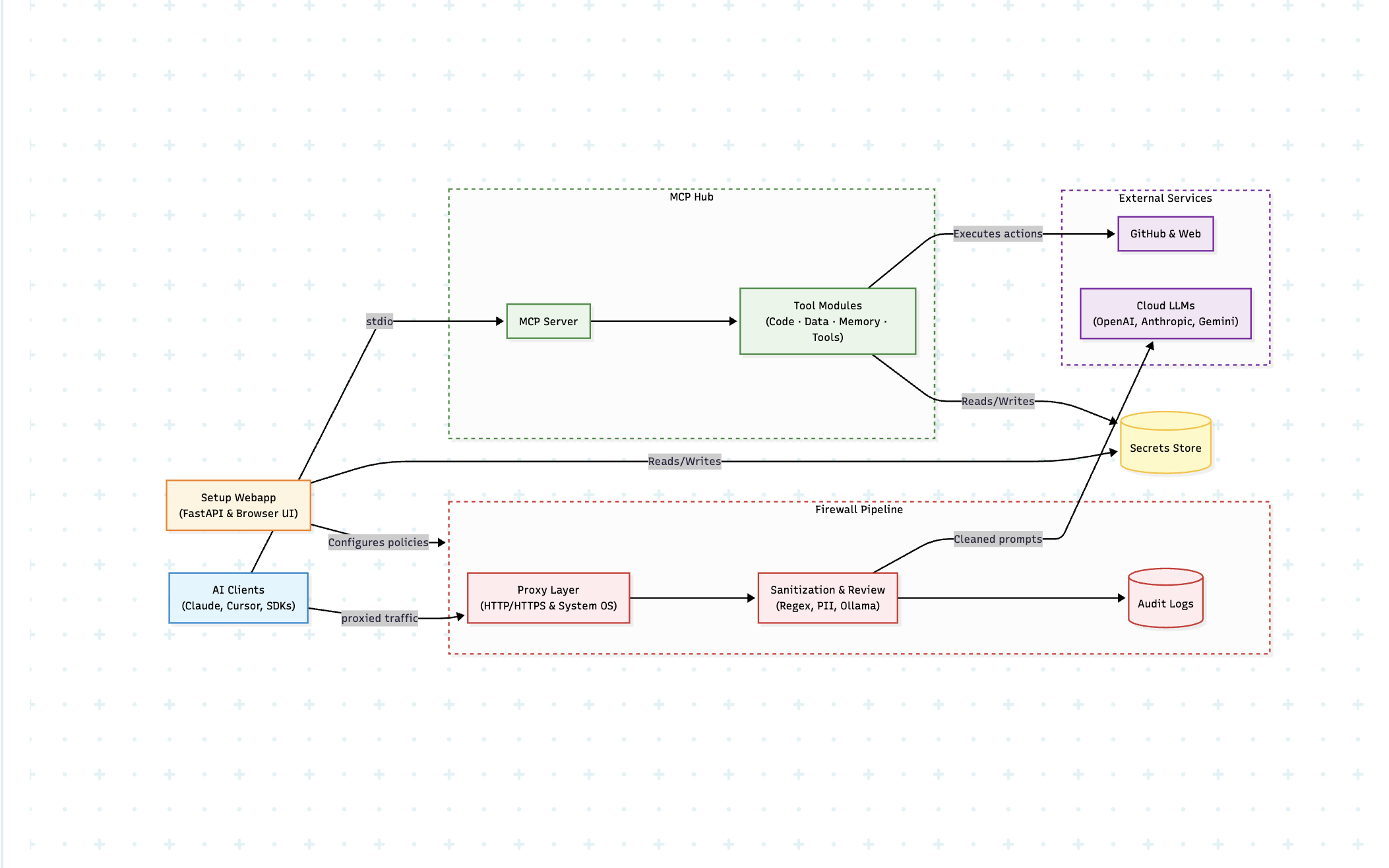
🛡️ The LLM Prompt Firewall: A secure local proxy that intercepts, scans, and sanitizes your prompts before they leave your machine. It flags leaked secrets, PII, and API keys, using local models (like Ollama) to sanitize data and generate strict audit traces for all AI usage.
🧰 The MCP Toolkit (31 Tools): A production-ready arsenal. Instantly arm your AI with everything from code analyzers and CVE vulnerability scanners (OSV CVE scans), to context pruners, token optimizers, persistent semantic memory, and self-hosted SearXNG web search.
Zero subscriptions. Zero vendor lock-in. Configure your MCP tools manually or effortlessly through a beautiful local GUI.
---
<div align="center">
<h3>🎥 Prompt Firewall Demo</h3>
<video src="https://github.com/user-attachments/assets/4e1976e1-c4a3-4737-9a4e-7539abc4e89c" width="100%" controls title="AgenticStore Prompt Firewall Demo">
Your browser does not support the video tag. <a href="https://github.com/user-attachments/assets/4e1976e1-c4a3-4737-9a4e-7539abc4e89c">Take a look at the Prompt Firewall Demo video here</a>.
</video>
<br/>
<i>(If the video above doesn't load, <a href="https://github.com/user-attachments/assets/4e1976e1-c4a3-4737-9a4e-7539abc4e89c">click here to watch the demo</a>)</i>
<br/><br/>
<details>
<summary><strong>🎥 Watch the GUI Demo in Action (MCP Tools)</strong></summary>
<br/>
<video src="https://github.com/user-attachments/assets/e894bd97-b535-4563-ada8-5561c8d10513" width="100%" controls title="AgenticStore MCP User Interface Demo">
Your browser does not support the video tag. <a href="https://github.com/user-attachments/assets/e894bd97-b535-4563-ada8-5561c8d10513">Take a look at the AgenticStore MCP GUI Demo video here</a>.
</video>
<br/>
<i>(If the video above doesn't load, <a href="https://github.com/user-attachments/assets/e894bd97-b535-4563-ada8-5561c8d10513">click here to watch the demo</a>)</i>
<br/><br/>
</details>
<br/>
<h3>🏗️ How It Works</h3>
</div>
🔥 Why Choose AgenticStore MCP?
| Feature | AgenticStore MCP Server | Standard MCP Servers |
| :--- | :--- | :--- |
| AI Security & Prompt Firewall | 🛡️ Yes (Proxy & Rule-based DLP) | ❌ No |
| Audit Traces & Logs | 📝 Yes (Prompt recording & compliance) | ❌ No |
| Local LLM Prompt Sanitization| 🦙 Yes (Ollama integration) | ❌ No |
| Persistent Agent Memory | 🧠 Yes (survives restarts & sessions) | ❌ No |
| Token Optimization & Pruning | ✂️ Yes (LLM token compression) | ❌ No |
| Agentic Web Search | 🌐 Self-hosted SearXNG | ❌ Usually No |
| Capabilities | 🛠️ 31 specialized tools | ⛏️ 1 to 5 basic tools |
| Configuration | 🖥️ Web GUI Dashboard OR ⚙️ Manual | ⚙️ Manual JSON setup |
| Privacy | 🔒 100% Local Execution | 🔒 Varies |
- 🛡️ LLM Prompt Firewall: Intercept, sanitize, and perform prompt recording for all data leaving your system, ensuring robust AI security.
- 🔒 100% Privacy-First: Everything runs locally. Generate reliable audit traces for AI usage while your code and data never leave your machine unaudited.
- ✂️ LLM Token Optimization: Radically reduce your token burn with code structural compression (token_optimizer) and relevance-based context trimming (context_pruner).
- 💸 Truly Free: No accounts, no paywalls, no subscriptions.
- 🧠 Persistent Agent Memory: Let your AI remember facts and contexts across sessions seamlessly.
- ⚡ Plug & Play: Installs instantly via uvx or pip. MCP configuration supports both manual JSON and GUI workflows.
---
📋 Table of Contents
- 🛡️ LLM Prompt Firewall & Sanitization
- 🧰 What's Inside the Toolkit
- 🚀 Quick Start Guide (Fastest Way to Install)
- V0: Python/uvx (Recommended)
- V1: From GitHub Source
- V2: MCP Hub Webapp (UI)
- 🔌 Connect to Your AI Client
- 🗂 Tool Directory — All 31 Tools
- 💻 Claude Code CLI Integration
- 🔎 Enabling Web Search
- 🎛 Overriding Configs & Advanced Usage
---
🛡️ LLM Prompt Firewall & Sanitization
The Prompt Firewall gives you complete control over what natural language data and code leaves your computer when using cloud-based AI coding assistants, delivering enterprise-grade AI security.
> [!NOTE]
> The Firewall feature is currently tested and stable on macOS. Support for Linux and Windows is coming soon!
Key Features:
- Proxy Interception: Set up a local proxy to monitor all LLM traffic.
- Audit Traces for AI Usage: Automatically generate prompt recording logs. Get clear warnings at each prompt level showing exactly what was changed or redacted.
- 1-Click UI Setup: Install certificate -> start proxy. The magic starts immediately. (Note: Firewall setup is only made available on the UI to ensure smooth installation and operation).
- Local LLM Integration (Optional): Connect your local Ollama instance. Download open-source models to run completely local, pre-flight prompt sanitization, scanning your code to make it better and safer before sending it to a remote API.
- Rule-Based Sanitization: Easily define regex or grammar rules to block PII, AWS keys, database strings, or proprietary logic.
…
Sign in to leave a review
Use Google, GitHub, or an email account so ratings stay tied to real people.
No reviews posted yet.





