
Agent Device
About
Discovery router for the agent-device CLI with status, install, help, prompts, and resources.
Details
- Author
- callstackincubator
- Downloads
- 222
- Categories
- Developer Tools, AI
Jump to
- Token-efficient accessibility snapshots with refs like @e1, @e2
- Supports iOS, Android, tvOS, Android TV, macOS, and Linux
- Captures screenshots, video, logs, network, CPU/memory/perf, crash logs, and React profiles
- Produces replayable .ad scripts for local or CI e2e runs
- MCP router for discovery-oriented clients (automation via CLI only)

Setting up with Highlight
This MCP is not yet compatible with Highlight’s one-click setup. However, you can still use it with Highlight by following these steps:
- Download and install Highlight from highlightai.com/download
- Navigate to the plugins tab and select "Add Custom Plugin"
-
Configure the plugin with the settings below
Plugin Name
Agent DeviceCommand (node, npx, python, etc.)Please refer to the README for specific instructions on how to obtain API keys or other required environment variables.
- Enable "Start Automatically" if you want the plugin to start when Highlight launches





From the repository
Install globally with npm install -g agent-device@latest. Use commands like agent-device help workflow, agent-device open, agent-device snapshot, and agent-device close in a terminal. For MCP-aware clients, configure as a stdio MCP server with command agent-device and args ["mcp"] for discovery-only handoff; automation always runs through the CLI.
alert
Inspect, wait for, accept, or dismiss a platform alert. Use get before acting when the alert content matters; accept and dismiss change the active alert state.
app-switcher
Open the device app switcher to inspect or change foreground apps. This changes the visible system UI and may move focus away from the current app.
apps
List the apps installed on the selected device. Include system or OEM apps only when they are needed as automation targets.
appstate
Show foreground app/activity
artifacts
List daemon or cloud provider artifacts for an active or completed session.
audio
Measure browser or host-rendered simulator/emulator audio as compact dBFS buckets. Start a probe before requesting its status or stopping it.
back
Navigate back in the app or through system navigation. Use in-app for the app navigation stack and system when the platform back behavior is required.
batch
Execute multiple commands in one daemon request
boot
Boot or prepare the selected device or simulator so later commands can target it. The device is chosen through the device-selection inputs, not by naming it here.
capabilities
List the commands supported by the selected device or active session. Use device-selection inputs when checking support before a session is open.
click
Activate a UI target by snapshot ref, selector, or coordinates. Prefer a ref or selector after a snapshot; use coordinates only when semantic targeting is unavailable. This can change app state; use settle or verify to confirm the result without a follow-up snapshot.
clipboard
Read the current device clipboard text, or replace its contents with the given text.
close
Close the named app, or close the active session app when app is omitted. Use shutdown only when the selected simulator or emulator should also stop.
debug
Symbolicate Apple crash artifacts with matching dSYM UUIDs. This debug namespace is intentionally narrow: use logs for app logs, network for HTTP evidence, perf for performance samples, record/trace for media and traces, and react-devtools for React Native profiles.
devices
List available devices and simulators that can be selected for automation. Use platform, device, udid, or serial inputs on later commands to target one result.
diff
Compare accessibility snapshots or screenshots to identify UI changes. Use snapshot comparisons for semantic tree changes and screenshot comparisons for pixel differences.
doctor
Diagnose device, app, development-server, and React Native or Expo readiness issues. Returns compact evidence for local inventory, sessions, optional app discovery, toolchains, and server reachability. On iOS simulators it also warms the XCTest runner build cache in the background when missing, so run it before the first Apple snapshot or interaction of a session.
events
Read the daemon-owned session event timeline as paged JSON-friendly entries
fill
Replace text in a UI input selected by snapshot ref, selector, or coordinates. Prefer refs or selectors after snapshot; use recordAs to keep sensitive text out of a recorded replay while sending it to the live app.
find
Find by text/label/value/role/id and run action
focus
Move input focus to explicit screen coordinates without entering text. Prefer semantic interactions when a snapshot ref or selector is available; use type or fill after focus.
gesture
Perform a structured pan, fling, swipe, pinch, rotate, transform, or drag gesture. Select the gesture kind, then provide only the inputs that apply to that kind.
get
Read text or accessibility attributes from a snapshot ref or selector without changing the app. Use format text for visible content or attrs for the element attribute map.
home
Send the selected device to its home screen. This leaves the app session open but moves the foreground away from the app.
hover
Move the pointer over a UI target by snapshot ref, selector, or coordinates without pressing, to reveal hover-gated UI such as row toolbars or menus. Web only; touch platforms have no hover state. Use settle to observe what the hover revealed without a follow-up snapshot.
install
Install an app binary from a local path. Provide an app identifier with the path when the target needs explicit app selection; use reinstall to replace an already installed app.
install-from-source
Install app builds from URLs, remote source specs, or CI artifacts resolved by a remote daemon.
is
Check whether a selector satisfies a UI predicate such as visible, hidden, editable, selected, focused, or text. Use wait when the condition may appear asynchronously.
keyboard
Inspect Android keyboard visibility/type or press/dismiss the device keyboard. To hide the keyboard, use keyboard dismiss. It taps the keyboard dismiss/hide key when one is exposed, verifies the keyboard closed, and reports UNSUPPORTED_OPERATION when no dismiss key exists — background taps are never attempted.
logs
Session app log info, start/stop streaming, diagnostics, and markers
longpress
Hold a UI target by snapshot ref, selector, or coordinates to open a context menu or perform another hold gesture. Set durationMs when the default hold duration is unsuitable.
metro
Prepare a React Native development server or ask connected apps to reload, using the development server this session is bound to. Provide explicit runtime inputs only to override that binding for one call. The binding is cleared when the session closes, and a fresh open without runtime hints also clears any leftover binding from a previous same-name session.
network
Dump recent HTTP(s) traffic parsed from the session app log
open
Boot the selected device when needed, then open an app, deep link, or URL in a session. Use the app or URL inputs to choose what becomes the foreground automation target. Metro and debug runtime hints given here are recorded as the session's dev-server binding, so a later reload reuses them; a fresh open without them clears any binding left by a previous same-name session.
orientation
Set device orientation on iOS and Android
perf
Collect frame health, memory diagnostics, and platform profiling artifacts with compact agent-readable summaries. For CPU profiles, start and stop write the raw artifact while report writes a compact summary; request the report when the task needs readable native CPU evidence. Profiling output is evidence only: compact state, artifact path, and size.
press
Short-press a UI target by snapshot ref, selector, or coordinates. Use longpress instead when the target requires a context-menu or hold gesture.
push
Deliver push notification payloads to an installed app.
react-native
Run supported React Native automation helpers. Use dismiss-overlay to close a visible development error overlay before continuing normal UI automation.
record
Start or stop a screen recording for the active app session or, where supported, the selected device. Long Android recordings can return multiple video artifacts; HarmonyOS supports whole-screen recording on physical devices.
reinstall
Replace an installed app with a binary from a local path. Use this when preserving the same app identity while installing a new build on the selected device.
replay
Run a recorded automation script, including compatible Maestro YAML flows. A script without a terminal close leaves its session active for subsequent automation.
screenshot
Capture a screenshot of the active app or web session. Choose the capture scope, density, size, or annotations through the corresponding input fields when needed.
scroll
Scroll in a direction, or toward the top/bottom edge of scrollable content.
session
List active sessions, print the effective daemon state directory, or publish an armed open-to-destination script without closing its session
settings
Change supported operating-system settings, animation scales, appearance, or app permissions on the selected target. Platform support varies by setting and action.
shutdown
Shutdown a selected simulator or emulator.
snapshot
Capture the accessibility tree or compare it with the previous session baseline. Use the returned refs for subsequent semantic interactions and the diff option to verify UI changes.
swipe
Quick coordinate fling with optional repeat pattern.
test
Run one or more replay scripts as a serial test suite
trace
Start or stop trace-log capture and return the resulting artifact when capture ends. Use the same artifact path for the matching start and stop requests when an explicit path is required.
trigger-app-event
Ask the app to handle an app-defined automation or test event, with an optional structured payload. Call this only for event names and payload shapes the app documents.
tv-remote
Press or long-press a TV remote or D-pad button on Android TV, tvOS, or Vega OS. Choose the button and optional hold duration through the input fields. The aliases ok, center, and enter all map to select.
type
Append text to the currently focused input. Use fill when the existing field value should be replaced, and focus first when no input is active.
viewport
Resize the active web viewport before taking snapshots or screenshots. Useful for fixed-layout or 100vh apps where changing the viewport reveals different content.
wait
Wait for a duration, text, snapshot ref, selector, or stable UI. Use text, ref, or selector for a specific readiness condition; stable waits until the UI stays quiet for the requested window.
help
Usage guides. No topic: the full workflow card. topic = one of commands, manual-qa, maestro, workflow, scripting, gestures, tv, debugging, react-devtools, cdp, react-native, physical-device, ios-system-ui, remote, macos, web, dogfood, validate for that guide, or a tool name for its complete flag reference. For specialized work or an unclear command shape only; not a startup step, not needed after an error that carries a hint.
Claude Desktop / Cursor
Paste into your MCP client config file to install this server.
{
    "mcpServers": {
        "agent device": {
            "agent-device": {
                "command": "npx",
                "args": [
                    "-y",
                    "agent-device",
                    "mcp"
                ]
            }
        }
    }
}McpServers
{
    "agent-device": {
        "command": "npx",
        "args": [
            "-y",
            "agent-device",
            "mcp"
        ]
    }
}
agent-device


Device automation CLI for AI agents. Mobile, TV, and desktop apps.
agent-device lets coding agents run real apps, inspect UI state, interact with visible elements, and collect debugging evidence through one CLI.
It is built around token-efficient accessibility snapshots, not pixel-first screenshots. Agents read compact UI trees, locate elements through refs like @e3, perform touch and text actions, and capture screenshots, video, logs, network, CPU/memory/perf, crash-related logs, and React profiles only when evidence is needed.
Agents can ingest the current docs from llms-full.txt. The installed CLI help remains authoritative for exact command syntax.
Agentic QA And Development
- Quality Assurance: dogfood flows, validate PR builds, check accessibility coverage, and turn stable explorations into .ad e2e tests.
- Development: build from specs, inspect real runtime behavior, and iterate until the UI matches the work.
agent-device closes the agentic development loop: agents can write code, run the real app, verify the UI end-to-end, collect screenshots/videos/logs/perf evidence, and feed bugs, crashes, or performance findings back into the next fix iteration before a human reviews the PR.
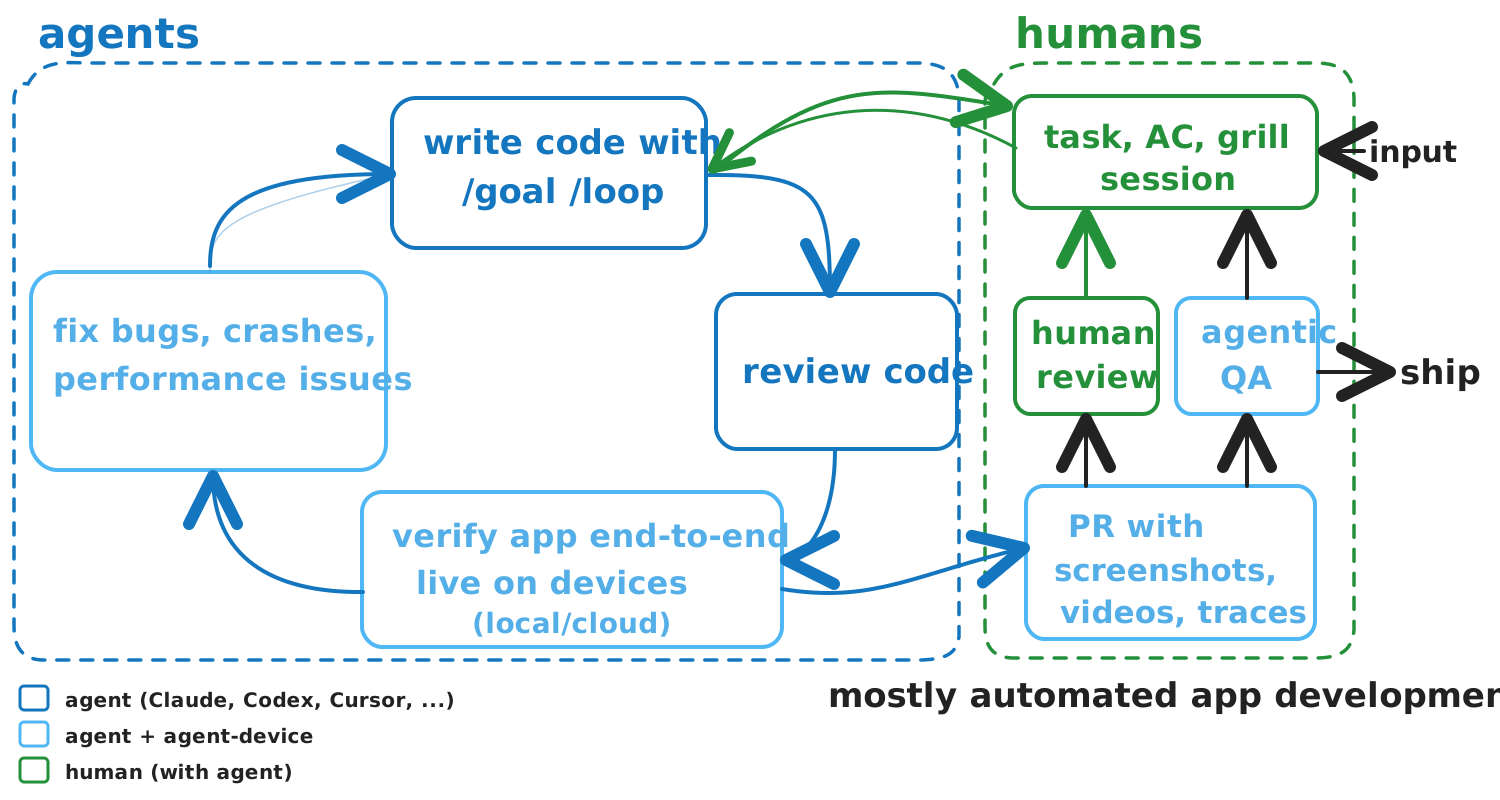
If you know Vercel's agent-browser, this is the same idea for apps and devices.
Use it for AI mobile testing, AI QA for React Native and Expo apps, iOS Simulator automation, Android Emulator automation, tvOS/Android TV checks, and desktop app verification from coding agents. Humans install and configure agent-device; agents run the workflows.
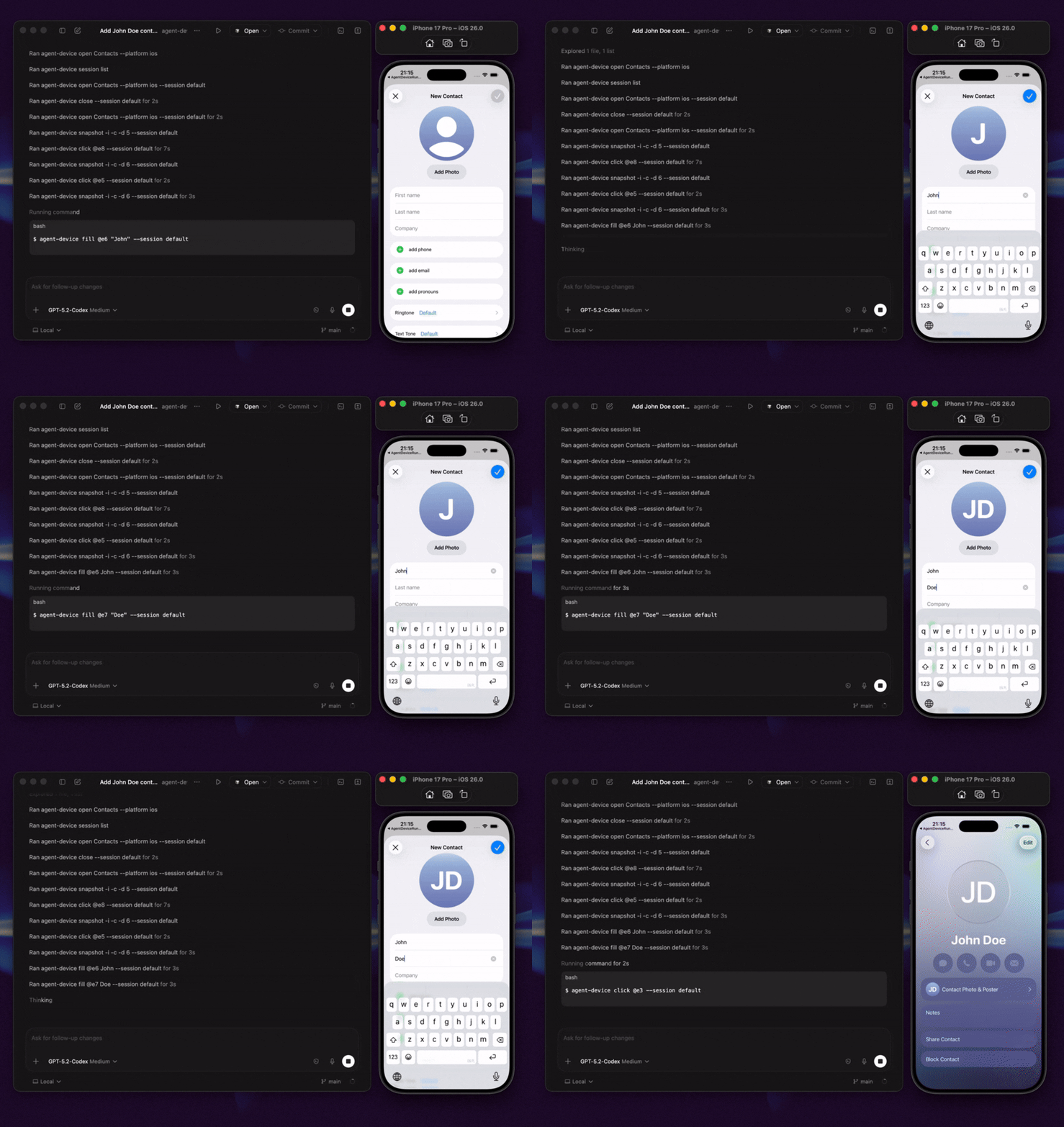
Demo: Codex uses agent-device to inspect iOS Contacts through accessibility snapshots, interact with visible UI, and create a contact from a simple prompt.
Quick Start
Install the CLI first:
npm install -g agent-device@latest
agent-device --version
agent-device help workflow
The CLI help is the source of truth for agents and is shipped with the installed version. Skills are optional but recommended when your agent runtime supports them: they auto-route device, React DevTools, and dogfood tasks to the right agent-device help <topic> page and verify the CLI is new enough before acting.
If you install skills separately, keep the CLI on agent-device >= 0.14.0. Older CLIs do not include the workflow help topics that the router skills expect.
AI Agent Entry Points
- Agent + terminal: in Cursor, Codex, Claude Code, Windsurf, and similar clients, run agent-device in the integrated terminal. Start planning with agent-device help workflow; CLI help is authoritative.
- Skills or rules: install the skill with npx skills add callstackincubator/agent-device, use the bundled agent-device skill, or mirror it as a thin project rule, so the agent checks the installed version and reads agent-device help workflow before acting. Use agent-device help react-native for React Native apps, overlays, Metro/Fast Refresh blockers, and routing to React DevTools or debugging evidence.
- MCP router: use agent-device mcp when an MCP-aware client needs to discover the CLI package, install command, version check, and first help command. MCP is discovery-only; device automation still runs through terminal CLI commands.
For client-specific setup, see AI Agent Setup. For agent-readable docs, use llms-full.txt.
MCP Router
agent-device ships an official stdio MCP router for discovery-oriented clients. It exposes only a status tool that returns structured CLI handoff guidance: npm package name, installed version, CLI command name, install command, verify command, starting help command, and an explicit note that automation happens through the CLI.
MCP clients must not use this server as a device automation surface or generic shell runner. If the CLI is missing, agents should ask a human before installing or updating packages, then verify with agent-device --version and start with agent-device help workflow.
Paste one of these into clients that accept mcpServers, such as Cursor project .cursor/mcp.json or user-level MCP settings.
<details>
<summary>Global install MCP config</summary>
{
  "mcpServers": {
    "agent-device": {
      "command": "agent-device",
      "args": ["mcp"]
    }
  }
}
</details>
<details>
<summary>No global install MCP config</summary>
{
  "mcpServers": {
    "agent-device": {
      "command": "npx",
      "args": ["-y", "agent-device@<reviewed-version>", "mcp"]
    }
  }
}
</details>
Registry metadata uses MCP name io.github.callstackincubator/agent-device, npm package agent-device, stdio transport, mcpName package verification, server.json, and smithery.yaml.
npm install -g agent-device@latest
agent-device --version
agent-device help
agent-device performs a lightweight background upgrade check for interactive CLI runs and, when a newer package is available, suggests a global reinstall command. Updating the package also refreshes the bundled skills/ shipped with the CLI.
Prerequisites: Node.js 22+, Xcode for iOS/tvOS/macOS targets, Android SDK + ADB for Android, and macOS Accessibility permission for desktop automation. See Installation.
Try the loop.
```bash
Sign in to leave a review
Use Google, GitHub, or an email account so ratings stay tied to real people.
No reviews posted yet.





