

Shopify MCP Proxy & Mock Server (ShopifyMCPMockShop)
About
A Shopify MCP Server built to interact with Mock.shop
Details
- Author
- ramakay
- GitHub stars
- 12
- Downloads
- 180
- Categories
- Other
Jump to
- Supports mock.shop sandbox for risk‑free development and testing.
- Prioritizes safety with explicit ToolAnnotations (readonly, destructive, etc.).
- Provides transparent control over which Shopify API version is used.
- Offers ten Storefront API tools: product, collection, and cart operations.
- Communicates via stdio for local client integration.
- Built with a layered architecture separating MCP and Shopify logic.
Clone the repository, install dependencies (npm install), and build (npm run build). Configure your MCP client (Claude Desktop or Cursor) to launch the compiled server (dist/server.js) via stdio. Optionally set environment variables (SHOPIFY_STORE, SHOPIFY_ACCESS_TOKEN, SHOPIFY_VERSION) to connect to a real store; otherwise mock.shop is used by default with no configuration required. The server runs automatically when launched by the client.
Shopify MCP Proxy & Mock Server (ShopifyMCPMockShop)
This project implements a Model Context Protocol (MCP) server that acts as an intelligent bridge and proxy to Shopify's Storefront API. It uniquely supports mock.shop for safe development and testing without requiring real store credentials.
The server communicates via Standard Input/Output (stdio), making it suitable for local integration with clients like Claude Desktop and Cursor.
Motivation
Generic AI developer tools and off-the-shelf MCP servers often promise much but can lack the transparency, safety mechanisms (like explicit
ToolAnnotations), stability, or specific features needed for controlled development and testing, especially against rapidly evolving APIs like Shopify's.This project was born from the need for a reliable, open-source Shopify MCP server that:
Prioritizes Safety: Integrates deeply with
mock.shop to provide a crucial sandbox for risk-free development and accurate testing without impacting live stores.Emphasizes Transparency & Control: Allows developers (and their AI partners) to understand exactly how interactions with the Shopify API occur, including which API versions are used and the potential impact of actions (via
ToolAnnotations like readonly, destructive, etc.).Addresses Specific Needs: Fills the gap left by purely informational tools or closed-source commercial offerings by providing a safe execution engine tailored for Shopify development workflows.
The goal is to enable developers to confidently leverage AI assistance for Shopify tasks, knowing they have a tool built with intentional guardrails and clear operational context.
Architecture
System Overview
The ShopifyMCPMockShop server follows a layered architecture that provides clean separation between MCP protocol handling and Shopify API integration:
Data Flow
This sequence diagram illustrates how a typical request flows through the system, from user interaction to API response: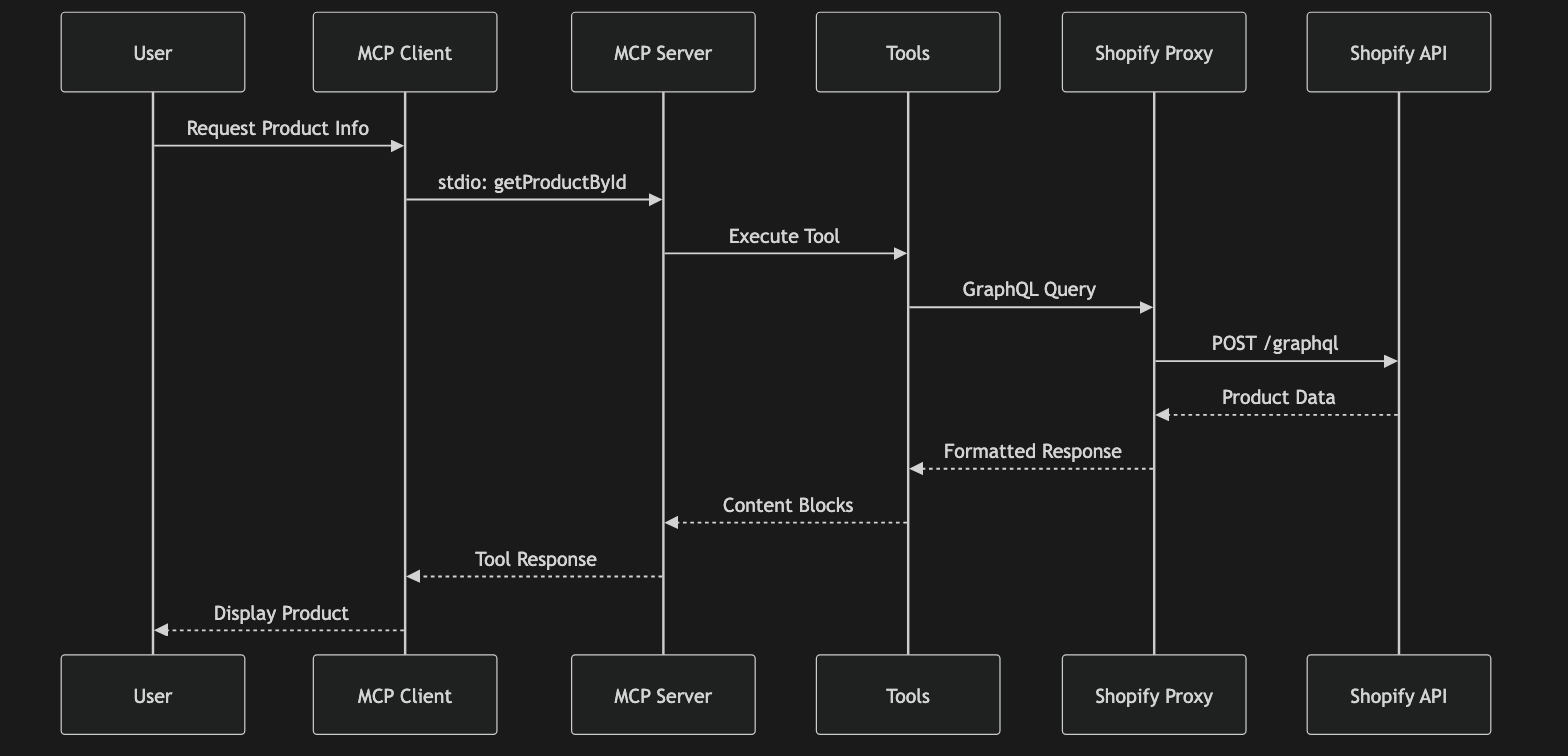
Tool Hierarchy
The MCP server exposes a comprehensive set of tools organized by Shopify resource type:
Setup & Running Locally
This server is a standalone Node.js script.
1. Clone the repository:
    git clone https://github.com/ramakay/ShopifyMockMCP.git

    cd ShopifyMCPMockShop
2. Install dependencies:
npm install
3. Build the server:
npm run build
This compiles the TypeScript code into JavaScript in the
dist directory (dist/server.js).4. Configure Environment (Optional - for Real Store):
If you want to connect to a real Shopify store instead of
mock.shop, set the following environment variables before running the server (e.g., via export or a .env file loaded by your client):SHOPIFY_STORE: Your store domain (e.g., your-store.myshopify.com). Required for real store usage.SHOPIFY_ACCESS_TOKEN: Your Storefront API access token. Required for real store usage.SHOPIFY_VERSION: Optional specific Storefront API version (e.g., 2025-04). Defaults to latest stable.Note: Using
mock.shop (default when SHOPIFY_STORE is not set) requires no environment variables.Note: Admin API functionality is currently disabled but planned for future updates. Configuration variables (
USE_ADMIN_API, ADMIN_ACCESS_TOKEN, ADMIN_VERSION) are not currently used.
5. Running: The server is intended to be launched automatically by MCP clients (like Claude Desktop or Cursor) using the stdio configuration. You do not need to run npm run start manually. See the "Usage" section below.
Usage with Cursor or Claude Desktop
Configure your MCP client (Cursor, Claude Desktop) to launch this server via stdio. Add an entry like the following to the respective configuration file:
Claude Desktop:~/Library/Application Support/Claude/claude_desktop_config.jsonCursor:
~/.cursor/mcp.json (or similar)
{
  "mcpServers": {
    // ... other servers ...
    "shopify-mcp": {
      "command": "node",
      "args": [
        "/full/path/to/ShopifyMCPMockShop/dist/server.js"
      ],
      "env": {
        // Only needed if connecting to a REAL store:
        // "SHOPIFY_STORE": "your-store.myshopify.com",
        // "SHOPIFY_ACCESS_TOKEN": "your-storefront-token",
        // "SHOPIFY_VERSION": "2025-04"
      },
      "disabled": false,
      "alwaysAllow": []
    }
    // ... other servers ...
  }
}
Important:
/full/path/to/ShopifyMCPMockShop with the absolute path to where you cloned the repository.Only include the
env variables if you are connecting to a real store.Restart your client (Cursor/Claude Desktop) after modifying the configuration.
Available Tools
This MCP server currently provides tools for interacting with the Shopify Storefront API.
| Tool Name | Description | API |
| :------------------ | :-------------------------------------------------------------------------------------------- | :--------- |
| getShopInfo | Fetches basic shop details (name, description, currency). | Storefront |
| getProductById | Fetches a specific product by ID. If includeImages is true, returns JSON details and the first image (75px) as a base64 ImageContentBlock. | Storefront |
| findProducts | Searches/filters products with pagination/sorting. | Storefront |
| getCollectionById | Fetches a specific collection by ID, optionally including products. | Storefront |
| findCollections | Searches/filters collections with pagination/sorting. | Storefront |
| cartCreate | Creates a new shopping cart. | Storefront |
| cartLinesAdd | Adds line items to an existing shopping cart. | Storefront |
| cartLinesUpdate | Updates line items (e.g., quantity) in an existing shopping cart. | Storefront |
| cartLinesRemove | Removes line items from an existing shopping cart. | Storefront |
| getCart | Fetches the details of an existing shopping cart by ID. | Storefront |
(Note: Admin API tools like getCustomerById and createProduct are planned for future updates and are currently disabled.)
Inspecting Server Capabilities
To verify the server is built correctly and see the exact capabilities it advertises to MCP clients, you can use the inspect script defined in package.json:
```bash
Sign in to leave a review
Use Google, GitHub, or an email account so ratings stay tied to real people.
No reviews posted yet.





