
MCP Server ODBC via PyODBC
About
A lightweight MCP (Model Context Protocol) server built with FastAPI and pyodbc that enables AI agents to interact with ODBC-compatible databases. It is compatible with Virtuoso DBMS and other DBMS backends that have an ODBC driver.
Details
- Author
- MCP-Mirror
- Downloads
- 111
- Categories
- Other
Jump to
- List all schema names from the connected database.
- Retrieve table information for a specific schema.
- Describe table columns, data types, keys, and nullability.
- Filter tables by name substring.
- Execute SQL queries returning results in JSONL or Markdown format.
- Execute Virtuoso-specific SPASQL and SPARQL queries.

Setting up with Highlight
This MCP is not yet compatible with Highlight’s one-click setup. However, you can still use it with Highlight by following these steps:
- Download and install Highlight from highlightai.com/download
- Navigate to the plugins tab and select "Add Custom Plugin"
-
Configure the plugin with the settings below
Plugin Name
MCP Server ODBC via PyODBCCommand (node, npx, python, etc.)Please refer to the README for specific instructions on how to obtain API keys or other required environment variables.
- Enable "Start Automatically" if you want the plugin to start when Highlight launches





From the repository
Clone the repository, set environment variables (ODBC_DSN, ODBC_USER, ODBC_PASSWORD, API_KEY) in a .env file, and configure an MCP client like Claude Desktop by adding a claude_desktop_config.json entry with the command uv --directory /path/to/mcp-pyodbc-server run mcp-pyodbc-server and the required environment variables.
Claude Desktop / Cursor
Paste into your MCP client config file to install this server.
{
    "mcpServers": {
        "mcp server odbc via pyodbc": {
            "OpenLinkSoftware_mcp-pyodbc-server": {
                "command": "npx",
                "args": [
                    "@modelcontextprotocol/inspector",
                    "uv",
                    "--directory",
                    "/path/to/mcp-pyodbc-server",
                    "run",
                    "mcp-pyodbc-server"
                ]
            }
        }
    }
}McpServers
{
    "OpenLinkSoftware_mcp-pyodbc-server": {
        "command": "npx",
        "args": [
            "@modelcontextprotocol/inspector",
            "uv",
            "--directory",
            "/path/to/mcp-pyodbc-server",
            "run",
            "mcp-pyodbc-server"
        ]
    }
}
MCP Server ODBC via PyODBC
A lightweight MCP (Model Context Protocol) server for ODBC built with FastAPI and pyodbc. This server is compatible with Virtuoso DBMS and other DBMS backends that has ODBC driver.
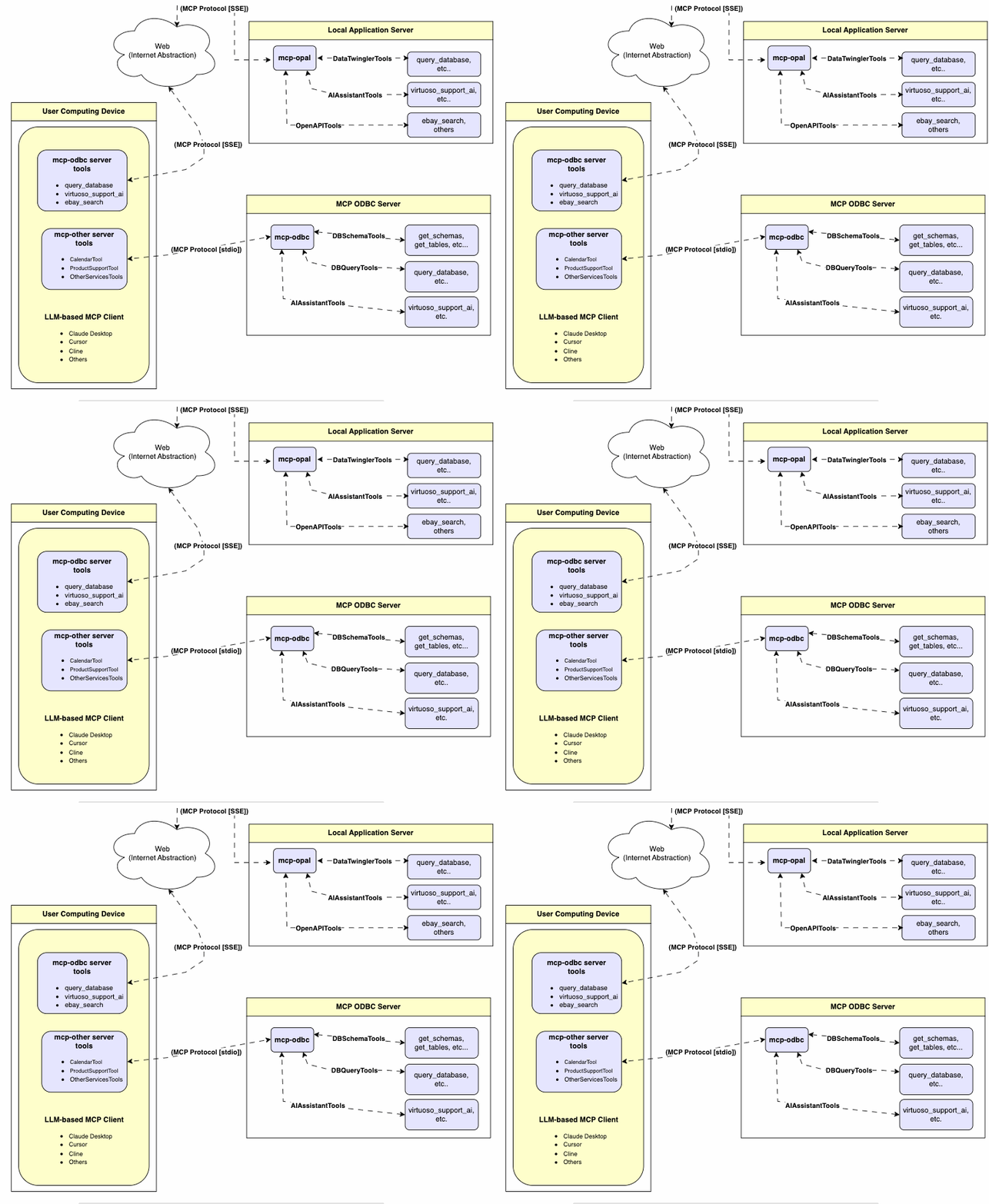
---
Features
- Get Schemas: Fetch and list all schema names from the connected database.
- Get Tables: Retrieve table information for specific schemas or all schemas.
- Describe Table: Generate a detailed description of table structures, including:
- Column names and data types
- Nullable attributes
- Primary and foreign keys
- Search Tables: Filter and retrieve tables based on name substrings.
- Execute Stored Procedures: In the case of Virtuoso, execute stored procedures and retrieve results.
- Execute Queries:
- JSONL result format: Optimized for structured responses.
- Markdown table format: Ideal for reporting and visualization.
---
Prerequisites
1. Install uv:
pip install uv
Or use Homebrew:
brew install uv
2. unixODBC Runtime Environment Checks:
3. Check installation configuration (i.e., location of key INI files) by running: odbcinst -j
4. List available data source names by running: odbcinst -q -s
5. ODBC DSN Setup: Configure your ODBC Data Source Name (~/.odbc.ini) for the target database. Example for Virtuoso DBMS:
   [VOS]

   Description = OpenLink Virtuoso

   Driver = /path/to/virtodbcu_r.so

   Database = Demo

   Address = localhost:1111

   WideAsUTF16 = Yes
---
Installation
Clone this repository:
git clone https://github.com/OpenLinkSoftware/mcp-pyodbc-server.git

cd mcp-pyodbc-server
Environment Variables
Update your
.envby overriding the defaults to match your preferencesODBC_DSN=VOS
ODBC_USER=dba
ODBC_PASSWORD=dba
API_KEY=xxx
---
Configuration
For Claude Desktop users:
Add the following to claude_desktop_config.json:
{

  "mcpServers": {

    "my_database": {

      "command": "uv",

      "args": ["--directory", "/path/to/mcp-pyodbc-server", "run", "mcp-pyodbc-server"],

      "env": {

        "ODBC_DSN": "dsn_name",

        "ODBC_USER": "username",

        "ODBC_PASSWORD": "password",

        "API_KEY": "sk-xxx"

      }

    }

  }

}
---
Sign in to leave a review
Use Google, GitHub, or an email account so ratings stay tied to real people.
No reviews posted yet.





