

MCP-X Agent 🤿 🤖
About
这是一个MCP客户端,让你轻松配置各个大模型,对接各种MCP Server而开发。This is an MCP client that allows you to easily configure various large models and develop interfaces with various MCP servers.
Details
- Author
- TimeCyber
- GitHub stars
- 139
- Downloads
- 695
- Categories
- AI
Jump to
- Universal LLM support (ChatGPT, Anthropic, Ollama, OpenAI‑compatible)
- Cross‑platform (Windows, macOS, Linux)
- Knowledge base management with file upload and search
- Model Context Protocol (MCP) integration via stdio and SSE
- AI agent system with specialized, categorized agents
- Multi‑language support (English, Chinese, Spanish, and more)
- Advanced API key and model switching
- Automatic application updates

Setting up with Highlight
This MCP is not yet compatible with Highlight’s one-click setup. However, you can still use it with Highlight by following these steps:
- Download and install Highlight from highlightai.com/download
- Navigate to the plugins tab and select "Add Custom Plugin"
-
Configure the plugin with the settings below
Plugin Name
MCP-X Agent 🤿 🤖Command (node, npx, python, etc.)Please refer to the README for specific instructions on how to obtain API keys or other required environment variables.
- Enable "Start Automatically" if you want the plugin to start when Highlight launches





From the repository
Download the latest release from GitHub, then install the appropriate package for your OS. Windows users get pre‑installed Python and Node.js; macOS and Linux users must install those environments separately. After installation, manage agents via the sidebar, upload documents to the knowledge base, and add MCP servers by editing the JSON configuration in the MCP settings.
Claude Desktop / Cursor
Paste into your MCP client config file to install this server.
{
    "mcpServers": {
        "mcp-x agent \ud83e\udd3f \ud83e\udd16": {
            "MCP_SERVER_NAME": {
                "enabled": true,
                "transport": "sse",
                "url": "YOUR_SSE_SERVER_URL"
            }
        }
    }
}McpServers
{
    "MCP_SERVER_NAME": {
        "enabled": true,
        "transport": "sse",
        "url": "YOUR_SSE_SERVER_URL"
    }
}
MCP-X Agent 🤿 🤖







MCP-X is an open-source MCP Host Desktop Application that seamlessly integrates with any LLMs supporting function calling capabilities. ✨

Use Cases 🎯
AI Agent
MCP-X good at agent and understanding various types of content through its powerful AI agents. Here's an example of food content agent: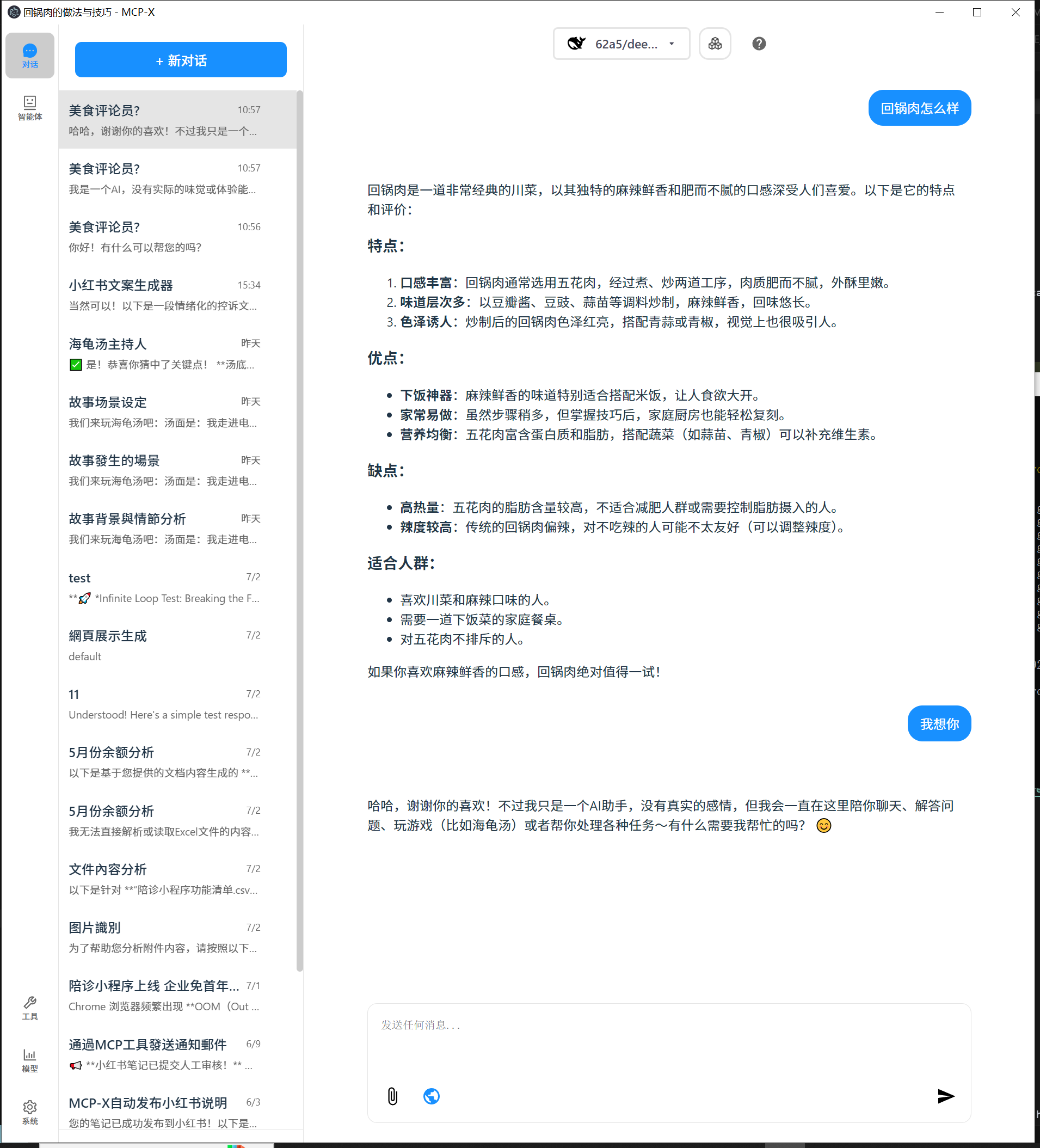
Key Features Demonstrated:
- 🍽️ Food Content Analysis: Detailed breakdown of dishes, ingredients, and nutritional information
- 🎯 Targeted Recommendations: Personalized suggestions based on user preferences
- 📊 Structured Output: Well-organized information with clear categorization
- 💬 Interactive Chat: Natural conversation flow with comprehensive responses
Perfect for:
- Food bloggers and content creators
- Nutritionists and health professionals
- Restaurant owners and chefs
- Anyone interested in food analysis and recommendations
This showcases how MCP-X can transform simple queries into detailed, actionable insights across various domains.
What's New
We've just rolled out major updates to improve your experience:
📚 Brand New Knowledge Base Feature (v0.1.0)
MCP-X now supports powerful knowledge base management! - Knowledge Management: Upload, view, search, and delete knowledge documents (supports txt, md, json, csv, xml, html formats) - Smart Search: Full-text search by filename and content with highlighted matching results - Chat References: One-click reference to knowledge base documents in chat, AI can answer based on your knowledge base content - Document Preview: Real-time document content preview with file metadata display - Responsive Design: Perfect adaptation for desktop and mobile devices🚀 AI Agent System
MCP-X as a full-fledged AI agent platform. - New Agent Sidebar: Discover, manage, and search for specialized AI agents. - One-Click Talk: Instantly talk to any agent for your current task. - Agent Profiles: See what each agent can do, with details on their skills and example uses. - Organized for You: Agents are sorted into categories like content creation, data analysis, and programming.🎨 A Fresh New Look
We've redesigned the app to be cleaner and more intuitive. - New Side Navigation: A permanent sidebar gives you quick access to Chat, Agents, Knowledge Base, Tools, Models, and System settings. - Clearer Icons: Navigation icons now have text labels so you know exactly where you're going. - Consistent Design: We've unified the color scheme and layout for a more polished feel.This update also includes a move to a more professional icon set (react-icons) and various under-the-hood CSS and component optimizations for better performance.
Features 🎯
- 🌐 Universal LLM Support: Compatible with ChatGPT, Anthropic, Ollama and OpenAI-compatible models
- 💻 Cross-Platform: Available for Windows, MacOS, and Linux
- 📚 Knowledge Base Management: Upload, search, and reference knowledge documents, let AI answer based on your materials
- 🔄 Model Context Protocol: Enabling seamless MCP AI agent integration on both stdio and SSE mode
- 🤖 AI Agent System: Rich professional AI agents covering various domain-specific needs
- 🌍 Multi-Language Support: Traditional Chinese, Simplified Chinese, English, Spanish with more coming soon
- ⚙️ Advanced API Management: Multiple API keys and model switching support
- 💡 Custom Instructions: Personalized system prompts for tailored AI behavior
- 🔄 Auto-Update Mechanism: Automatically checks for and installs the latest application updates
Download and Install ⬇️
Get the latest version of MCP-X:

For Windows users: 🪟
- Download the .exe version
- Python and Node.js environments are pre-installed
For MacOS users: 🍎
- Download the .dmg version
- You need to install Python and Node.js (with npx uvx) environments yourself
- Follow the installation prompts to complete setup
For Linux users: 🐧
- Download the .AppImage version
- You need to install Python and Node.js (with npx uvx) environments yourself
- For Ubuntu/Debian users:
- You may need to add --no-sandbox parameter
- Or modify system settings to allow sandbox
- Run chmod +x to make the AppImage executable
MCP Tips
While the system comes with a default echo MCP Server, your LLM can access more powerful tools through MCP. Here's how to get started with two beginner-friendly tools: Fetch and Youtube-dl.
Quick Setup
Add this JSON configuration to your MCP-X MCP settings to enable both tools:
 "mcpServers":{
    "fetch": {
      "command": "uvx",
      "args": [
        "mcp-server-fetch",
        "--ignore-robots-txt"
      ],
      "enabled": true
    },
    "filesystem": {
      "command": "npx",
      "args": [
        "-y",
        "@modelcontextprotocol/server-filesystem",
        "/path/to/allowed/files"
      ],
      "enabled": true
    },
    "youtubedl": {
      "command": "npx",
      "args": [
        "@kevinwatt/yt-dlp-mcp"
      ],
      "enabled": true
    }
  }
Using SSE Server for MCP
You can also connect to an external MCP server via SSE (Server-Sent Events). Add this configuration to your MCP-X MCP settings:
{
  "mcpServers": {
    "MCP_SERVER_NAME": {
      "enabled": true,
      "transport": "sse",
      "url": "YOUR_SSE_SERVER_URL"
    }
  }
}
Additional Setup for yt-dlp-mcp
yt-dlp-mcp requires the yt-dlp package. Install it based on your operating system:
Windows
winget install yt-dlp
MacOS
brew install yt-dlp
Linux
pip install yt-dlp
Usage Guide 📖
How to use Knowledge Base:
1. Add Documents: Click "Knowledge Base" in sidebar → Upload supported file formats (txt, md, json, csv, xml, html)
2. Search Documents: Use search box in knowledge base page, supports search by filename and content
3. Reference Documents: Click knowledge base button (📚) in chat → Search and select document → Auto-insert reference
4. Manage Documents: Preview, delete documents, view detailed information and metadata
For more details, see CHANGELOG.md.
Build 🛠️
See BUILD.md for more details.
Connect With Us 🌐
- 💬 Join our Home - 🐦 Follow us on RedNote - ⭐ Star us on GitHub - 🐛 Report issues on our Issue TrackerSign in to leave a review
Use Google, GitHub, or an email account so ratings stay tied to real people.
No reviews posted yet.



