
MCP Server for cryptographic hashing
About
A Model Context Protocol (MCP) server for calculating MD5 and SHA-256 hashes, complete with tools and guides for understanding and building MCP servers. Works with Claude Desktop & VSCode.
Details
- Author
- kanad13
- Downloads
- 361
- Categories
- Other, AI
Jump to
- Two tools: calculate_md5 and calculate_sha256
- Runs via Docker or directly on Python 3.13+
- Simple configuration for VS Code and Claude Desktop
- Supports stdio transport (MCP default)
- Open source under MIT License
- Available on PyPI and Docker Hub

Setting up with Highlight
This MCP is not yet compatible with Highlight’s one-click setup. However, you can still use it with Highlight by following these steps:
- Download and install Highlight from highlightai.com/download
- Navigate to the plugins tab and select "Add Custom Plugin"
-
Configure the plugin with the settings below
Plugin Name
MCP Server for cryptographic hashingCommand (node, npx, python, etc.)Please refer to the README for specific instructions on how to obtain API keys or other required environment variables.
- Enable "Start Automatically" if you want the plugin to start when Highlight launches





From the repository
Install via Docker (recommended) by pulling the image from Docker Hub and configuring your MCP client with docker run -i --rm. Alternatively, install via pip (hashing-mcp-server) in a Python 3.13+ virtual environment and point your client to the absolute path of the installed executable. Once configured, ask your LLM to calculate hashes (e.g., "Calculate the MD5 hash of 'hello world'").
Claude Desktop / Cursor
Paste into your MCP client config file to install this server.
{
    "mcpServers": {
        "mcp server for cryptographic hashing": {
            "hashing-docker": {
                "command": "docker",
                "args": [
                    "run",
                    "-i",
                    "--rm",
                    "kunalpathak13/hashing-mcp-server:latest"
                ]
            }
        }
    }
}McpServers
{
    "hashing-docker": {
        "command": "docker",
        "args": [
            "run",
            "-i",
            "--rm",
            "kunalpathak13/hashing-mcp-server:latest"
        ]
    }
}
MCP Server for cryptographic hashing
A Model Context Protocol (MCP) server for MD5 and SHA-256 hashing. This server enables LLMs to process cryptographic requests efficiently.
Available Tools
The server offers 2 tools:
- calculate_md5: Computes the MD5 hash of a given text.
- calculate_sha256: Computes the SHA-256 hash of a given text.
The server is designed to be used with MCP clients like VS Code Copilot Chat, Claude for Desktop, and other LLM interfaces that support the Model Context Protocol.
Understand MCP and Build Your Own MCP Server
If you are new to the concept of Model Context Protocol (MCP), then you can use these resources:
- What is MCP?
- Understanding Model Context Protocol & Agentic AI
- How can I build my own MCP Server?
- Simple tutorial on how to build your own MCP Server
- Where to find the hashing-mcp-server package?
- You can find the Python Package on PyPI
- You can find the Docker Image on Docker Hub
- You can find the source code in this GitHub repository
- You can find it also on MCP Server Lists like
- mcp.so
- How to install and use the hashing-mcp-server?
- See the sections below for installation and usage instructions.
Server in action
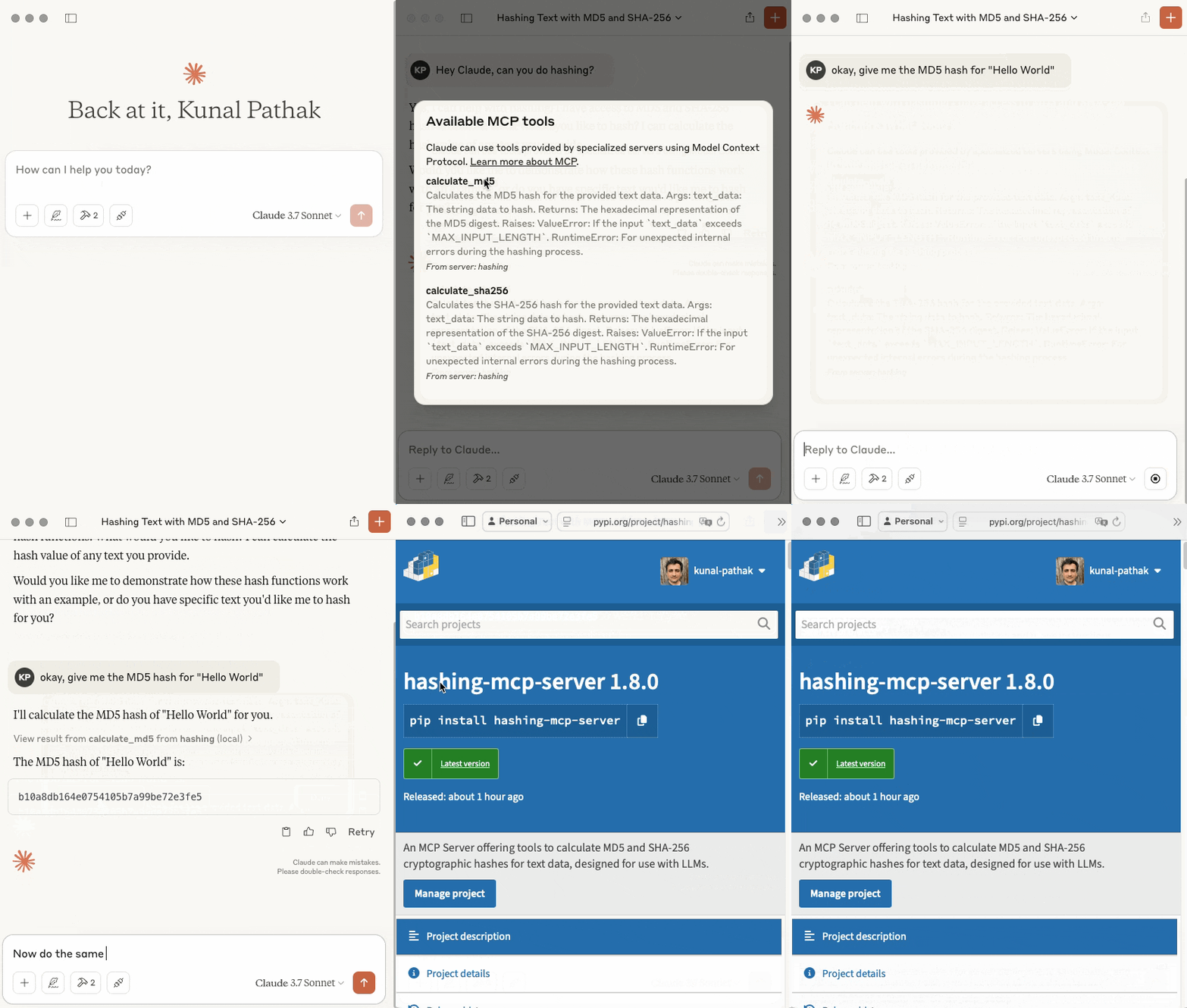
The gif below shows how the MCP server processes requests and returns the corresponding cryptographic hashes.
I have used Claude Desktop as an example, but it works equally well with other MCP clients like VSCode.
Prerequisites
- To Run via Docker: Docker installed and running.
- To Run Directly: Python 3.13+ and a virtual environment tool (venv, uv).
- To Contribute/Develop: Git, Python 3.13+, uv (recommended) or pip, Docker (optional, for testing build).
Option 1: Running the Server with Docker (Recommended)
This is the simplest way to run the server without managing Python environments directly.
1. Get the Docker Image:
- Pull from Docker Hub (Easiest):
docker pull kunalpathak13/hashing-mcp-server:latest
2. Configure Your MCP Client:
Configure your client to use docker run.
- VS Code (settings.json):
  // In your VS Code settings.json (User or Workspace)
  "mcp": {
      "servers": {
          "hashing-docker": { // Use a distinct name if needed
              "command": "docker",
              "args": [
                  "run",
                  "-i",      // Keep STDIN open for communication
                  "--rm",    // Clean up container after exit
                  "kunalpathak13/hashing-mcp-server:latest" // Change the tag to your version if needed e.g. "hashing-mcp-server:X.Y.Z"
              ]
          }
      }
  }
- Claude Desktop (claude_desktop_config.json):
  {
  	"mcpServers": {
  		"hashing-docker": {
  			"command": "docker",
  			"args": [
  				"run",
  				"-i",
  				"--rm",
  				"kunalpathak13/hashing-mcp-server:latest" // Change the tag to your version if needed e.g. "hashing-mcp-server:X.Y.Z"
  			]
  		}
  	}
  }
- Other Clients: Adapt according to their docs, using docker as the command and run -i --rm IMAGE_NAME as arguments. Refer to their official documentation for precise configuration steps:
- Claude for Desktop/Web Setup
- VSCode MCP using Copilot
- Open AI ChatGPT Agents (via Python)
3. Test the Integration:
Once configured, interact with your MCP client (VS Code Chat, Claude Desktop, etc.). Ask questions designed to trigger the hashing tools:
- "Calculate the MD5 hash of the text 'hello world'"
- "What is the SHA256 hash for the string 'MCP is cool!'?"
The client should start the Docker container in the background using the command you provided, send the request, receive the hash result, and display it.
Option 2: Running the Server Directly (Python Environment)
Use this method if you prefer not to use Docker or for development purposes.
1. Set Up Environment & Install:
```bash
Sign in to leave a review
Use Google, GitHub, or an email account so ratings stay tied to real people.
No reviews posted yet.





