
🌐 MCP-Server-101
About
This project 🌐 is a robust implementation of the Model Context Protocol (MCP), designed to facilitate seamless integration and interaction with various documentation sources. It provides tools for querying and extracting relevant information from documentation, making it an esse
Details
- Author
- shiv-rna
- GitHub stars
- 1
- Downloads
- 75
- Categories
- Other, AI, Knowledge Base
Jump to
- Environment configuration via dotenv for secure variable management.
- Web search using the Serper.dev API (up to two results).
- Web content fetching with httpx and BeautifulSoup.
- get_docs tool for searching documentation of supported libraries.
- Asynchronous operations for efficient network requests.
- Extensible modular design for adding new tools.

Setting up with Highlight
This MCP is not yet compatible with Highlight’s one-click setup. However, you can still use it with Highlight by following these steps:
- Download and install Highlight from highlightai.com/download
- Navigate to the plugins tab and select "Add Custom Plugin"
-
Configure the plugin with the settings below
Plugin Name
🌐 MCP-Server-101Command (node, npx, python, etc.)Please refer to the README for specific instructions on how to obtain API keys or other required environment variables.
- Enable "Start Automatically" if you want the plugin to start when Highlight launches





From the repository
Set up a Python 3.12+ environment with the uv package manager, install dependencies (mcp[cli], httpx, beautifulsoup4, dotenv), and create the server file main.py. Run uv run main.py to start the server over stdio transport. A Serper.dev API key is required. For integration with Claude Desktop, add the server configuration to claude_desktop_config.json.
Claude Desktop / Cursor
Paste into your MCP client config file to install this server.
{
    "mcpServers": {
        "\ud83c\udf10 mcp-server-101": {
            "MCP-Server-101": {
                "command": "uv",
                "args": [
                    "init",
                    "mcp-server"
                ]
            }
        }
    }
}McpServers
{
    "MCP-Server-101": {
        "command": "uv",
        "args": [
            "init",
            "mcp-server"
        ]
    }
}
🌐 MCP-Server-101
🌟 Project Overview
MCP-Server-101 is a robust implementation of the Model Context Protocol (MCP), designed to facilitate seamless integration and interaction with various documentation sources. It provides tools for querying and extracting relevant information from documentation, making it an essential resource for developers working with libraries likelangchain, openai, and llama-index.
📔 Model Context Protocol (MCP)
The Model Context Protocol (MCP) is an open, standardized protocol that connects AI models with external data sources and tools, functioning like a “USB-C port” for AI applications. MCP uses a client-server architecture: hosts (AI applications) communicate via MCP clients to lightweight MCP servers, which expose specific functionalities by interfacing with local files, databases, APIs, or other services.
Key components include:
- Hosts: AI applications needing access to external data or tools.
- Clients: Maintain one-to-one connections with MCP servers.
- MCP Servers: Lightweight servers exposing functionality over MCP.
- Local Data Sources: Files or databases accessed by servers.
- Remote Services: External APIs or services accessed by servers.
MCP servers can provide three main types of capabilities:
- Resources: File-like data that can be read by clients (like API responses or file contents)
- Tools: Functions that can be called by the LLM (with user approval)
- Prompts: Pre-written templates that help users accomplish specific tasks
For example, a host like Cursor instructs its MCP client to update a Google Sheet and send a Slack message; the client then connects to separate MCP servers for Google Sheets and Slack, which call the respective APIs and return the results back through the client to the host.
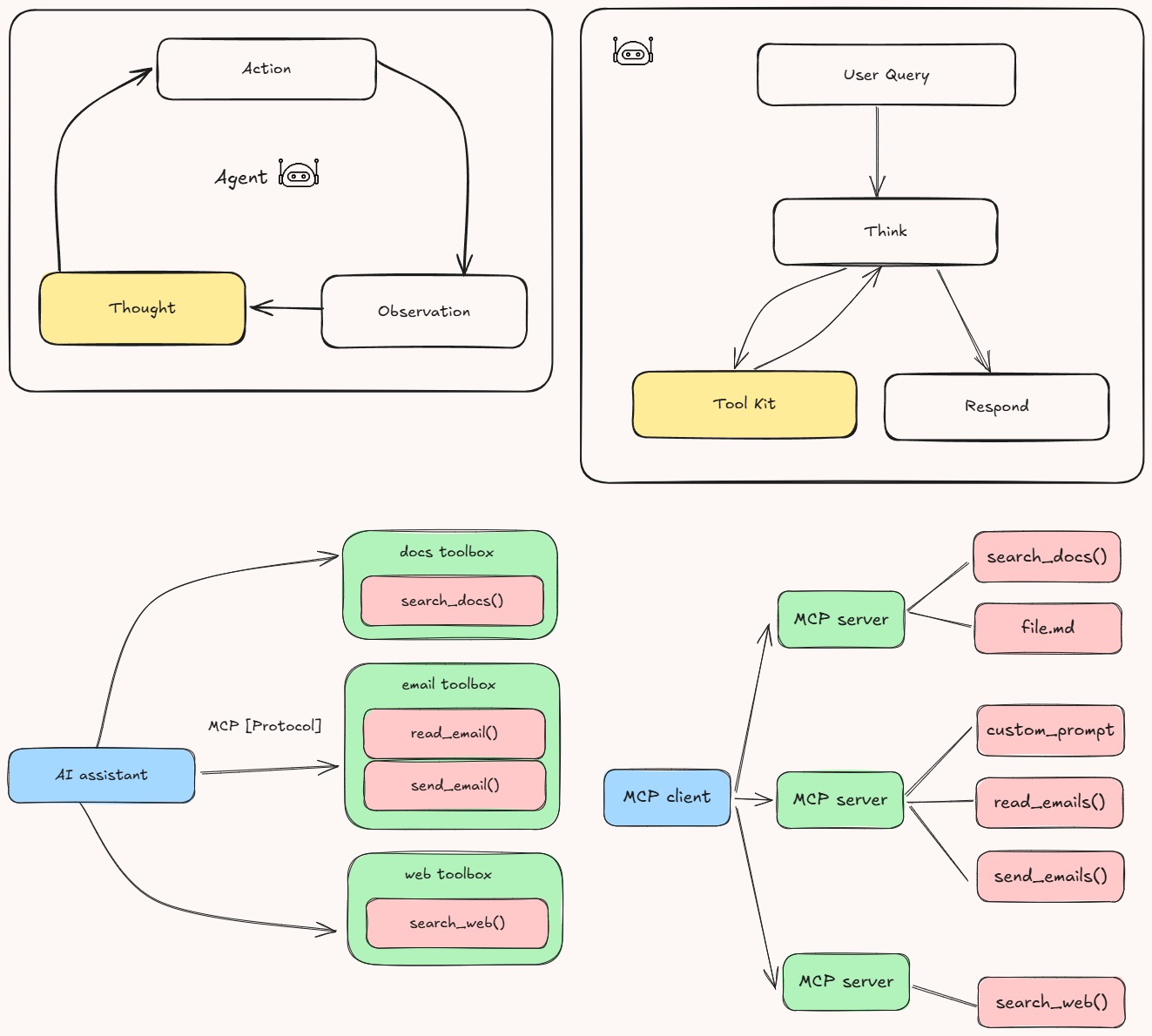
🏗️ Key Functionalities
1. Environment Configuration
The project usesdotenv to load environment variables, ensuring secure and flexible configuration management.
2. Web Search
Thesearch_web function performs web searches using the Serper.dev API. It retrieves up to two results for a given query and handles timeouts gracefully.
3. Web Content Fetching
Thefetch_url function fetches and parses visible text content from a webpage. It uses httpx for asynchronous HTTP requests and BeautifulSoup for HTML parsing.
4. Documentation Search Tool
Theget_docs MCP tool allows users to search documentation for specific queries within supported libraries (langchain, openai, llama-index). It performs a web search constrained to the documentation domain of the selected library and extracts visible text content from the top results.
5. Server Execution
The MCP server is executed using themcp.run method with stdio transport, making it suitable for integration with other tools and systems.
💻 Getting Started
Prerequisites
- Python 3.12 or higher -pip (Python package manager)
- Access to the Serper.dev API (API key required)
Installing uv Package Manager
On MacOS/Linux:
curl -LsSf https://astral.sh/uv/install.sh | sh
Make sure to restart your terminal afterwards to ensure that the uv command gets picked up.
Project Setup
1. Create and initialize the project:
```bash
Sign in to leave a review
Use Google, GitHub, or an email account so ratings stay tied to real people.
No reviews posted yet.





