
Letsfg
About
Agent-native travel search. 5 second flights & hotels $50 cheaper. Free forever for the first 1000 Stargazers.
Details
- Author
- LetsFG
- Downloads
- 686
- Categories
- Other, AI
Jump to
- Searches 75 direct airline connectors and 400+ carriers via GDS/NDC sources
- Returns results in ~5–10 seconds with real-time prices, no markup
- Free forever for the first 1,000 stargazers (register after starring)
- Works natively in AI agents via CLI, MCP, or SDK (Python, JS)
- Virtual interlining builds cross‑airline round‑trips saving 30–50%
- City‑wide airport expansion (e.g., LON → all London airports)

Setting up with Highlight
This MCP is not yet compatible with Highlight’s one-click setup. However, you can still use it with Highlight by following these steps:
- Download and install Highlight from highlightai.com/download
- Navigate to the plugins tab and select "Add Custom Plugin"
-
Configure the plugin with the settings below
Plugin Name
LetsfgCommand (node, npx, python, etc.)Please refer to the README for specific instructions on how to obtain API keys or other required environment variables.
- Enable "Start Automatically" if you want the plugin to start when Highlight launches





From the repository
Install the Python package with pip install letsfg and optionally playwright install chromium for browser-based connectors. Then run CLI commands (e.g., letsfg search-local LHR BCN 2026-04-15) or use the Python/JS SDK. For MCP integration, add the letsfg-mcp server to your MCP config. Registration for an API key is optional but recommended for access to enterprise GDS sources (400+ airlines) and booking features.
Claude Desktop / Cursor
Paste into your MCP client config file to install this server.
{
    "mcpServers": {
        "letsfg": {
            "letsfg": {
                "command": "npx",
                "args": [
                    "-y",
                    "letsfg-mcp"
                ],
                "env": {
                    "LETSFG_API_KEY": "your_api_key"
                }
            }
        }
    }
}McpServers
{
    "letsfg": {
        "command": "npx",
        "args": [
            "-y",
            "letsfg-mcp"
        ],
        "env": {
            "LETSFG_API_KEY": "your_api_key"
        }
    }
}
LetsFG🔥🚀✈️ — agent-native travel search.
Flights & hotels $50 cheaper in 5 seconds. Native to AI agents.
</td> </tr> </table> LetsFG finds the cheapest flights across the entire internet — 75 airline connectors firing in parallel + enterprise GDS sources (Amadeus, Duffel, Sabre, Travelport) — and returns results in ~5 seconds. No web scraping wait times, no browser tabs, no inflated prices. Just raw airline prices, zero markup. Native to OpenClaw, Perplexity Computer, Manus, Claude Code, Codex, Cursor, Windsurf — any AI agent that supports CLI, MCP, or packages. > ⭐ Free forever for the first 1,000 stargazers. Star this repo → register → get unlimited access. No credit card, no trial, no catch. Once 1,000 people have starred, this offer closes permanently.




Demo: LetsFG vs Default Agent Search
<div align="center">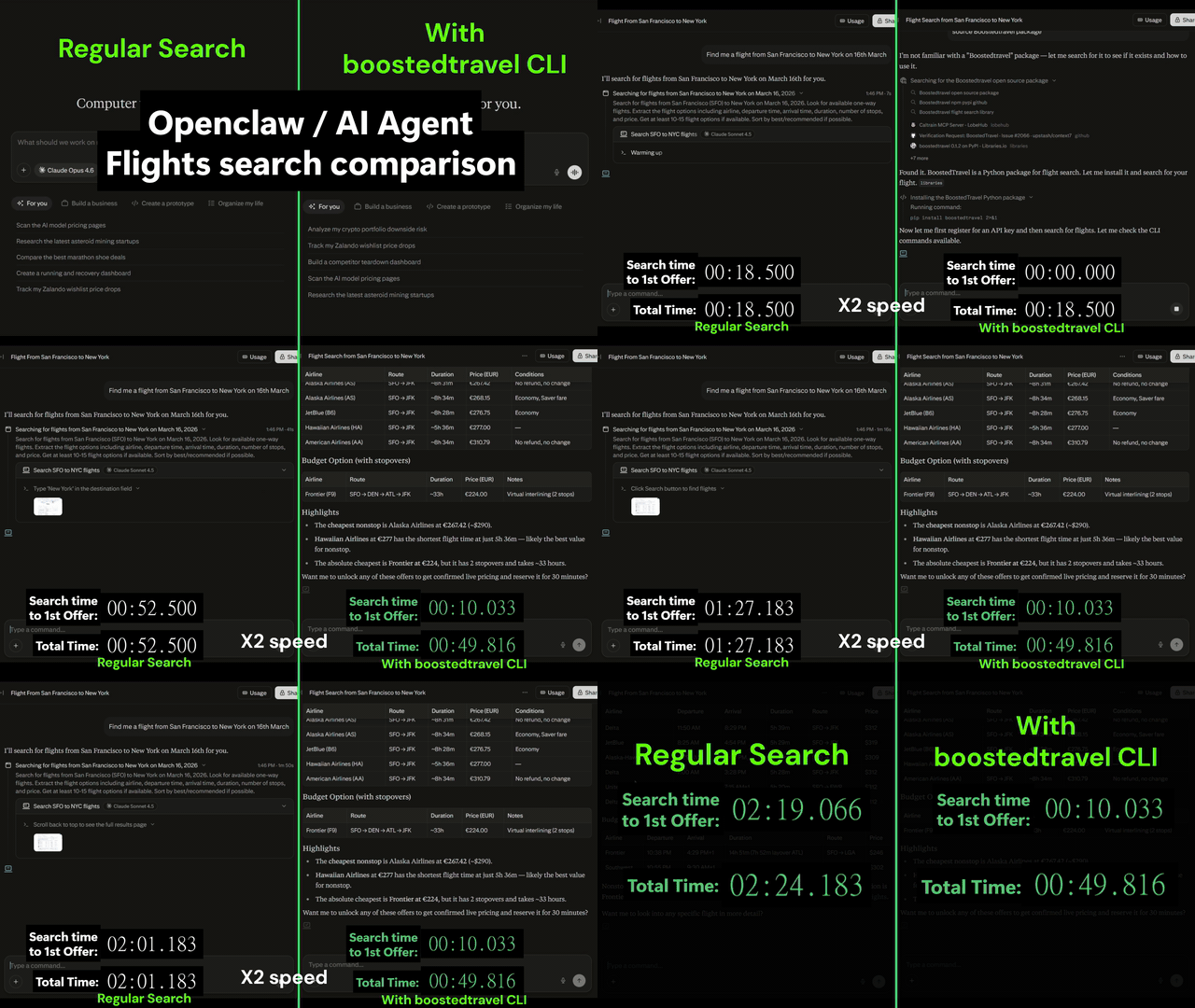 </div>
> Side-by-side comparison: default agent search (OpenClaw, Perplexity Computer) vs LetsFG CLI. Same query — LetsFG finds cheaper flights across 75 airlines in seconds.
</div>
> Side-by-side comparison: default agent search (OpenClaw, Perplexity Computer) vs LetsFG CLI. Same query — LetsFG finds cheaper flights across 75 airlines in seconds.
Why LetsFG?
Flight websites inflate prices with demand tracking, cookie-based pricing, and surge markup. The same flight is often $20–$50 cheaper through LetsFG — raw airline price, zero markup. LetsFG works by finding the best price across the entire internet. It fires 75 airline connectors in parallel, scanning carriers across Europe, Asia, Americas, Middle East, and Africa — then merges results with enterprise GDS/NDC sources (Amadeus, Duffel, Sabre, Travelport) that provide competitive pricing from 400+ carriers including premium airlines like Lufthansa, British Airways, and Emirates. The best price wins. | | Google Flights / Booking.com / Expedia | LetsFG | |---|---|---| | Search speed | 30s+ (loading, ads, redirects) | ~10 seconds | | Search | Free (with tracking/inflation) | Free (no tracking, no cookies) | | Booking | Ticket + hidden markup | Free (raw airline price) | | Price goes up on repeat search? | Yes (demand tracking) | Never | | LCC coverage | Missing many low-cost carriers | 75 direct airline connectors | | Works inside AI agents? | No | Native (CLI, MCP, SDK) | ---One-Click Install
``bash
pip install letsfg
`
That's it. You can search flights immediately — no account, no API key, no configuration:
`bash
letsfg search-local GDN BCN 2026-06-15
`
This runs 75 airline connectors locally on your machine and returns real-time prices. Completely free, unlimited, zero setup.
---
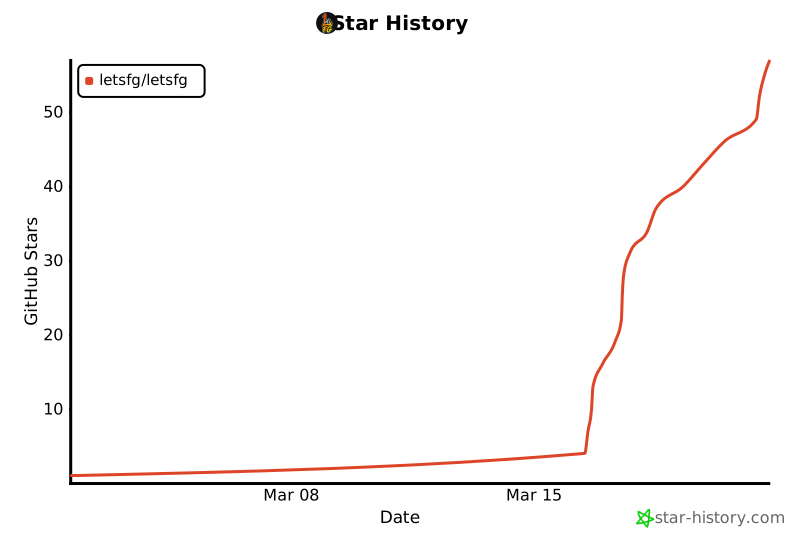
Star History
<a href="https://star-history.com/#LetsFG/LetsFG&Date">
<picture>
<source media="(prefers-color-scheme: dark)" srcset="https://api.star-history.com/svg?repos=LetsFG/LetsFG&type=Date&theme=dark" />
<source media="(prefers-color-scheme: light)" srcset="https://api.star-history.com/svg?repos=LetsFG/LetsFG&type=Date" />
 </picture>
</a>
---
</picture>
</a>
---
Two Ways to Use LetsFG
Option A: Local Only (Free, No API Key)
Install and search. One command, zero configuration.
`bash
pip install letsfg
letsfg search-local LHR BCN 2026-04-15
`
What you get:
- 75 airline connectors running on your machine (Ryanair, Wizz Air, EasyJet, Southwest, AirAsia, Norwegian, and 69 more)
- Real-time prices scraped directly from airline websites
- Virtual interlining — cross-airline round-trips that save 30–50%
- Completely free, unlimited searches
`python
from letsfg.local import search_local
result = await search_local("GDN", "BCN", "2026-06-15")
for offer in result.offers[:5]:
print(f"{offer.airlines[0]}: {offer.currency} {offer.price}")
`
Option B: With API Key (Recommended — Much Better Coverage)


One extra command unlocks the full power of LetsFG:
``bash
pip install letsfg
letsfg register --name my-agent --email you@example.comSign in to leave a review
Use Google, GitHub, or an email account so ratings stay tied to real people.
No reviews posted yet.





