
File system MCP
About
This is a File system mcp server that could allow an LLM to read and list files from a specified safe directory on your local machine.
Details
- Author
- iBz-04
- GitHub stars
- 2
- Downloads
- 254
- Categories
- Other, AI
Jump to
- List all files in a configurable directory.
- Read file contents and metadata (size, last modified).
- Integrates with Anthropic Claude for natural language queries.
- Validates paths to prevent directory traversal attacks.
- Configurable base directory via config/config.json.
- Built with Python and FastMCP for lightweight operation.

Setting up with Highlight
This MCP is not yet compatible with Highlight’s one-click setup. However, you can still use it with Highlight by following these steps:
- Download and install Highlight from highlightai.com/download
- Navigate to the plugins tab and select "Add Custom Plugin"
-
Configure the plugin with the settings below
Plugin Name
File system MCPCommand (node, npx, python, etc.)Please refer to the README for specific instructions on how to obtain API keys or other required environment variables.
- Enable "Start Automatically" if you want the plugin to start when Highlight launches





From the repository
Clone the repository, optionally create a virtual environment, install dependencies from requirements.txt, set the Anthropic API key in .env.local, and configure the target directory in config/config.json. Start the server with python run.py, then in a separate terminal run python interact_with_claude.py to chat with Claude, or directly request files://list or files://read/{filename} via any MCP-compatible client.
Claude Desktop / Cursor
Paste into your MCP client config file to install this server.
{
    "mcpServers": {
        "file system mcp": {
            "Filesys": {
                "command": "python",
                "args": [
                    "-m",
                    "venv",
                    "venv"
                ]
            }
        }
    }
}McpServers
{
    "Filesys": {
        "command": "python",
        "args": [
            "-m",
            "venv",
            "venv"
        ]
    }
}
File system MCP
Overview
filesys is a lightweight mcp server built with Python and the mcp library that securely exposes file contents and metadata from a preconfigured directory. The project leverages FastMCP to provide a set of endpoints that allow: - Listing all files in a specified directory. - Reading the contents and metadata of a specified file.New: It now includes an integration with Anthropic's Claude AI, allowing users to interact with the file system through natural language conversation, using Claude Tools to securely access the defined MCP resources.
The project ensures safe file access by validating paths and preventing directory traversal attacks.
Preview
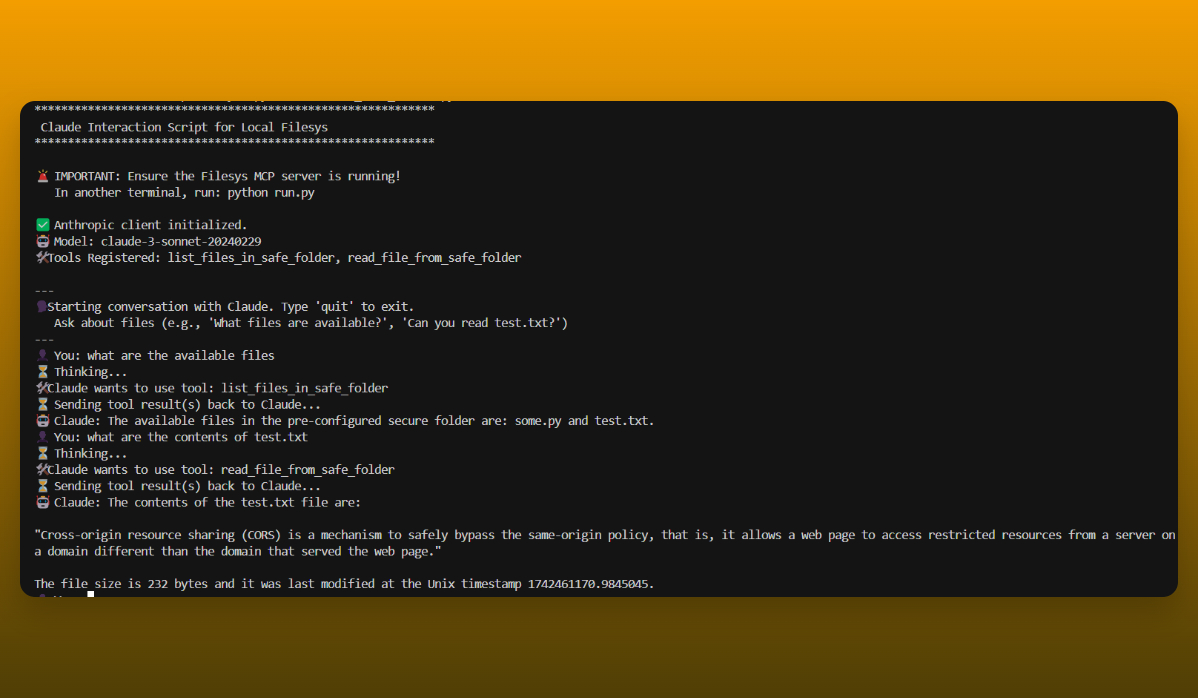
- Interacting with Claude to list and read files from thesafe_folder:
How It Works
The core functionality is divided into several components:- Resources:
In src/resources.py, two functions are responsible for file operations:
- list_files(): Scans the base directory (configured in config/config.json) to return a list of visible files.
- read_file(filename): Reads the content of the specified file and returns it along with metadata (size and last modified timestamp), while ensuring that the file access is safe.
- Server:
In src/server.py, a FastMCP server is initialized and registers two resource endpoints:
- files://list: Invokes list_files().
- files://read/{filename}: Invokes read_file(filename).
The server is started via run.py, and it utilizes the mcp library to handle resource requests.
- Claude Tool Client:
In claude_tool_client.py, functions (list_files_in_safe_folder, read_file_from_safe_folder) are defined to interact with the running Filesys MCP server. These functions act as a bridge, translating simple function calls into MCP requests and parsing the responses. They are designed to be easily consumable by Claude Tools.
- Claude Interaction Script:
The interact_with_claude.py script sets up an Anthropic client, defines Claude Tools based on the functions in claude_tool_client.py, and runs a command-line conversation loop. Users can ask Claude questions like "What files are available?" or "Read test.txt", and Claude will use the provided tools (which securely call the MCP server) to fulfill the requests.
- Testing:
Unit tests in tests/test_resources.py ensure that the file listing and reading functionalities work as expected.
Installation
1. Clone the Repository: git clone https://github.com/iBz-04/Filesys.git
cd Filesys
   python -m venv venv
   source venv/bin/activate  # On Windows: venv\Scripts\activate
pip install -r requirements.txt
.env.local in the project's root directory.
- Add your Anthropic API key to this file:
ANTHROPIC_API_KEY=your_api_key_here
.gitignore file is configured to prevent this file from being committed to Git.
Configuration
The file server reads its configuration fromconfig/config.json. By default, the server operates on the directory specified below:
{
  "directory": "./safe_folder"
}
- Anthropic API Key: The Claude interaction script reads the ANTHROPIC_API_KEY from the .env.local file (see Installation step 5).
Usage
1. Start the MCP Server: First, ensure the Filesys MCP server is running in a terminal: python run.py
files://list and files://read/{filename} endpoints available.
2. Interact with Claude:
In a separate terminal (while the server from step 1 is still running), run the Claude interaction script:
python interact_with_claude.py
You can then ask Claude to interact with the files in the configured
safe_folder. Examples:- "What files can you see?"
- "List the available files."
- "Can you read test.txt for me?"
- "Tell me the contents of the file named test.txt"
3. Direct MCP Requests (Optional):
You can also interact with the server directly using any MCP-compatible client:
- List Files: Request files://list.
- Read a File: Request files://read/{filename} (replace {filename} with the actual file name).
Testing
- MCP Client Functions: You can test the functions that communicate with the MCP server by running: python claude_tool_client.py
test_tool_functions defined at the end of the script. Ensure the MCP server (python run.py) is running beforehand.
- Core Resources (if tests exist): If unit tests are created in the tests/ directory (e.g., tests/test_resources.py), you can run them using:
python -m unittest discover tests
Contributing
Contributions are welcome! To contribute: 1. Fork the repository. 2. Create a new branch for your feature or bugfix. 3. Commit your changes with detailed messages. 4. Push your branch and open a pull request.Additional Notes
- Customize the configuration (config/config.json, .env.local) as needed.
- Important: The Claude interaction script (interact_with_claude.py) requires the Filesys MCP server (run.py) to be running in a separate process.
- This project implements basic security measures to restrict file access to the configured directory and prevent directory traversal.
- Update this documentation as new features are added or changes are made.Sign in to leave a review
Use Google, GitHub, or an email account so ratings stay tied to real people.
No reviews posted yet.





