
DeepMyst MCP Server
About
An MCP server that allow you to talk to DeepMyst and perform collaboration between LLMs using our Gateway, Router and Token Optimization
Details
- Author
- DeepMyst
- GitHub stars
- 4
- Downloads
- 215
- Categories
- Other
Jump to
- Token optimization reduces usage by up to 75% while preserving quality
- Smart model routing selects the optimal LLM per query
- Combine both features for maximum efficiency
- Supports STDIO (Claude Desktop) and SSE (HTTP clients) transports
- Clients provide their own API keys; no server-side storage

Setting up with Highlight
This MCP is not yet compatible with Highlight’s one-click setup. However, you can still use it with Highlight by following these steps:
- Download and install Highlight from highlightai.com/download
- Navigate to the plugins tab and select "Add Custom Plugin"
-
Configure the plugin with the settings below
Plugin Name
DeepMyst MCP ServerCommand (node, npx, python, etc.)Please refer to the README for specific instructions on how to obtain API keys or other required environment variables.
- Enable "Start Automatically" if you want the plugin to start when Highlight launches





From the repository
Install Python 3.8+, UV, and dependencies, then run python deepmyst_mcp.py --stdio for Claude Desktop or --sse for HTTP clients. Configure Claude Desktop by adding the server to claude_desktop_config.json with the correct path and --stdio argument. Provide your DeepMyst API key with each tool call.
Claude Desktop / Cursor
Paste into your MCP client config file to install this server.
{
    "mcpServers": {
        "deepmyst mcp server": {
            "DeepMyst-MCP": {
                "command": "uv",
                "args": [
                    "venv"
                ]
            }
        }
    }
}McpServers
{
    "DeepMyst-MCP": {
        "command": "uv",
        "args": [
            "venv"
        ]
    }
}
DeepMyst MCP Server
Intelligent LLM Optimization & Routing for Claude Desktop and HTTP Clients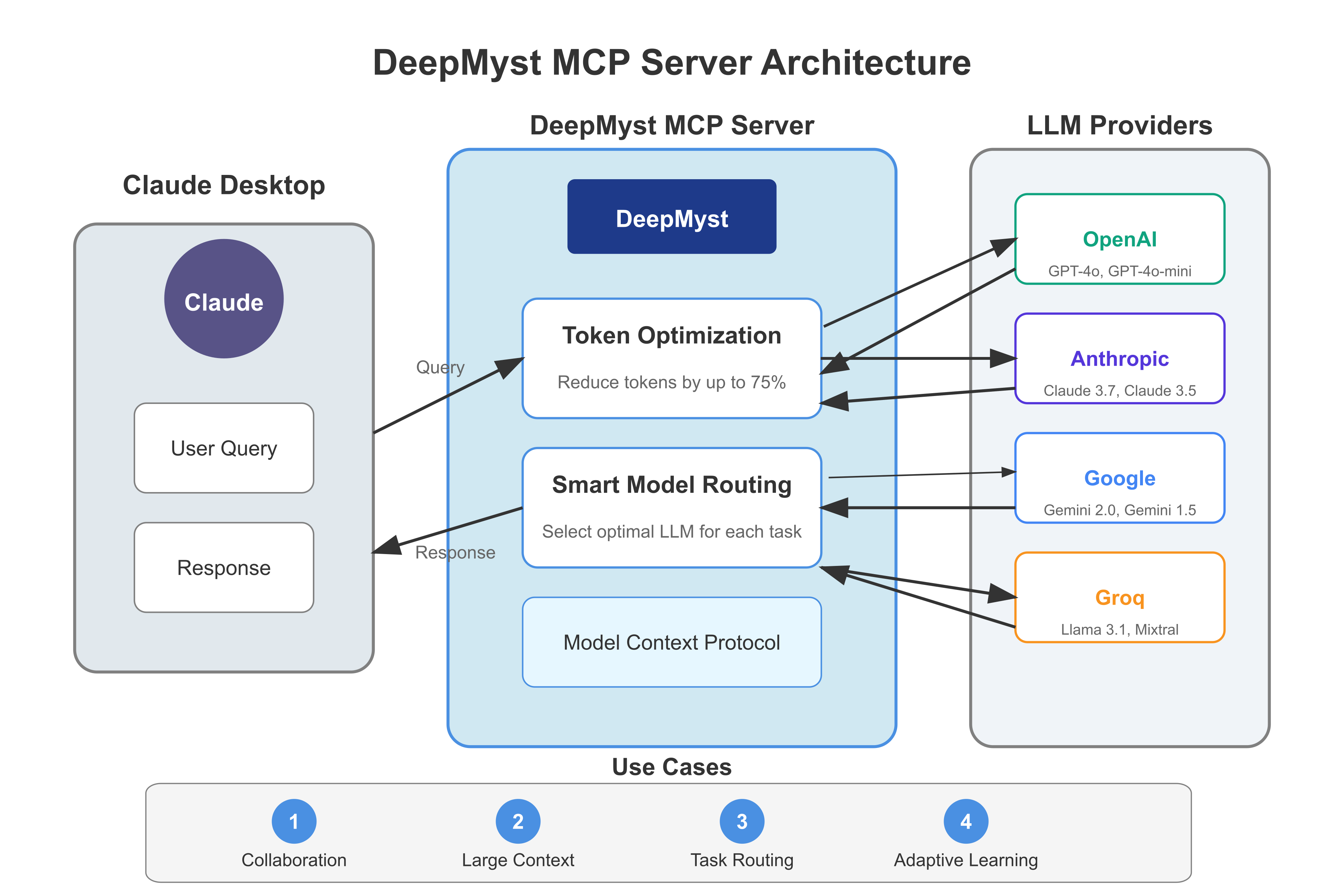
Overview
DeepMyst MCP Server creates a seamless bridge between DeepMyst and Claude Desktop or any client through the Model Context Protocol (MCP). This integration allows Claude and other clients to harness DeepMyst's powerful optimization and routing capabilities while maintaining your familiar workflows.
Key Features
- Token Optimization - Reduce token usage by up to 75% while preserving response quality, directly lowering your API costs
- Smart Model Routing - Automatically select the optimal LLM for each specific query based on task requirements
- Combined Capabilities - Use both optimization and routing together for maximum efficiency
- Multiple Transport Support - Connect via STDIO (for Claude Desktop) or SSE (for HTTP clients)
- Client-provided API Keys - No need to store your DeepMyst API key on the server
How It Works
- Token Optimization: DeepMyst identifies redundancies in prompts, intelligently compresses content, preserves key information, and maintains contextual meaning—all while significantly reducing token usage without sacrificing quality.
- Smart Routing: The system analyzes each query's category, complexity level, and required capabilities. It evaluates available models based on performance benchmarks, token cost, response latency, and capability support through a weighted scoring system.
Installation
Prerequisites
- Python 3.8 or higher
- UV - Fast Python package installer
- Claude Desktop - Latest version (or another MCP client)
- DeepMyst API key (get one from platform.deepmyst.com)
Installation Steps
1. Clone or download the DeepMyst MCP Server code:
```bash
Sign in to leave a review
Use Google, GitHub, or an email account so ratings stay tied to real people.
No reviews posted yet.





