
Aynops
About
A Model Context Protocol server that gives AI Clients real-time cybersecurity reconnaissance capabilities — WHOIS, DNS enumeration, port scanning, SSL inspection, CVE lookup, IP reputation, ASN lookup and more.
Details
- Author
- AynOps
- Downloads
- 296
- Categories
- Other, Security
Jump to
- Runs all cybersecurity tools locally — data never leaves your computer
- 9 core tools plus a full_recon tool that runs them in parallel
- Port scanning with 5 scan types (basic, service, os, full, vuln)
- CVE lookup via NVD without requiring an API key
- Subdomain discovery via crt.sh with automatic fallback to HackerTarget
- Integrates with Claude Desktop as an MCP server

Setting up with Highlight
This MCP is not yet compatible with Highlight’s one-click setup. However, you can still use it with Highlight by following these steps:
- Download and install Highlight from highlightai.com/download
- Navigate to the plugins tab and select "Add Custom Plugin"
-
Configure the plugin with the settings below
Plugin Name
AynopsCommand (node, npx, python, etc.)Please refer to the README for specific instructions on how to obtain API keys or other required environment variables.
- Enable "Start Automatically" if you want the plugin to start when Highlight launches





From the repository
Install Python 3.12+, Nmap, and Git. Clone the repository, install dependencies with pip install -r requirements.txt, then configure Claude Desktop with the full absolute path to the virtual environment’s Python interpreter and the path to server.py in the MCP servers config. For ip_reputation and asn_lookup tools, set ABUSEIPDB_API_KEY and IP_API_KEY environment variables respectively.
Claude Desktop / Cursor
Paste into your MCP client config file to install this server.
{
    "mcpServers": {
        "aynops": {
            "AynOps": {
                "command": "C:\\full\\path\\to\\AynOps\\.venv\\Scripts\\python.exe",
                "args": [
                    "C:\\full\\path\\to\\AynOps\\server.py"
                ],
                "env": {
                    "ABUSEIPDB_API_KEY": "your-api-key-here",
                    "IP_API_KEY": "your-api-key-here"
                }
            }
        }
    }
}McpServers
{
    "AynOps": {
        "command": "C:\\full\\path\\to\\AynOps\\.venv\\Scripts\\python.exe",
        "args": [
            "C:\\full\\path\\to\\AynOps\\server.py"
        ],
        "env": {
            "ABUSEIPDB_API_KEY": "your-api-key-here",
            "IP_API_KEY": "your-api-key-here"
        }
    }
}
<div align="center">
<picture>
</picture>
</div>
<div align="center">
<h3>
A Model Context Protocol (MCP) server that gives AI Clients real-time cybersecurity reconnaissance capabilities. Instead of manually running tools across different terminals, just tell Claude "analyze google.com" and get a complete security breakdown instantly.
</h3>
</div>
<div align="center">
<a href="https://opensource.org/licenses/MIT" target="_blank">  </a>
</a>
<a href="https://github.com/AynOps/AynOps" target="_blank"> 
<a href="https://github.com/AynOps/AynOps/network/members" target="_blank">
<a href="https://pypi.org/project/AynOps/" target="_blank">
<a href="https://github.com/AynOps/AynOps/issues" target="_blank">
<a href="https://glama.ai/mcp/servers/gaoharimran29-glitch/AynOps">
 </a>
</a>
</div>
What is this?
Claude by default has zero native cybersecurity tooling. No WHOIS. No DNS enumeration. No port scanning. No SSL inspection.
This MCP server fixes that — extending Claude with real-world security tools that run live against any domain or IP. Reconnaissance that normally requires multiple specialized tools and 20+ minutes of manual work becomes a single prompt.
This is a local MCP server — it runs entirely on your machine. Your data never leaves your computer.
It is also listed on glama mcp registry.
---
Tools Available
| Tool | Description |
|---|---|
| whois_lookup | Domain registration data — owner, registrar, creation date, expiry, name servers |
| dns_enumeration | A, AAAA, MX, NS, TXT, CNAME, SOA records + common subdomain brute-forcing |
| port_scan | Nmap-powered scanner with service/version detection and security warnings |
| ssl_inspect | SSL/TLS certificate — issuer, expiry, cipher strength, SANs, TLS version |
| tech_stack_detect | Web server, CMS, JS frameworks, CDN, analytics, and security header scoring |
| cert_transparency | Subdomain discovery via crt.sh Certificate Transparency logs with an automatic fallback to HackerTarget passive DNS on timeouts |
| asn_lookup | Autonomous System Number (ASN) and network ownership lookup — identifies hosting provider, ISP, organization, geolocation, and infrastructure ownership for domains or IP addresses |
| full_recon | Runs all 7 core tools in parallel and returns combined results for Claude to analyze |
| cve_lookup | Search NVD for known CVEs by software name and version (no API key required) |
| ip_reputation | Check if an IP is flagged as malicious via AbuseIPDB (api key requied) |
---
📸 Demo
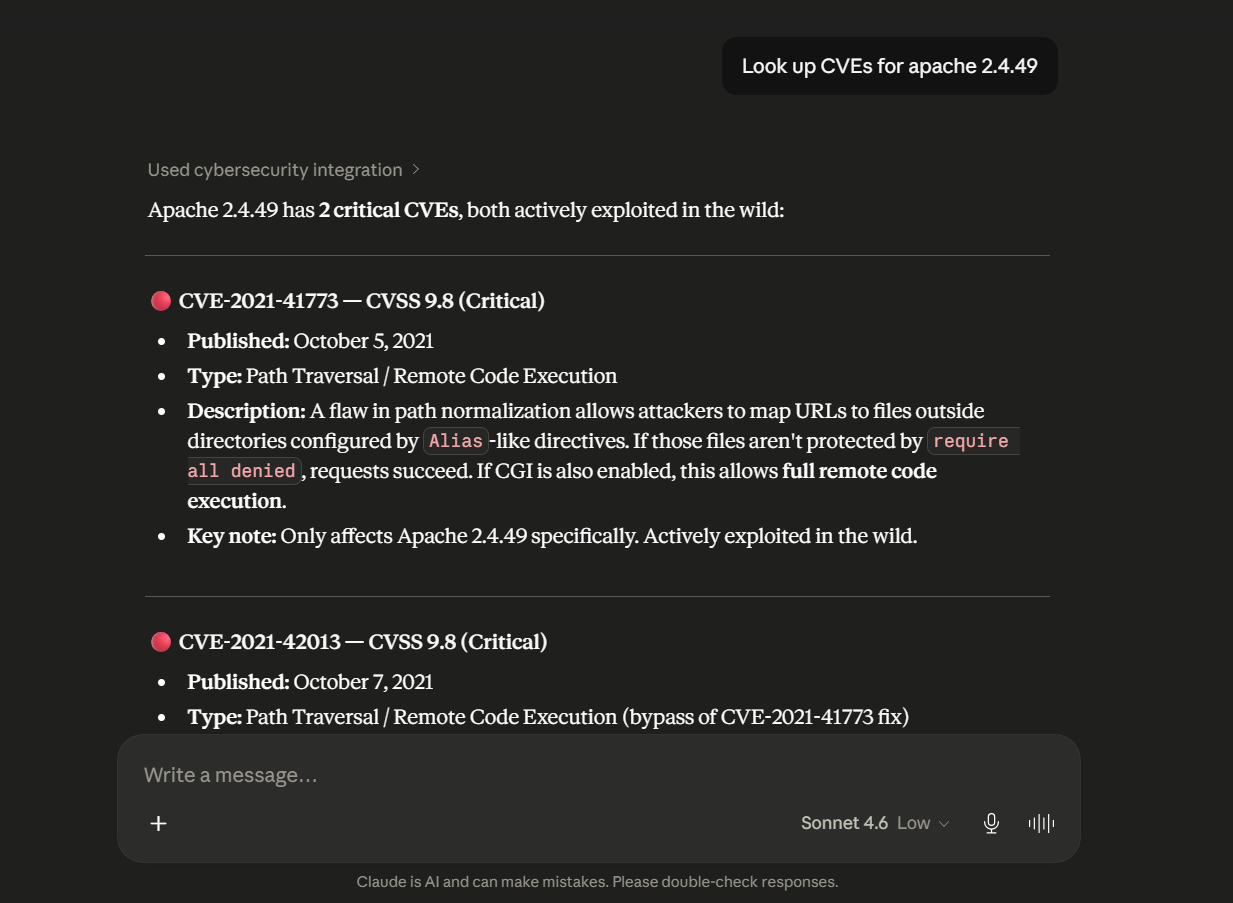
Single tool — CVE lookup
You: Look up CVEs for apache 2.4.49
Claude: Found 2 critical CVEs for Apache 2.4.49:

        CVE-2021-41773 (Score: 9.8 CRITICAL) — Path traversal vulnerability

        allowing remote code execution if CGI is enabled. Actively exploited

        in the wild...
<div align="center">
<picture>
</picture>
</div>
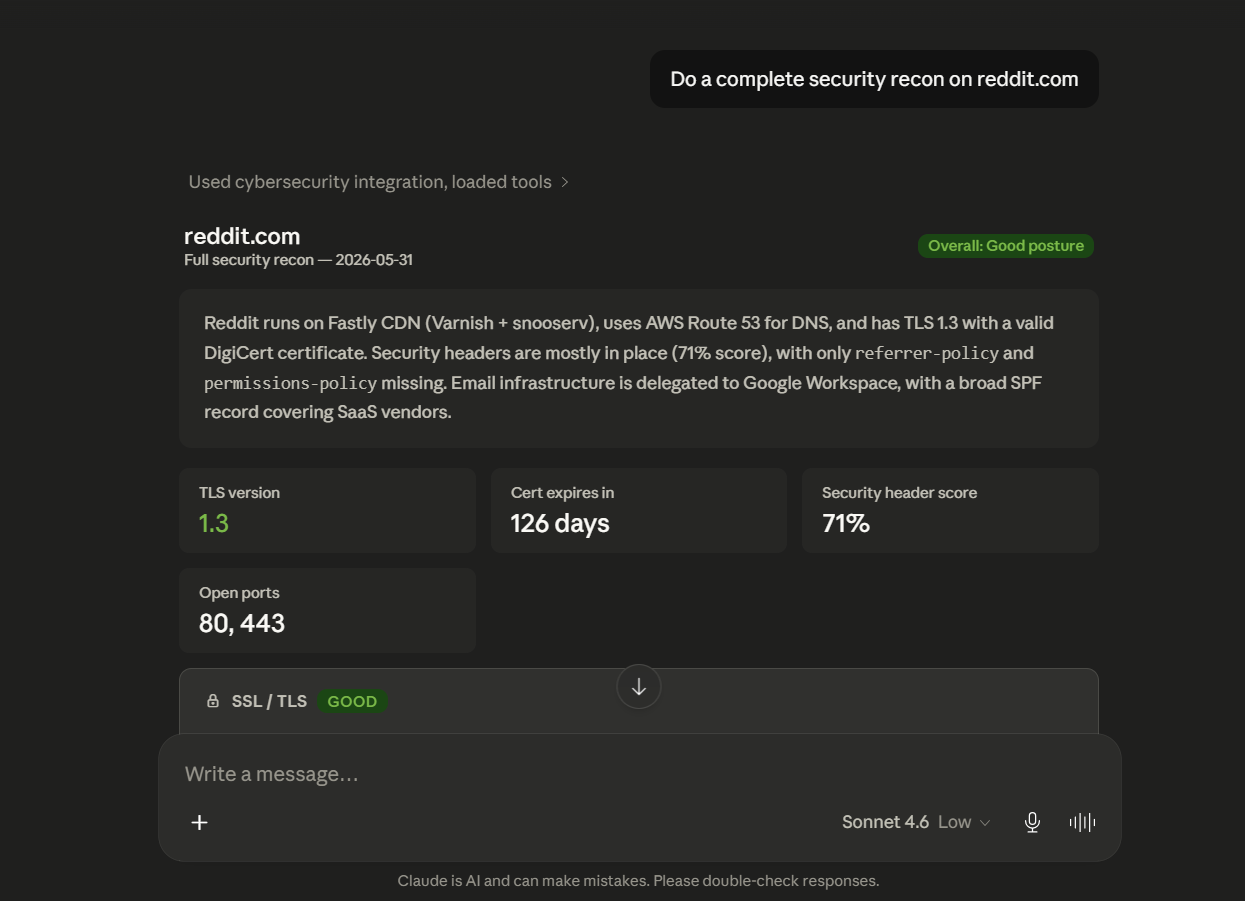
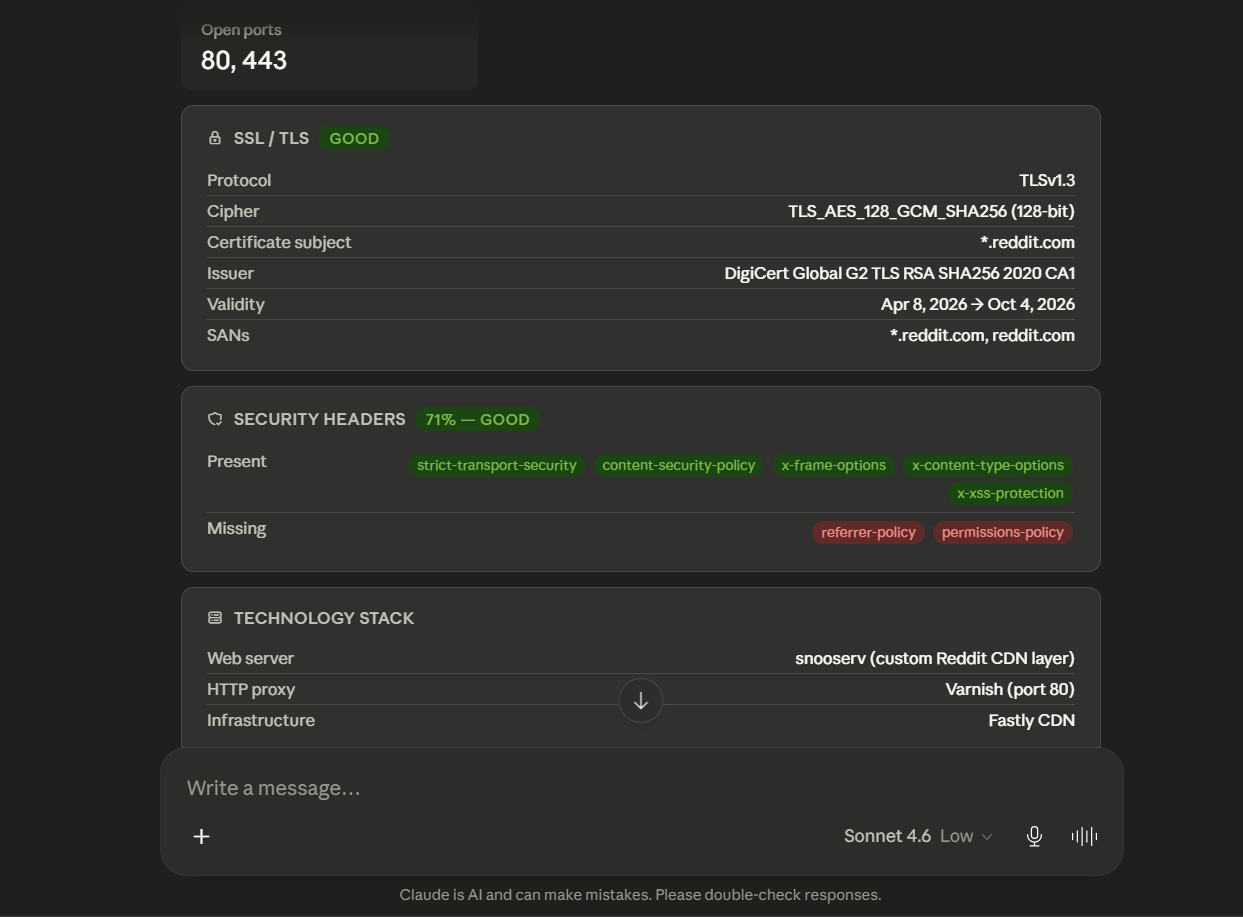
Full recon
You: Do a complete security recon on reddit.com
Claude: [calls full_recon → runs 6 tools in parallel → delivers full analysis]
<div align="center">
<picture>
</picture>
</div>
<div align="center">
<picture>
</picture>
</div>
---
📋 Prerequisites
- Python 3.12+ — download
- Claude Desktop — download
- Nmap — required for port scanning (download)
- Git — download
---
⚙️ Installation
Step 1 — Clone the repository
git clone https://github.com/AynOps/AynOps
cd AynOps
Step 2 — Install Python dependencies
pip install -r requirements.txt
Step 3 — Install Nmap
Windows:
1. Download from nmap.org/download.html and run the installer
2. Manually add Nmap to PATH:
- Press Win + S → search "Environment Variables"
- Under System Variables → find Path → click Edit
- Click New → add C:\Program Files (x86)\Nmap
- Click OK on all windows
3. Restart your terminal and verify:
nmap --version
Mac:
brew install nmap
Linux:
sudo apt install nmap
Step 4 — Connect to Claude Desktop
Open your Claude Desktop config file:
| OS | Path |
|---|---|
| Windows | %APPDATA%\Claude\claude_desktop_config.json |
| Mac | ~/Library/Application Support/Claude/claude_desktop_config.json |
| Linux | ~/.config/Claude/claude_desktop_config.json |
Add this configuration:
Windows:
{

  "mcpServers": {

    "AynOps": {

      "command": "C:\\full\\path\\to\\AynOps\\.venv\\Scripts\\python.exe",

      "args": ["C:\\full\\path\\to\\AynOps\\server.py"],

      "env": {

        "ABUSEIPDB_API_KEY": "your-api-key-here",

        "IP_API_KEY": "your-api-key-here"

      }

    }

  }

}
Mac/Linux:
{

  "mcpServers": {

    "AynOps": {

      "command": "/full/path/to/AynOps/.venv/bin/python3",

      "args": ["/full/path/to/AynOps/server.py"],

      "env": {

        "ABUSEIPDB_API_KEY": "your-api-key-here",

        "IP_API_KEY": "your-api-key-here"

      }

    }

  }

}
> ⚠️ Always use the full absolute path to your .venv Python executable — not just python or python3. Claude Desktop may use a different Python installation otherwise.
> Note: ABUSEIPDB_API_KEY is only required for the ip_reputation tool. Get a free key at abuseipdb.com. IP_API_KEY is only required for the asn_lookup tool. get a free key at ipapi.com
Step 5 — Restart Claude Desktop
Fully quit and reopen Claude Desktop — closing the window is not enough. Check the system task manager and quit from there.
Verify tools are connected by asking Claude:
What cybersecurity tools do you have available?
Claude should list all tools.
---
📦 Listed On
| Registry | Link |
|---|---|
| Official MCP Registry | registry.modelcontextprotocol.io |
| Glama | glama.ai/mcp/servers/... |
🚀 Usage
Basic tool usage
Do a WHOIS lookup on example.com
Run DNS enumeration on github.com
Scan ports on scanme.nmap.org
Inspect the SSL certificate of stripe.com
Detect the tech stack of wordpress.org
Look up CVEs for apache 2.4.49
Look up CVEs for log4j 2.14.1
Check the reputation of IP 1.2.3.4
ASN Lookup for google.com
Port scan types
| Type | Description | Speed |
|---|---|---|
| basic | Top 100 ports | Fast (~5s) |
| service | Service & version detection | Medium (~15s) |
| os | OS detection (requires admin) | Medium |
| full | All 65535 ports | Slow (~5min) |
| vuln | Vulnerability scripts | Slow (~30s) |
Scan scanme.nmap.org with service detection
Full recon
Do a complete security recon on reddit.com
Claude will run all core tools in parallel and deliver a full security analysis.
Follow-up analysis
Based on the recon, what are the top security risks?
What do the open ports mean from an attacker's perspective?
Is this SSL configuration strong enough for a financial services company?
Cross-reference the open ports with known CVEs for the detected services.
⚠️ Legal & Ethical Usage
> Only scan domains and IPs you own or have explicit written permission to scan.
- All tools use public data — safe on any domain
- Port scanning should only target your own infrastructure or authorized systems
- The only public host officially permitted for Nmap testing is scanme.nmap.org
- Unauthorized port scanning may be illegal in your jurisdiction
Intended for:
- Security researchers
- Penetration testers (on authorized targets)
- Developers auditing their own infrastructure
- Students learning cybersecurity concepts
---
🗂️ Project Structure
├── .github/              # GitHub Actions workflows and templates
├── tests/                # Unit tests
├── tools/                # MCP tool implementations
├── utils/                # Shared helper utilities
├── server.py             # MCP server entry point
├── pyproject.toml        # Project metadata and dependencies
├── requirements.txt      # Python dependencies
├── mcp.json              # MCP server metadata
├── glama.json            # Glama MCP metadata
├── Dockerfile            # Docker image definition
├── SECURITY.md           # Security policy
├── CONTRIBUTING.md       # Contribution guidelines
└── README.md             # Project documentation
Glama MCP Scoring
<div align="left">
<a href="https://glama.ai/mcp/servers/gaoharimran29-glitch/AynOps">

</a>
</div>
PyPI Package
mcp-name: io.github.AynOps/AynOps <br> Link:- https://pypi.org/project/AynOps/🤝 Contributing
Pull requests are welcome! Check contributing.md for guidelines and a list of open issues ready to pick up.
---
📜 License
MIT License — free to use, modify, and distribute.
---
👤 Author
Built by Gaohar Imran
- GitHub: @gaoharimran29-glitch
- LinkedIn: Gaohar Imran
---
> ⭐ If this project helped you, consider giving it a star on GitHub!
Sign in to leave a review
Use Google, GitHub, or an email account so ratings stay tied to real people.
No reviews posted yet.





