mcp-gomamayo
- desktop-chat
MCP server for ”ゴママヨ”
About
What is mcp-gomamayo?
mcp-gomamayo is an MCP (Model Context Protocol) server that checks text for “ゴママヨ” syntax. It is written in Go and runs on the command line, intended for use with Claude Desktop.
How to use mcp-gomamayo?
Clone the repository, run task build to compile, then add the server’s command and arguments to Claude Desktop’s claude_desktop_config.json (e.g., via WSL). After restarting Claude Desktop, the check_gomamayo tool becomes available for checking text.
Key features of mcp-gomamayo
- Detects “ゴママヨ” syntactic patterns in text.
- Provides a single check_gomamayo tool.
- Integrates seamlessly with Claude Desktop.
- Built with Go for cross‑platform use.
- Supported by WSL on Windows.
Use cases of mcp-gomamayo
- Verify Japanese text for unintended gomamayo structures.
- Assist linguists or editors in identifying playful homophonic phrases.
- Automate checks during content creation or proofreading.
FAQ from mcp-gomamayo
What is the “ゴママヨ” syntax?
The term refers to a specific Japanese linguistic pattern where two consecutive phrases sound nearly identical, creating a humorous or ambiguous effect.
How do I set up mcp-gomamayo with Claude Desktop?
Clone the repo, build with task build, then add the WSL command in claude_desktop_config.json under mcpServers. Restart Claude Desktop to use the tool.
Does mcp-gomamayo work on macOS or Linux?
The README only provides a WSL configuration for Windows; it does not specify support for other platforms.
Is mcp-gomamayo free and open‑source?
Yes, the project is licensed under the MIT License.
What are the system requirements?
Go 1.24 is required, and the build tool task must be installed.
Details
- Author
- mizakahk
- GitHub stars
- 3
- Category
- desktop-chat
- Repository
- mizakahk/mcp-gomamayo
mcp-gomamayo
<!-- バッジ (必要に応じて実際のバッジURLに置き換えてください) -->


テキスト中の「ゴママヨ」構文をチェックするための Model Context Protocol (MCP) サーバーです。
目次
- セットアップ
- Claude Desktop での利用
- MCPサーバー設定
- 使い方
セットアップ
git clone https://github.com/mizakahk/mcp-gomamayo.git
cd mcp-gomamayo
task build
Claude Desktop での利用
MCPサーバー設定
claude_desktop_config.json に以下の設定を追加します
1. WSL上で起動:
    {

      "mcpServers": {

          "mcp-gomamayo": {

              "command": "wsl",

              "args": [

                  "bash",

                  "-ic",

                  "~/mcp-gomamayo/bin/mcp-gomamayo"

              ],

              "env": {}

          }

      }

    }
設定ファイルを保存した後、Claude Desktop を再起動すると、gomamayo-checker が利用可能になります。
使い方
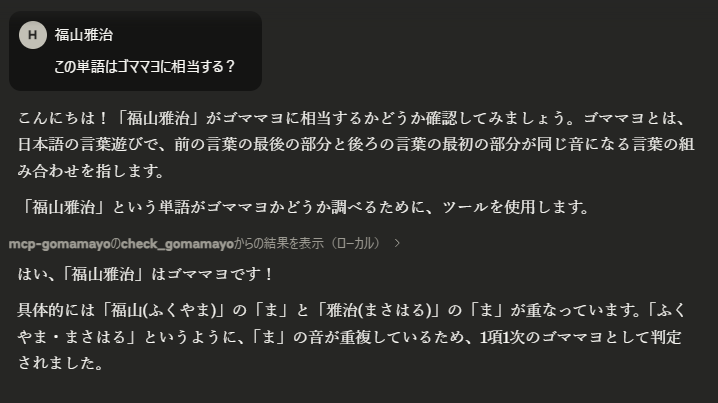
MCP サーバーが Claude Desktop で有効になると、check_gomamayo ツールを使用してテキストのゴママヨ構文をチェックできます。
例 「福山雅治」の判定: