Google Maps MCP with Speech Input
- other
Google Maps MCP web application with speech to text functionality.
About
What is Google Maps MCP with Speech Input?
Google Maps MCP with Speech Input is a web application that upgrades Google's Basic MCP Maps by adding speech as an input option. It runs locally on Node.js and requires API keys for Gemini and Google Maps.
How to use Google Maps MCP with Speech Input?
Clone the repository, install dependencies with npm install, create a .env.local file containing your GEMINI_API_KEY and MAPS_API_KEY, then run npm run dev. Open the app at http://localhost:5173 in your browser.
Key features of Google Maps MCP with Speech Input
- Speech input for map queries
- Integration with Gemini API for processing
- Uses Google Maps API for mapping data
- Runs locally as a web application
- Built upon Google AI Studio’s Basic MCP Maps
Use cases of Google Maps MCP with Speech Input
- Voice-controlled navigation and location search
- Hands-free map interaction while driving or multitasking
- Accessibility for users who prefer or require speech input
FAQ from Google Maps MCP with Speech Input
How does this differ from Basic MCP Maps?
It adds speech as an input option, allowing users to interact with maps using their voice instead of typing.
What API keys are needed to run the app?
You need both a Gemini API key and a Google Maps API key. These are set in the .env.local file.
How do I run the application?
Follow the “Run Locally” steps: clone the repo, run npm install, create .env.local with your API keys, then execute npm run dev and open http://localhost:5173.
Is this project built from scratch?
No, it is a slight upgrade from Google’s Basic MCP Maps project available on AI Studio Apps.
What are the system prerequisites?
Node.js is required. Windows users need WSL to create the .env.local file
Details
- Author
- l145dev
- GitHub stars
- 1
- Category
- other
- Repository
- l145dev/google-maps-mcp-speech
Google Maps MCP with Speech Input
> [!NOTE]
> I did not develop this project from scratch. The original project was developed by Google on AI Studio Apps.
A slight upgrade from Basic MCP Maps. Adding speech as input option.
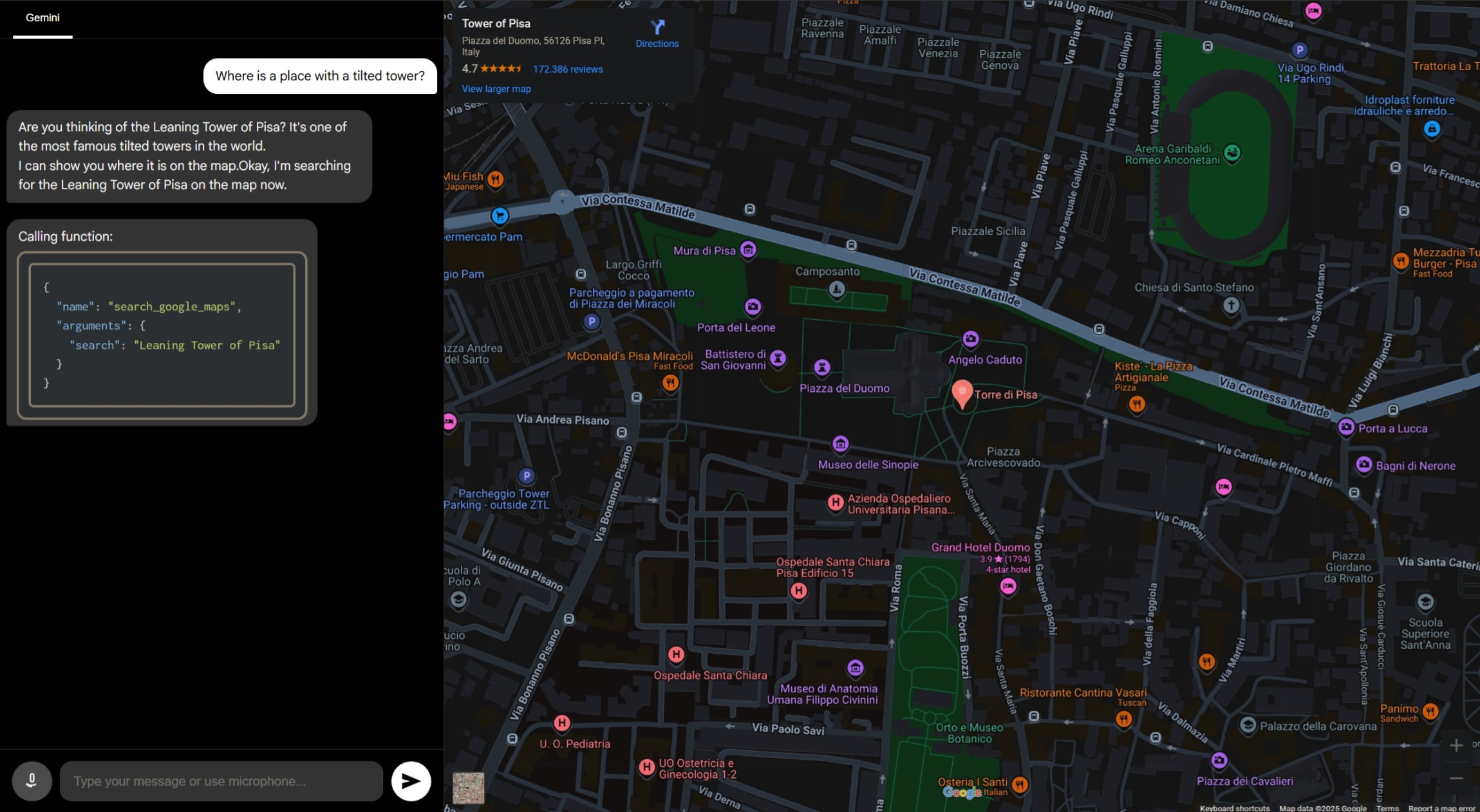
Run Locally
Prerequisites:: Node.js
1. Clone the repository
git clone "https://github.com/l145dev/Google-Maps-MCP-Speech"
2. Navigate to the repository
cd ./Google-Maps-MCP-Speech
3. Install dependencies:
npm install
4. Create .env.local: <br>
Windows (Make sure you have WSL, check by trying
wsl --version): wsl touch .env.local
Linux/Mac:
touch .env.local
5. Open in your desired code editor.
code .
6. Set the
GEMINI_API_KEY in .env.local to your Gemini API key. Get your API key here. GEMINI_API_KEY="YOUR_API_KEY"
7. Set the
MAPS_API_KEY in .env.local to your Maps API key. Get your API key here MAPS_API_KEY="YOUR_API_KEY"
8. Run the app:
npm run dev
9. Open web app in your browser at http://localhost:5173.