DrissionPage MCP Server -- 骚神出品
- ide
基于DrissionPage和FastMCP的浏览器自动化MCP服务器,提供丰富的浏览器操作API供AI调用
About
What is DrissionPage MCP Server?
DrissionPage MCP Server is a browser automation MCP server built on DrissionPage and FastMCP. It provides a rich set of browser operation APIs for AI to control web pages programmatically. Designed for developers and AI agents, it runs on any system with Python and a Chrome browser, and is typically configured in editors like Cursor and VSCode.
How to use DrissionPage MCP Server?
Clone the repository and ensure Python ≥3.9, Chrome 90+, and required packages (drissionpage ≥4.1.0.18, fastmcp ≥2.4.0, uv) are installed. In your editor’s MCP settings (e.g., Cursor or VSCode), add a JSON configuration with "type": "stdio", "command": "uv", and "args": ["run", "<absolute-path-to-main.py>"]. Use the provided debug commands via npx or mcp dev to test.
Key features of DrissionPage MCP Server
- Open, close, and manage browser connections
- Rich page element operations (click, input, etc.)
- Execute JavaScript code on pages
- Support for Chrome DevTools Protocol (CDP)
- Convenient file download and upload automation
- Keyboard key simulation
- Page screenshot functionality
- Background network packet listening
- Automatic file upload/download handling
Use cases of DrissionPage MCP Server
- AI-driven web scraping and data extraction
- Automated form filling and submission
- Monitoring network traffic from a page
- Testing web application interactions
- Automated file downloads from sites
FAQ from DrissionPage MCP Server
What Python version is required?
Python 3.9 or higher is required, along with a recent version of pip and uv.
What browser does it support?
Chrome browser is recommended, version 90 or above.
How do I install the required Python packages?
The repository uses uv as the package runner. Dependencies listed include drissionpage ≥4.1.0.18 and fastmcp ≥2.4.0; they are resolved automatically when running with uv run.
Can I use this with editors other than Cursor and VSCode?
Yes, as an MCP server it works with any editor or tool that supports the Model Context Protocol using stdio transport. The configuration method is the same: add an MCP server entry pointing to the main.py script.
What is the difference between this and other browser automation tools?
DrissionPage MCP Server is specifically designed as an MCP server, making it easy for AI agents (like those in Cursor, Claude Desktop, or custom agents) to control a browser through standardized API calls. It combines DrissionPage’s simplified browser API with FastMCP’s server framework for seamless integration.
Details
- Author
- wxhzhwxhzh
- GitHub stars
- 17
- Category
- ide
- Repository
- wxhzhwxhzh/drssionpagemcp
DrissionPage MCP Server -- 骚神出品
基于DrissionPage和FastMCP的浏览器自动化MCP服务器,提供丰富的浏览器操作API供AI调用。
项目简介

DrissionPage MCP 是一个基于 DrissionPage 和 FastMCP 的浏览器自动化MCP server服务器,它提供了一系列强大的浏览器操作 API,让您能够轻松通过AI实现网页自动化操作。
主要特性
- 支持浏览器的打开、关闭和连接管理
- 提供丰富的页面元素操作方法
- 支持 JavaScript 代码执行
- 支持 CDP 协议操作
- 提供便捷的文件下载功能
- 支持键盘按键模拟
- 支持页面截图功能
- 增加 网页后台监听数据包的功能
- 增加自动上传下载文件功能
Python要求
- Python >= 3.9 - pip(最新版本) - uv (最新版本)浏览器要求
- Chrome 浏览器(推荐 90 及以上版本)必需的Python包
- drissionpage >= 4.1.0.18 - fastmcp >= 2.4.0 - uv安装说明
把本仓库git clone到本地,核心文件是main.py:安装到Cursor编辑器
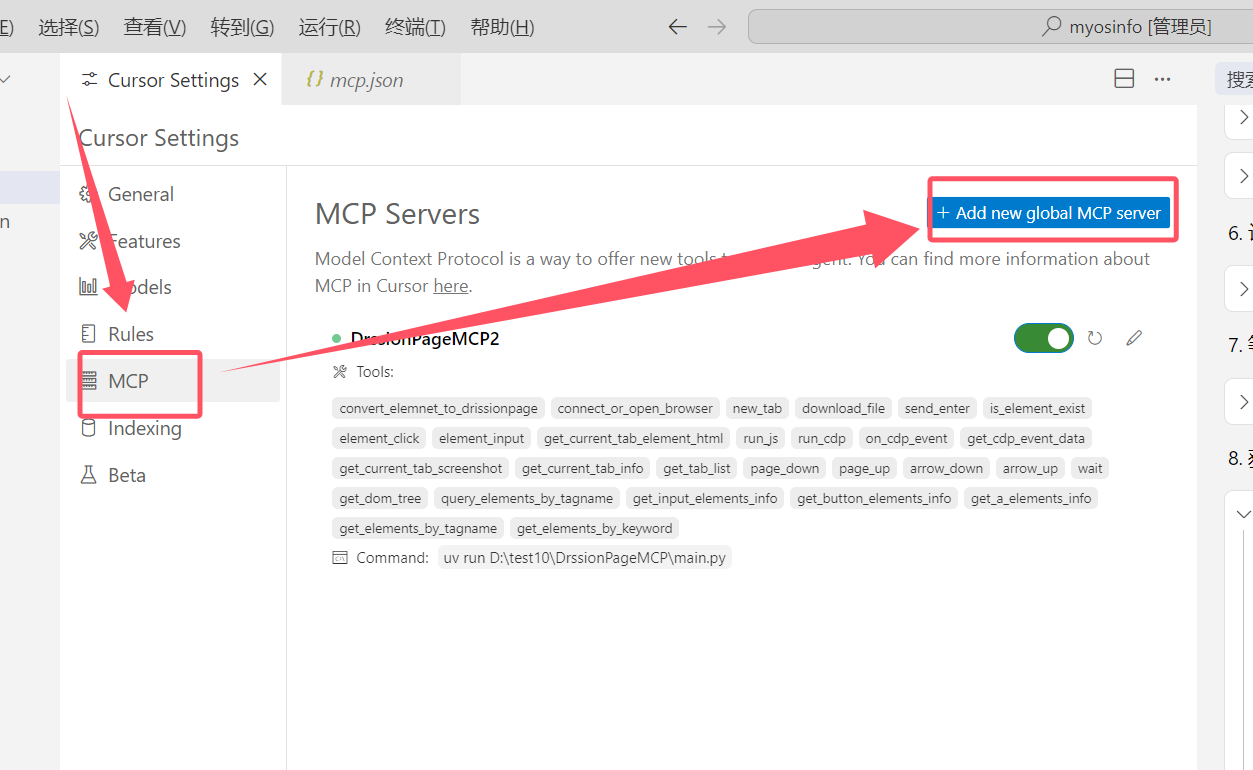
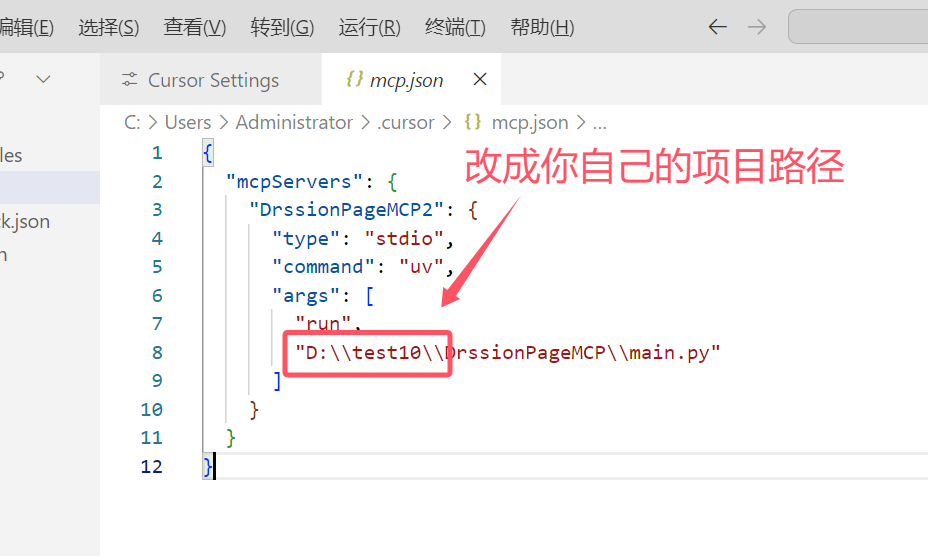
安装到vscode编辑器
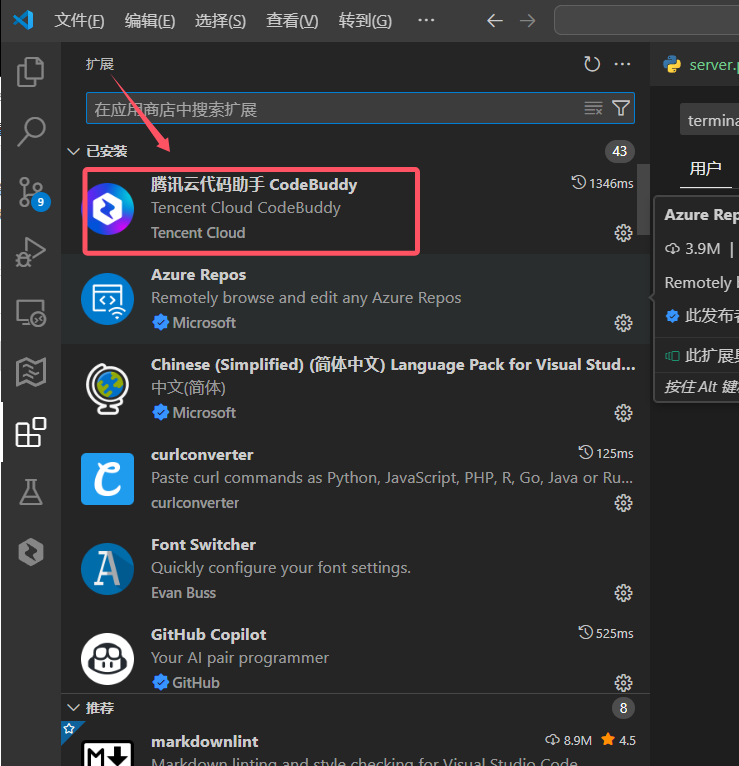
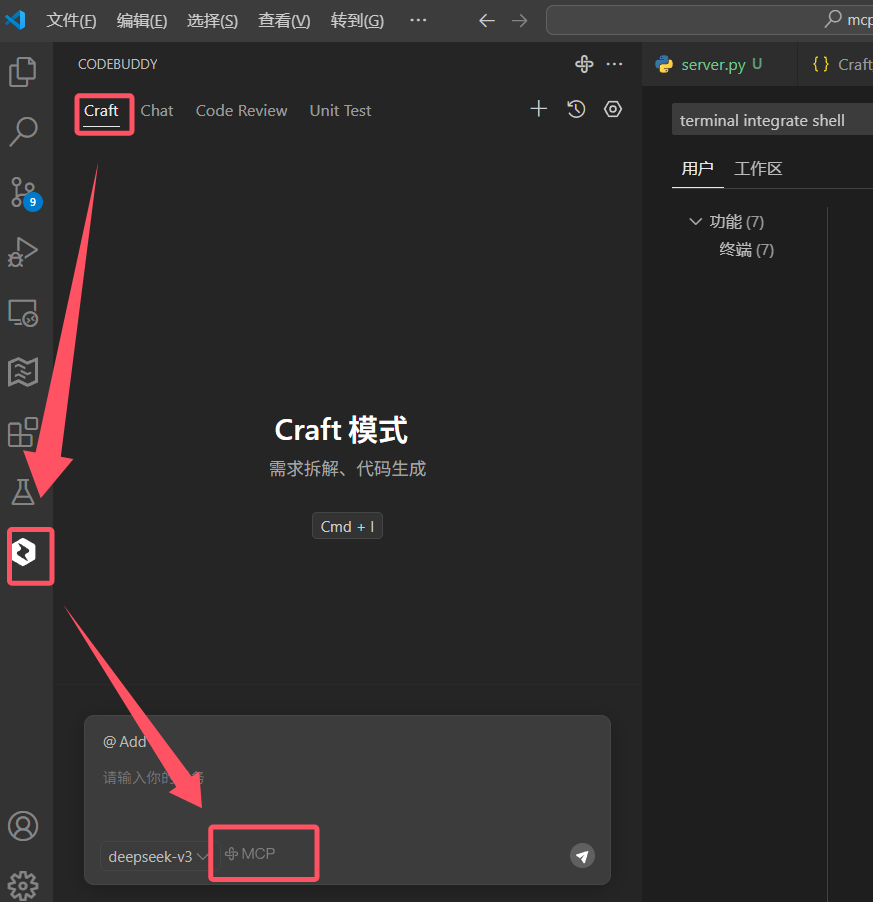
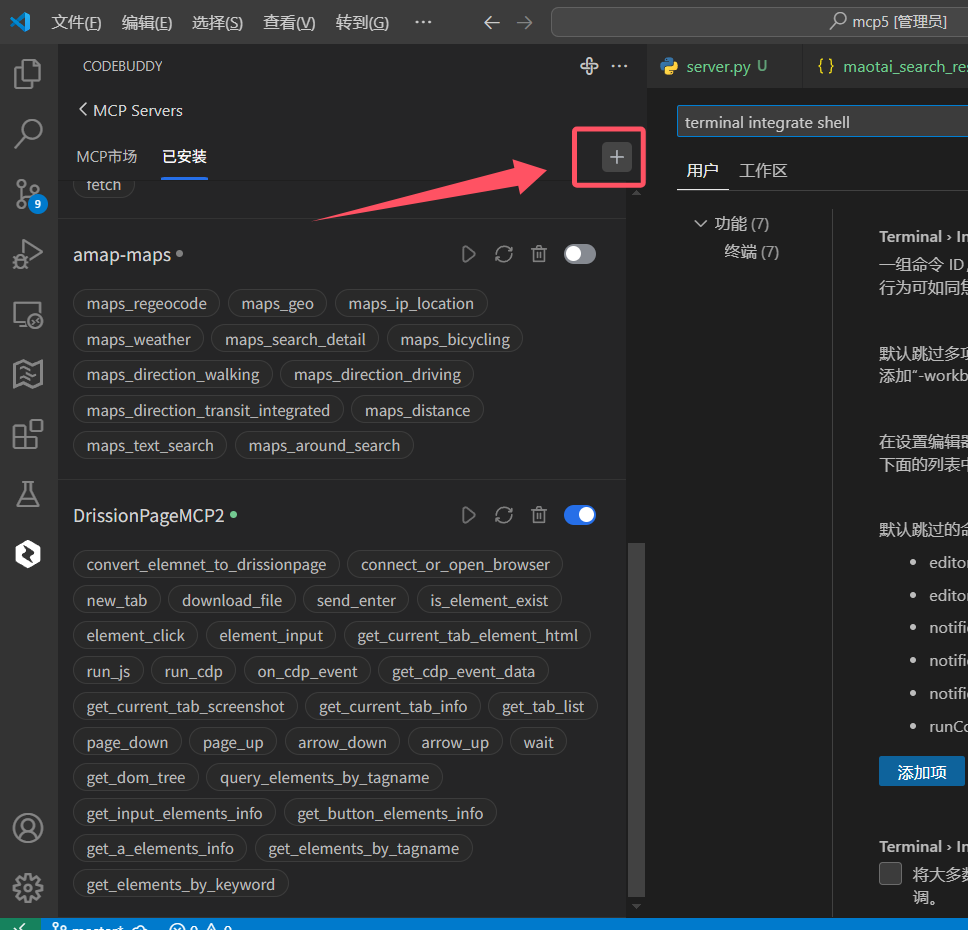
请将以下配置代码粘贴到编辑器的mcpServers设置中(请填写你自己电脑上 main.py 文件的绝对路径):
{
  "mcpServers": {
    "DrssionPageMCP": {
      "type": "stdio",
      "command": "uv",
      "args": [
        "run",
        "D:\\test10\\DrssionPageMCP\\main.py"
      ]
    }
  }
}
 json
"DrssionPageMCP": {
      "type": "stdio",
      "command": "uv",
      "args": [
        "run",
        "D:\\test10\\DrssionPageMCP\\main.py"
      ]
    }

注意事项:
- 请根据实际路径修改args中的路径
- Windows中路径中的反斜杠需要转义(使用\\)
- 确保uv命令在系统PATH中可用
- 《MCP安装参考教程》
调试命令
调试


npx -y @modelcontextprotocol/inspector uv run D:\\test10\\DrssionPageMCP\\main.py

或者


mcp dev  D:\\test10\\DrssionPageMCP\\main.py
``
更新日志
v0.1.3
增加 自动上传下载文件功能v0.1.2
增加 网页后台监听数据包的功能v0.1.0
- 初始版本发布
- 实现基本的浏览器控制功能
- 提供元素操作 API