
Console Chat Gpt
- desktop-chat
Python CLI for AI Chat with MCP support
About
What is Console Chat Gpt?
Console Chat Gpt is a command-line interface application for chatting with multiple AI models from providers such as OpenAI, MistralAI, Anthropic, xAI, Google AI, DeepSeek, Alibaba, Inception, and Ollama. It runs on Linux and macOS (Windows via WSL) and is designed for developers and power users seeking a terminal-based chat experience.
How to use Console Chat Gpt?
Clone the repository, install dependencies with pip install -r requirements.txt, obtain an API key from your chosen provider, and run python3 main.py. On first run, config.toml is created automatically; you can edit it or use the in-app settings command to configure API keys, model selection, and other options.
Key features of Console Chat Gpt
- Supports OpenAI, Anthropic, MistralAI, Google AI, DeepSeek, xAI, Alibaba, Inception, and Ollama models.
- Model Context Protocol (MCP) support – reuse MCP servers via mcp_config.json.
- Streaming responses (disabled by default, toggle in settings).
- OpenAI Assistants Beta and Responses API support.
- AI Managed mode auto-selects the best model for each task.
- Configurable temperature, role/persona, and conversation history saving.
Use cases of Console Chat Gpt
- Chat with multiple AI models from a single terminal without switching apps.
- Run local models via Ollama for offline or private interactions.
- Connect external tools through MCP servers to extend AI capabilities.
- Automate or script AI interactions in development workflows.
- Experiment with different providers and model parameters easily.
FAQ from Console Chat Gpt
What AI models are supported?
Console Chat Gpt supports OpenAI, MistralAI, Anthropic, xAI, Google AI, DeepSeek, Alibaba, Inception, and Ollama-hosted models. It also allows adding any OpenAI SDK-compatible model via config.toml.
How can I use MCP servers with Console Chat Gpt?
Copy your existing claude_desktop_config.json (from Claude Desktop) into the Console Chat Gpt root directory and rename it to mcp_config.json. The app will then use those MCP servers with any supported model.
Which platforms are supported?
Linux and macOS are fully supported. For Windows, the recommended method is to use Windows Subsystem for Linux (WSL).
Is there a cost or license limitation?
The software is released under the Apache 2.0 license and is free to use. You are responsible for any API usage costs from the model providers you connect to.
Does it support streaming?
Streaming is disabled by default but can be enabled in the in-app settings menu. All supported models that offer streaming are compatible.
Details
- Author
- amidabuddha
- GitHub stars
- 126
- Category
- desktop-chat
- Repository
- amidabuddha/console-chat-gpt
<div align="center">
<h1>
console-chat-gpt v6
</h1>
Your Ultimate CLI Companion for Chatting with AI Models
_Enjoy seamless interactions with OpenAI, MistralAI, Anthropic, xAI, Google AI, DeepSeek, Alibaba, Inception or Ollama hosted models directly from your command line. </br>Elevate your chat experience with efficiency and ease._
<h3>
</h3>
<h4 align="center">
<a href="https://github.com/amidabuddha/consoleChatGPT/blob/main/LICENSE.md">
</a>
</h4>




</div>
---
Table of Contents
- Features
- Installation and Usage
- Examples
- Contributing
---
DISCLAIMER:
The intention and implementation of this code are entirely unconnected and unrelated to OpenAI, MistralAI, Anthropic, xAI, Google AI, DeepSeek, Aliababa, Inception or any other related parties. There is no affiliation
or relationship with OpenAI, MistralAI, Anthropic, xAI, Google, DeepSeek, Alibaba, Inception or their subsidiaries in any form.
---
Features
- :new: OpenAI Responses API supported. :new:
- :new: Run any OpenAI SDK compatible model - just add the model structure with the relevant model_name and base_url to the config.toml file. :new:
- :star: Run Ollama hosted models locally. _Ollama should be installed and the selected models to be already downloaded_ :star:
- :star: Anthropic Prompt caching Fully supported :star:
- :star: Model Context Protocol (MCP) supported! If you are already using MCP servers just copy your claude_desktop_config.json to the root directory and rename to mcp_config.json to start using with any model! :star:
- Unified chat completion function separated as independent library to be used in any application for seamless cross-provider API experience. The source code is available in Python and TypeScript
- Streaming with all supported models, disabled by default, may be enabled in settings menu
- OpenAI Assistants Beta fully supported
- AI Managed mode Based on the complexity of the task, automatically determines which model to use.
- Configuration File: Easily customize the app's settings through the config.toml file for complete control over
how the app works. Also supported in-app via the settings command.
- Role selection: Users can define the role of the AI in the conversation, allowing for a more personalized and
interactive experience.
- Temperature Control: Adjust the temperature of generated responses to control creativity and randomness in the
conversation.
- Command Handling: The app responds to various commands entered by the user for easy and intuitive interaction.
- Image input: with selected models.
- Error Handling: Clear and helpful error messages to easily understand and resolve any issues.
- Conversation History: Review previous interactions and save conversations for future reference, providing context
and continuity.
- Graceful Exit: Smoothly handle interruptions, ensuring conversations are saved before exiting to avoid loss of
progress.
- A nice team: Actively adding features, open for ideas and fixing bugs.
Overall, this app focuses on providing a user-friendly and customizable experience with features that enhance
personalization, control, and convenience.
---
Installation and Usage
> The script works fine on Linux and MacOS terminals. For Windows it's recommended to use WSL.
1. Clone the repository:
git clone https://github.com/amidabuddha/console-chat-gpt.git
2. Go inside the folder:
cd console-chat-gpt
3. Install the necessary dependencies:
python3 -m pip install -r requirements.txt
4. Get your API key from OpenAI, MistralAI, Anthropic, xAI, Google AI Studio, DeeepSeek, Alibaba, Inception depending on your selected LLM.
5. The config.toml.sample will be automatically copied into config.toml upon first run, with a prompt to enter your API key/s. Feel free to change any of the other defaults that are not available in the settings in-app menu as per your needs.
6. Run the executable:
python3 main.py
> Pro-tip:
> Create an alias for the executable to run from anywhere.
7. Use the help command within the chat to check the available options.
8. Enjoy
---
Examples
- Prompt example:
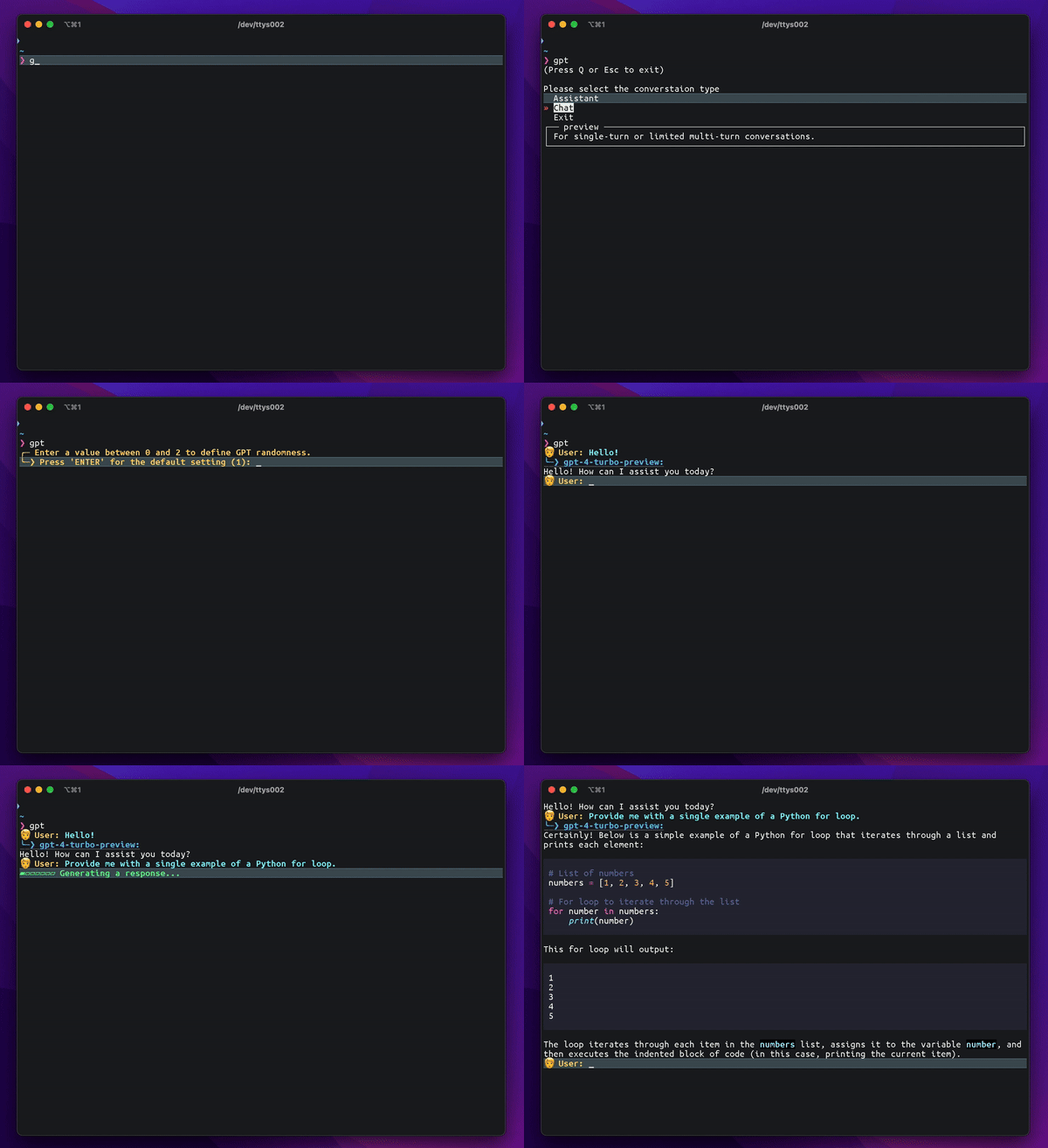
- Markdown visualization example:
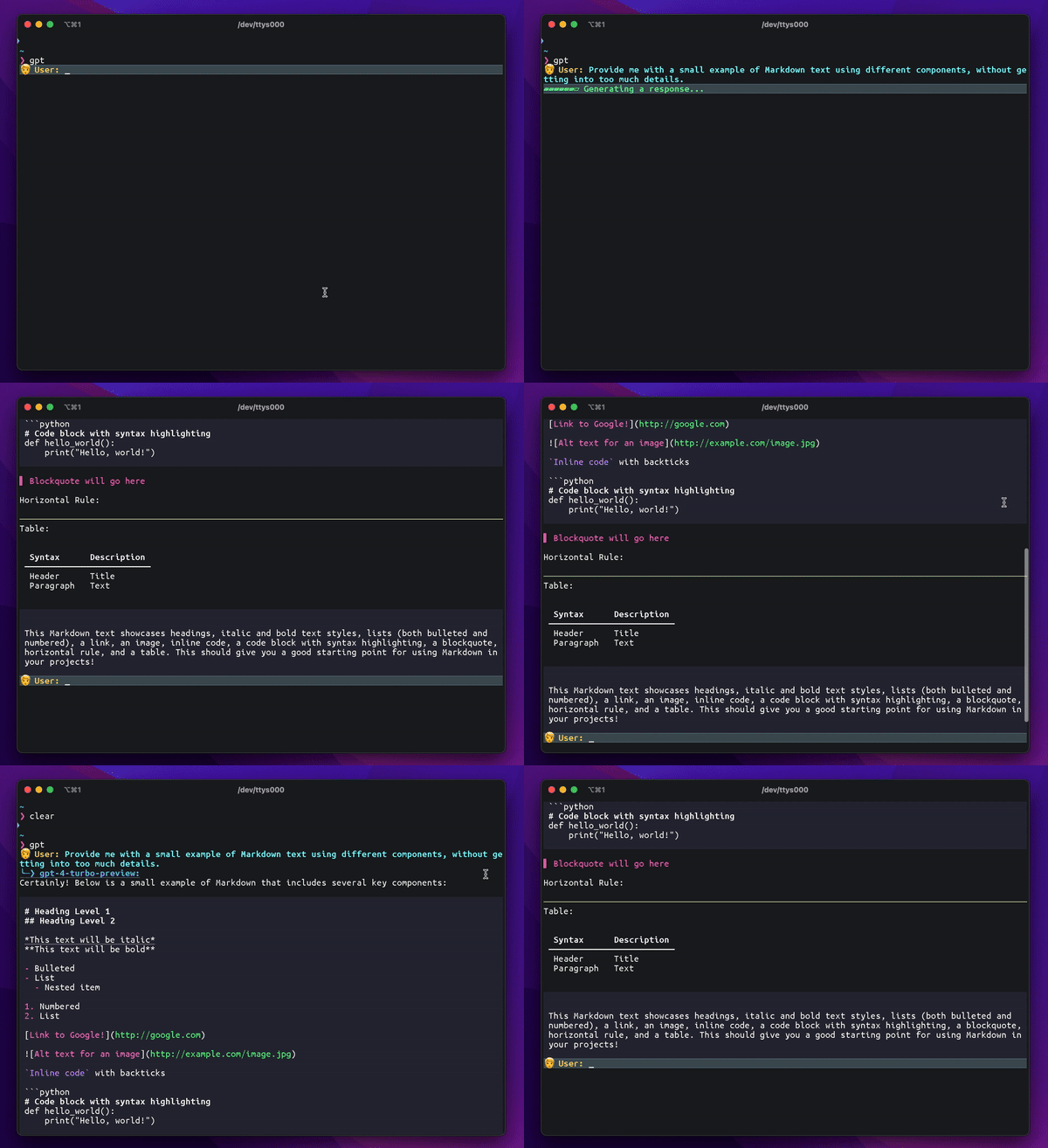
- Settings and help:
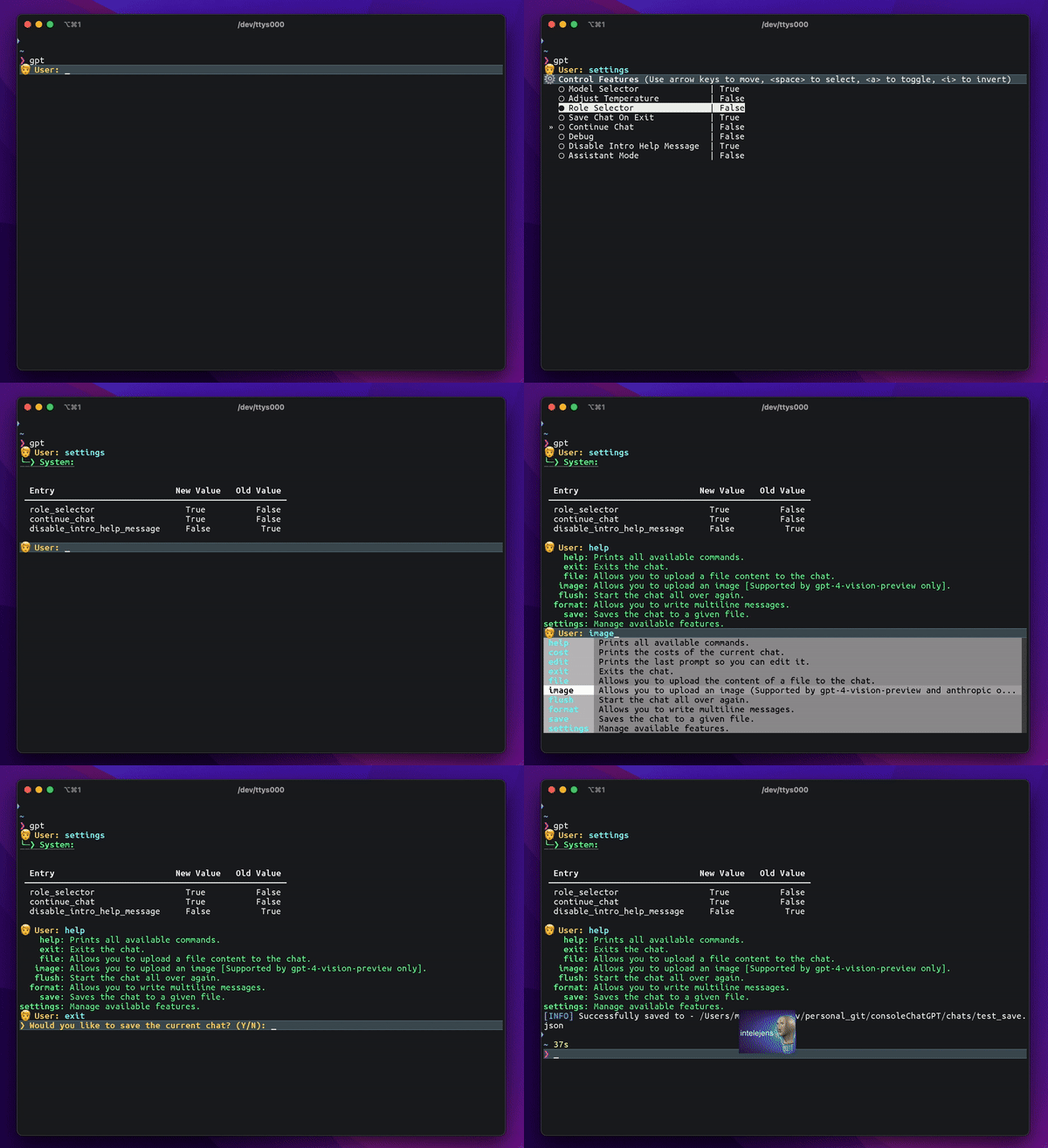
> You can find more examples on our Examples page.
---
Contributing
Contributions are welcome! If you find any bugs, have feature requests, or want to contribute improvements, please open an issue or submit a pull request.


